

Managing multiple online accounts or projects is more than opening extra browser tabs. Cookies, saved sessions, browser settings, extensions, and network connections quickly become difficult to manage when everything runs in a single environment.
That is where dedicated browser profile management software becomes valuable. Instead of treating the browser as one shared workspace, users can create separate environments for different accounts, projects, or operational tasks.
Hidemyacc follows this approach by combining browser profile management with fingerprint configuration, proxy integration, collaboration tools, and automation features.
This review explains how the various components of Hidemyacc work together. It covers profile management, fingerprint controls, proxy workflows, pricing tiers, team features, and a practical setup using an IPFLY residential proxy.
The aim is to help readers understand where Hidemyacc fits into modern browser-based workflows and what to evaluate before adopting it for business or personal use. Those interested in comparing antidetect browsers can consider how this platform differs from other solutions.
1. What Is Hidemyacc?
Hidemyacc is an anti-detect browser and browser profile management platform built to create and manage separate browsing environments on the same device.
Rather than running multiple accounts inside one conventional browser instance, users create independent profiles with their own cookies, cache, browsing data, extensions, and fingerprint-related settings. This separation keeps different projects and sessions organized and prevents cross-contamination of browser data.
Hidemyacc organizes the browser workflow into three connected elements: the browser profile (an isolated workspace), fingerprint configuration (settings that shape the browser’s technical characteristics), and proxy integration (the network layer assigned to each profile).
These elements address different layers of the same workflow: the profile manages local environment and data, while the proxy determines the network path. Together they support tasks like e-commerce account management, digital advertising, market research, social media administration, web data collection, and agency workflows.
It’s important to note that an anti-detect browser is not a universal privacy or anonymity solution. Websites use many signals and security methods; no browser configuration can guarantee that an account will never be challenged or restricted.
2. Key Features of Hidemyacc
Hidemyacc’s main strength is combining multiple browser-management functions into a single interface so users don’t need separate tools for each task.
2.1 Browser Profile Management
Browser profiles are the core of Hidemyacc.
Each profile maintains its own browsing environment, keeping cookies, cache, local storage, extensions, and session data isolated between projects.
Hidemyacc provides tools for creating, duplicating, organizing, and managing profiles, including folder-based organization to keep environments tidy as profile counts grow.
For small operations, the main benefit is clarity and organization: each browser window is tied to a named profile. For larger teams, features like profile sharing, transfer, and backup let organizations treat profiles as shared business resources instead of isolated local sessions.
2.2 Browser Fingerprint Customization
Fingerprint customization is another central capability.
Websites can detect many technical details from a browser, including the user agent, operating system, screen resolution, language, timezone, graphics environment, and other characteristics.
Hidemyacc lets users configure these parameters per profile and offers automated profile generation so you need not adjust every setting manually when creating a new environment.
The practical advantage is better control over how each profile appears to websites, which helps maintain distinct environments for different tasks. Still, fingerprint customization is not a foolproof protection against detection; network signals and behavior patterns are also evaluated by web security systems.
2.3 Proxy Management
Proxy integration is tightly integrated into Hidemyacc’s workflow.
Users can assign a proxy directly to a profile rather than configuring the network each time the profile is launched, creating a clear separation between local browser data and network connection.
Hidemyacc includes proxy management tools for organizing multiple network resources. When paired with a dedicated proxy provider, Hidemyacc handles the browser-side environment while the proxy provider manages the network connection.
2.4 Team Collaboration
Hidemyacc supports team workflows where multiple people need controlled access to browser environments.
Plans include features like profile sharing, profile transfer, sub-accounts, shared folders, and permission management.
These capabilities simplify agency and team workflows by allowing access to specific profiles without sharing raw login credentials. Organizations should review plan limits and permission options to confirm they match team needs.
2.5 Task Automation and Synchronization
Hidemyacc supports automation features to reduce repetitive actions across profiles.
Recorded actions, script imports, and synchronization features are available on supported plans and can streamline tasks that repeat across many environments, such as testing or routine administrative work. Automation must be used responsibly within the terms of the websites involved.
3. Hidemyacc Pricing
Pricing matters because the number of profiles needed can grow quickly with a project. At the time of writing, Hidemyacc offers several monthly plans with different profile caps:
| Plan | Monthly Price | Browser Profiles |
| Mini | $10/month | 5 |
| Starter | $29/month | 30 |
| Base | $49/month | 100 |
| Team | $99/month | 300 |
| Business | $199/month | 1,000 |
Hidemyacc also advertises a 7-day free trial to evaluate the platform before subscribing. There is a Share plan for users who primarily access shared profiles and folders, and custom plans are available for larger or specialized needs.
When choosing a plan, consider how many profiles you need and whether features like profile sharing, sub-accounts, synchronization, automation, or API access are essential. Plan features and pricing can change, so confirm current details before subscribing.
4. How to Set Up IPFLY in Hidemyacc
Combining Hidemyacc with a dedicated proxy service like IPFLY is a practical way to separate browser environment management from network connectivity.
In this arrangement, Hidemyacc manages the browser profile while IPFLY provides the network connection—useful for regional site testing, market research, advertising verification, and e-commerce operations.
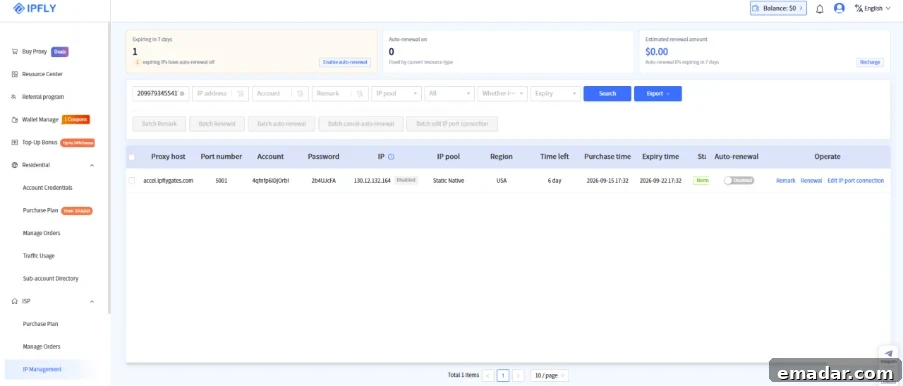
4.1 Prepare Your IPFLY Proxy
Before creating a profile, obtain the proxy credentials from your IPFLY account. Typical details include proxy type, host, port, username, and password. Confirm the connection protocol so the correct option can be selected in the profile settings.
4.2 Create a New Hidemyacc Profile
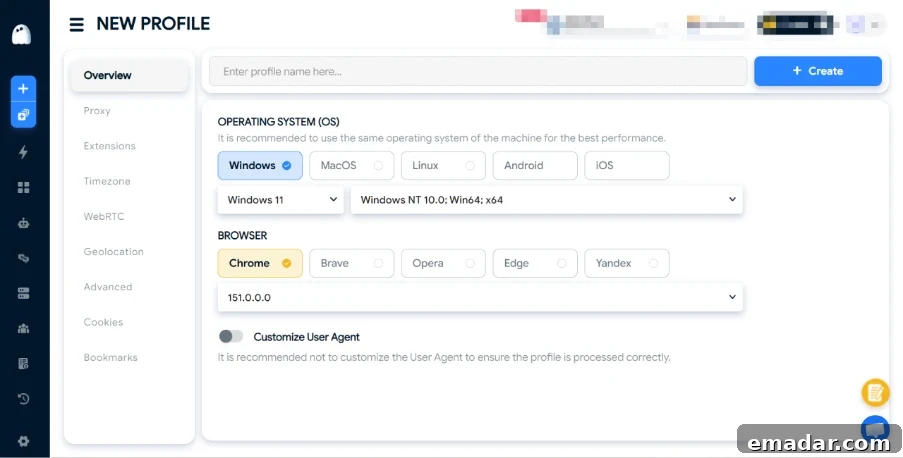
Open Hidemyacc and select New Profile. Enter a descriptive name tied to the account, client, or project, then configure the browser and operating system settings. Choose settings that make sense for the intended environment to maintain consistency across profiles.
4.3 Configure the Proxy
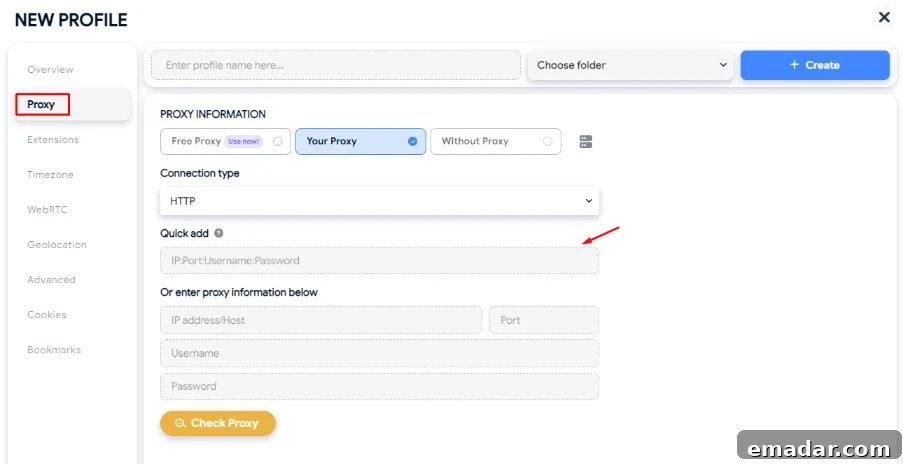
In the Proxy section, choose Your Proxy and select the connection type that matches the IPFLY settings. Enter the host, port, username, and password supplied by the proxy provider.
4.4 Check the Proxy
Use the Check Proxy button to test the connection. If the test fails, verify host, port, username, password, protocol selection, and any provider-side access restrictions. A successful check confirms the network link is active but does not guarantee every website will interpret the IP or browser environment the same way.
4.5 Launch and Verify the Profile
Create and launch the profile, then visit an IP-check or browser diagnostic site to confirm the visible IP, timezone, language, and browser data are consistent with your intended setup. Focus on consistency rather than chasing a particular benchmark score.
Practical Configuration Tip
Consistency matters more than changing as many settings as possible. Configure a profile around a clear purpose, and ensure the network connection matches the intended region. Unnecessary changes can complicate troubleshooting and long-term management.
5. Practical Workflow Evaluation: What to Check Before Deployment
Instead of relying on a single benchmark, evaluate whether Hidemyacc supports a stable, repeatable workflow. Key areas to test before full deployment include:
5.1 Profile Isolation
Create multiple profiles and confirm their environments remain separate. Verify that cookies, local storage, history, extensions, saved sessions, and settings stay associated with the correct profile. Activity in one profile should not affect another.
5.2 Fingerprint Consistency
Check that profile settings such as user agent, operating system, screen resolution, timezone, language, WebRTC behavior, and GPU characteristics behave consistently with the chosen configuration. The goal is to identify obvious inconsistencies that could hinder management.
5.3 Proxy Compatibility
Test the profile with its assigned IPFLY proxy: confirm the connection, verify the visible IP and approximate location, and confirm stable browsing performance. Treat browser and network configuration as a combined environment rather than independent components.
5.4 Profile Persistence
Close and relaunch profiles to ensure settings, stored sessions, extensions, and proxy configurations persist across restarts. Persistence is essential for daily operational use.
5.5 Multi-Profile Management
Create several profiles and evaluate organizational features such as search, folder management, naming, duplication, sharing, and transfer. For larger teams, efficient profile management often affects productivity more than individual fingerprint settings.
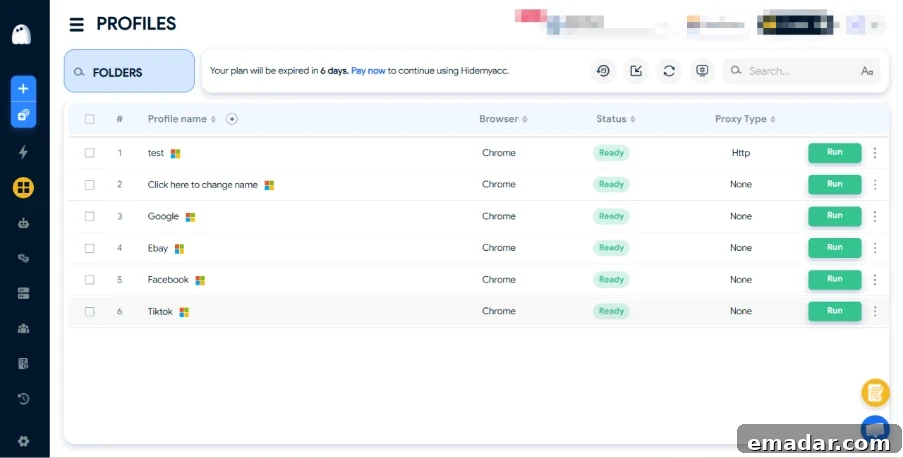
These checks help answer practical questions: Do profiles remain isolated? Can configurations be maintained consistently? Can users find and reuse the right profile quickly? Will the workflow scale as profile counts grow? Answers depend on device, browser version, proxy setup, plan limits, and use case, so treat these as deployment assessments rather than universal performance metrics.
6. Pros and Cons of Hidemyacc
Hidemyacc’s advantage is consolidating browser environment management into one platform. Profile isolation helps separate projects and sessions; fingerprint controls let users shape environment parameters; proxy integration ties network connections to profiles.
For teams, collaboration features such as sharing, transfers, sub-accounts, and permission management streamline coordinated work. Automation capabilities reduce repetitive tasks across multiple profiles.
Considerations include plan limits for large profile counts and feature-gated collaboration or automation on higher tiers. Configuration still requires careful planning to ensure browser and network settings align. An anti-detect browser cannot replace general security and privacy practices or guarantee an account will never be challenged.
Performance also depends on network quality, proxy characteristics, browser version, device resources, and the target website.
7. Conclusion
Hidemyacc treats browser profile management as a complete workflow rather than just another browser. Its core components—isolated profiles, fingerprint customization, proxy management, collaboration, and automation—cover many needs for users managing multiple browser environments.
For individuals, the main benefit is organization: separate profiles prevent project data and sessions from mixing. For teams and agencies, sharing, permissions, sub-accounts, synchronization, and automation become valuable daily tools.
When paired with a proxy provider like IPFLY, Hidemyacc can manage the browser environment while IPFLY provides the network connection needed for legitimate regional browsing, testing, and research tasks.
No platform can offer an absolute guarantee against detection. Instead, evaluate whether profile isolation, consistent browser configuration, proxy management, collaboration, and automation meet the specific requirements of your workflow. A 7-day free trial is available to test profile management and proxy integration before choosing a subscription.
8. FAQ
1. What is Hidemyacc used for?
Hidemyacc manages multiple independent browser profiles on the same device. Typical uses include e-commerce, digital marketing, market research, ad verification, social media management, and team-based workflows.
2. Does Hidemyacc support proxies?
Yes. Hidemyacc supports proxy configuration and management, allowing a proxy to be assigned to each browser profile and verified with built-in proxy-checking tools.
3. Can I use IPFLY with Hidemyacc?
Yes. You can enter IPFLY proxy credentials in a Hidemyacc profile so the platform manages the browser environment while IPFLY supplies the network connection.
4. How many browser profiles can Hidemyacc manage?
Available plans range from a small number of profiles up to 1,000 for business-level subscriptions. Custom plans are available for larger or specialized needs.
5. Does Hidemyacc offer a free trial?
Yes. A 7-day free trial is offered so users can evaluate the platform before subscribing.
6. Is Hidemyacc suitable for teams?
Yes. Hidemyacc includes team-oriented features like profile sharing, transfers, sub-accounts, shared folders, and permission controls on supported plans. Exact capabilities depend on the subscription tier.
7. Does Hidemyacc guarantee protection from detection?
No. Browser fingerprinting is one of many signals websites use. No browser profile platform can guarantee that an account will never be challenged or restricted.
8. How should I choose a Hidemyacc plan?
Estimate how many profiles you need and whether team collaboration, synchronization, automation, or API access are required. Compare those needs with plan limits to choose the most suitable subscription.
9. Should browser fingerprints and proxies be configured consistently?
Yes. For reliable results, browser settings, timezone, language, and network configuration should be consistent with the intended use case. Verify the complete environment before using it for production work.