
The most common question for cross-border teams isn’t “Is the IP pool large enough?” but “Which protocol should we choose: HTTP, HTTPS, or SOCKS5?”
Picking the wrong protocol can double latency at best or cause unstable connections and data risks at worst. This article clearly explains the technical differences between the three proxy IP protocols and provides a practical decision tree you can use immediately.
1. Technical nature of the three protocols
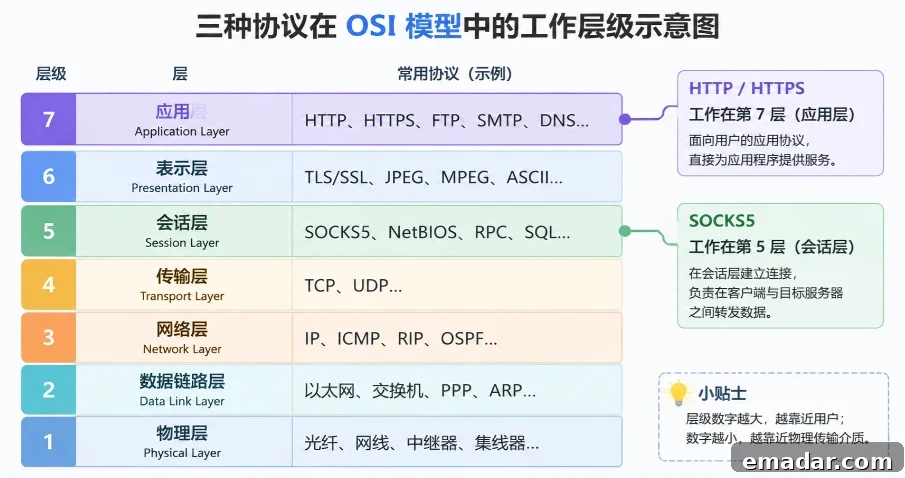
First, look at where each protocol operates in the network model — this determines what they can and cannot do.
L7 HTTP
Application layer · Can parse HTTP headers, perform content caching, and reuse connections
L7 HTTPS
Application layer + CONNECT tunnel · Establishes an encrypted tunnel and does not inspect content
L5 SOCKS5
Session layer · Protocol-agnostic, purely forwards TCP/UDP traffic
HTTP proxy
An HTTP proxy operates at the seventh layer (application layer) of the OSI model. It “understands” HTTP requests — it can parse request headers, handle responses, and even cache content.
What does this mean? If you are scraping a web page, an HTTP proxy can provide connection reuse (Keep-Alive) and response caching, reducing repeated request overhead. But it also means your HTTP request content is visible to the proxy node — the proxy can see what you requested and what was returned.
Quick summary
HTTP proxy = a mail carrier who can read your letters
HTTPS proxy
HTTPS proxies are essentially HTTP proxies that support the CONNECT method. They establish a TCP tunnel using CONNECT and carry TLS-encrypted traffic inside that tunnel.
The proxy node only sets up the tunnel and does not inspect encrypted content. It sees “an encrypted connection to a destination” but cannot see the specific requests or responses. This makes HTTPS proxies the preferred choice for cross-border store API integrations, session transfers, and payment interactions.
Quick summary
HTTPS proxy = a courier who only delivers sealed envelopes and doesn’t open them
SOCKS5 proxy
SOCKS5 works at the fifth layer (session layer) and does not care about the application-layer protocol. Its sole job is to help you establish TCP/UDP connections to the target and forward data.
SOCKS5 does not inspect application-layer data — whether it’s HTTP, HTTPS, FTP, or a custom protocol, it treats them the same. This means it cannot do HTTP caching or request filtering, but it can handle UDP traffic, which HTTP/HTTPS proxies cannot.
Quick summary
SOCKS5 proxy = a conveyor that delivers whatever you send to the destination without caring about contents
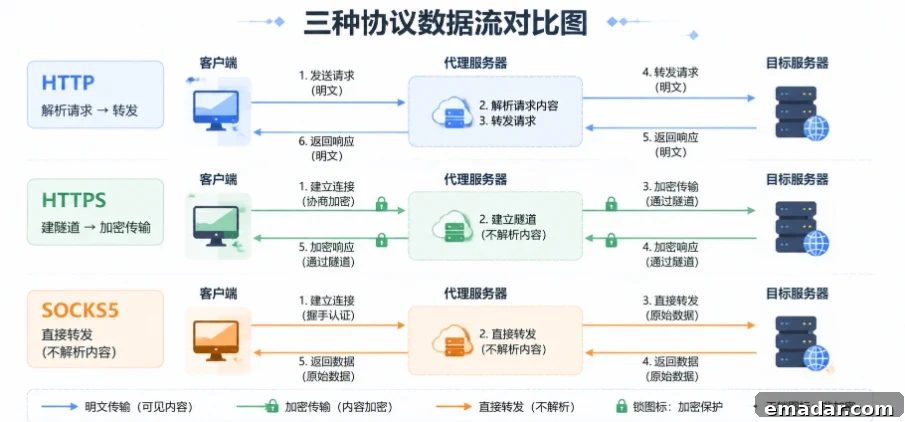
2. Side-by-side comparison across six dimensions
| Comparison dimension | HTTP proxy | HTTPS proxy | SOCKS5 proxy |
| Operating layer | Layer 7 (application) | Layer 7 + CONNECT tunnel | Layer 5 (session) |
| Supported protocols | HTTP only | HTTP + HTTPS via tunnel | Any TCP/UDP protocol |
| Data visibility | Proxy can see request content | Proxy cannot see encrypted content | Proxy cannot see application data |
| Encryption capability | None | TLS tunnel encryption | None (relies on application-layer encryption) |
| Caching capability | Supports response caching | Does not support caching | Does not support caching |
| UDP support | No | No | Yes |
| Configuration complexity | Low | Low | Medium |
This table answers about 80% of selection questions. For a more precise decision, we ran empirical tests.
3. Empirical test: latency differences for the same node using different protocols
This is something most proxy introductory articles don’t show — we used the same residential proxy nodes and the same target site (a North American e-commerce site), and issued requests with each protocol, averaging 100 consecutive requests.
| Test metric | HTTP | HTTPS | SOCKS5 |
| Base RTT | 45 ms | 48 ms | 46 ms |
| Proxy processing overhead | 2–5 ms | 8–15 ms | 1–3 ms |
| Time for initial connection | 50 ms | 120 ms | 48 ms |
| Average time across 100 requests | 52 ms | 63 ms | 49 ms |
| Average time after connection reuse | 48 ms | 55 ms | 49 ms |
| Latency standard deviation (stability) | ±3 ms | ±4 ms | ±2 ms |
Note: These test numbers are illustrative for comparison. Actual latency depends on network environment, target site, and proxy node location. Real performance should be measured in your environment.
Four key findings:
1. SOCKS5 shows the lowest single-request latency
Because it does not parse protocols and only forwards data, processing overhead is minimal (1–3 ms). However, it lacks caching advantages after the initial connection.
2. HTTPS has the slowest initial connection
TLS handshake requires an extra 1–2 RTTs, making the initial connection about 2.4 times slower than HTTP. After connection reuse, the gap shrinks to within 15%.
- HTTP is fastest in connection-reuse scenarios
Thanks to Keep-Alive and caching, HTTP proxies achieve the highest throughput in high-frequency repeated-request scenarios.
4. SOCKS5 offers the best stability
With the smallest standard deviation across 100 requests (±2 ms), SOCKS5 is suitable for long-running tasks that require stable latency.
The point of these numbers is not to memorize exact values but to understand a core insight: no protocol is universally superior — the right choice depends on the scenario.
4. Scenario decision tree
Based on the technical differences and test data above, follow this decision tree to find the best protocol for your needs.
Q1: Does your application need to handle UDP traffic?
Examples: real-time communication, game data, DNS queries
Yes → SOCKS5 ⬇ No → Continue to Q2
Q2: Do your requests include sensitive data?
Examples: API keys, session tokens, payment information, user data
Yes → HTTPS proxy ⬇ No → Continue to Q3
Q3: Do you need high-frequency repeated requests to the same target?
Examples: data scraping, price monitoring, SEO checks
Yes → HTTP proxy ⬇ No → Continue to Q4
Q4: Are you using a non-HTTP application?
Examples: instant messaging clients, games, custom TCP protocols
Yes → SOCKS5 ⬇ No → HTTPS proxy (the most generally secure default)
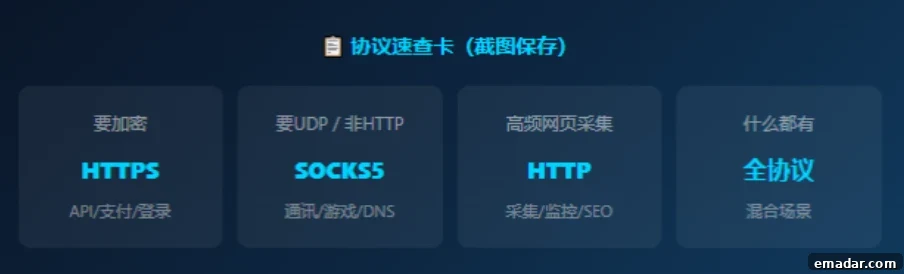
Extra tip: If your environment mixes protocols — for example, HTTP scraping plus non-HTTP applications — choose a universal protocol solution so one IP resource can cover all scenarios without switching accounts.
5. Three common pitfalls
! Pitfall 1: Using SOCKS5 for web scraping can be slower than HTTP
Symptom Users hear that SOCKS5 has “lowest per-request overhead” and use it for high-frequency scraping, but overall efficiency is worse than using an HTTP proxy.
Reason SOCKS5 does not provide HTTP connection reuse or response caching. When requesting many pages from the same domain, an HTTP proxy can reuse TCP connections and cache static resources, while SOCKS5 requires new connections each time (unless the client manages connection pooling).
Correct approach
For pure high-frequency web scraping, HTTP proxies typically deliver higher throughput. SOCKS5’s strengths are UDP support and protocol agnosticism, not web scraping.
! Pitfall 2: Using HTTP for cross-border store API integration risks data exposure
Symptom Choosing HTTP proxies for e-commerce API integration to “gain speed” leaves API keys and order data in plaintext at the proxy node.
Reason HTTP proxies can parse HTTP request content, so Authorization headers and sensitive fields in the request body are visible to intermediary nodes. If a proxy is untrusted or monitored, data can be exposed.
Correct approach
For scenarios involving API keys, payment data, or user information, use an HTTPS proxy or SOCKS5 combined with application-layer HTTPS. The speed difference becomes negligible after connection reuse, but data security is irreversible.
! Pitfall 3: Mixing protocols and ports causes connection failures
Symptom Configuring a SOCKS5 proxy but using port 8080, or setting an HTTP proxy to port 1080, results in immediate connection failure.
Reason Ports and protocols are mismatched. Common port mappings:
| Protocol | Common ports |
| HTTP proxy | 80 / 8080 / 3128 |
| HTTPS proxy | 443 / 8443 |
| SOCKS5 | 1080 / 1081 |
Service providers can choose custom ports, so ensure your client’s protocol type matches the proxy node’s supported protocol.
Correct approach
Confirm the proxy node’s supported protocol before configuration. Do not guess the port — check the provider documentation or console.
6. Full-protocol support: one IP pool for all scenarios
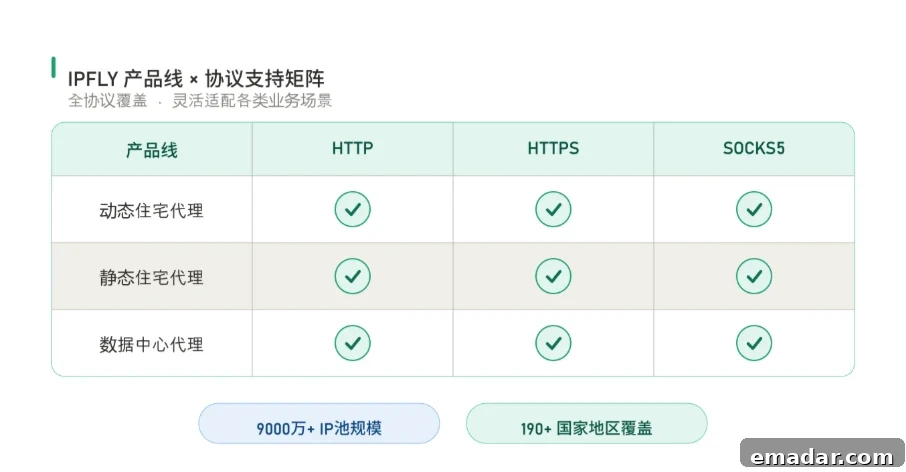
At this point you may face a practical question: if you need HTTP for data scraping, HTTPS for API integrations, and SOCKS5 for non-HTTP applications, do you need to buy separate proxy plans for each protocol?
Many providers offer product lines that fully support HTTP / HTTPS / SOCKS5 on the same IP resources.
Benefits of multi-protocol support:
- The same residential IP resources can switch protocols by scenario, no need to repurchase
- Use HTTP for dynamic scraping, HTTPS for API integrations, SOCKS5 for application-layer needs — all under one account
- Large pools of real residential IPs spanning many countries, usable across protocols
- Switching protocol does not require changing IPs; update configuration in one place and all protocols take effect
Note: Products are intended for use in overseas network environments only.
Choose the right protocol and double your cross-border network efficiency
New users may receive introductory offers and unified configuration for HTTP / HTTPS / SOCKS5 across product lines.
Final pricing and availability are subject to the order page and provider terms. Promotions may end without notice.