
Introduction: The Gap Between Buying and Getting Value
The residential proxy market grew rapidly through 2025 and 2026, with dozens of new vendors entering the space in a single year. To newcomers, that growth looks like plenty of options. To someone who has bought a residential proxy plan only to see it fail in production, it feels like a minefield. The uncomfortable truth is that many first-time buyers make at least one costly mistake—not because they selected a malicious provider, but because the signals that distinguish a usable residential proxy from an expensive dead end are rarely visible on a pricing page. Those signals live in IP quality metrics, rotation settings, and geographic consistency checks that onboarding wizards seldom explain.
This guide closes that gap. It focuses on the common mistakes that cause residential proxy purchases to fail, the verification steps that prevent those failures, and a practical walkthrough for purchasing and configuring residential proxies through IPFLY’s platform. The goal is not to push a subscription, but to help you ensure that the IP addresses you buy actually behave as expected in production.
Why Beginners Fail at Buying Residential Proxies
The False Signal of a Successful Connection
A residential proxy can pass a simple connectivity test and still be useless for real work. When an IP responds, buyers often see a green light and assume everything works. That view conflates connectivity with reputation. An IP can be reachable and report the correct geolocation in a test, yet be flagged across anti-fraud databases as a source of abusive traffic. The connection succeeds, but the destination server may silently degrade responses—returning stale prices, placeholder content, or rate-limited access instead of the data you need.
That is why evaluating IP quality before committing to a plan is essential. Quality depends on factors like purity and historical reputation, not just raw connectivity.
Confusing Pool Size with Pool Quality
A provider advertising tens of millions of IP addresses is not necessarily selling access to that many clean IPs. Pool size only matters if it leads to low reuse rates and high purity. When a pool is small relative to demand, providers must reuse the same addresses across users more frequently, which quickly erodes IP reputation. A smaller, well-maintained pool can outperform a much larger, overused one.
Misreading the Pricing Model
Residential proxy pricing is typically bandwidth-based, not IP-based. Selecting the plan with the lowest per-gigabyte rate without estimating actual traffic volume can leave you either running out of bandwidth mid-project or paying for unused capacity. Match the pricing model to your workload: per-request rotation consumes bandwidth far faster than long-lived sticky sessions used for account management or browsing.
Five Pitfalls to Avoid When Buying Residential Proxies
Pitfall One: Buying Datacenter IPs Sold as Residential
Paying residential prices for datacenter IPs is one of the costliest errors. Some providers label IP blocks as residential while sourcing them from cloud infrastructure. The invoice may look legitimate, but an ASN lookup will reveal the truth. If the ASN belongs to a hosting provider, the destination server will treat traffic like datacenter requests, not genuine residential traffic.
Verification is straightforward: an ASN lookup should point to a consumer ISP (Comcast, AT&T, Deutsche Telekom, or a regional equivalent), not Amazon, Google Cloud, or OVH. If the ASN maps to a hosting provider, the IP is not residential regardless of the provider’s label.
Pitfall Two: Ignoring Geographic Consistency
An IP in the correct country but the wrong city is often insufficient. Pricing, search results, and product availability can vary at the metropolitan level. Requests that appear to come from a region where the target platform has no real user base may trigger suspicion. City-level targeting—not coarse country-level approximations—is often required for reliable localized data collection.
Pitfall Three: Rotating IPs Mid-Session
One of the most common configuration errors is rotating IP addresses during a session that requires continuity. A user logs in through one IP, then the next request—loading the page behind the login—exits via a different IP. From the platform’s perspective, an authenticated session has suddenly moved to a new network address, which is a major red flag.
Multi-step workflows require sticky sessions: keep one IP for the entire sequence. Per-request rotation is appropriate only for independent, stateless fetches. Mixing these modes is the single biggest cause of “my residential proxy got detected” reports.
Pitfall Four: Overloading a Single Sticky IP
The opposite mistake is concentrating a high volume of requests on a single sticky IP. A real residential user does not load thousands of pages per minute. Even a pristine IP looks automated when request volume is superhuman. The point of a large residential pool is to distribute load so no single address displays suspicious behavior. Channeling too much traffic through one IP undermines that benefit.
Pitfall Five: Geo Signals That Contradict the IP
Using a German residential IP while sending Accept-Language: en-US, a browser timezone set to America/New_York, and a US locale creates a clear contradiction between network identity and application identity. Anti-bot systems are tuned to detect these mismatches. When targeting a location, every signal—language headers, timezone, locale, currency—should align with the IP address’s geography.
What to Verify Before You Buy Residential Proxies
ASN and ISP Verification
Start by checking the Autonomous System Number associated with the IP. A legitimate residential IP will belong to a consumer ISP ASN. If the ASN maps to a cloud provider, hosting company, or CDN, the IP is not residential. Reputable providers offer trial traffic or sample IP checks so you can perform this verification before purchase.
Blacklist and Reputation Screening
An IP can pass connectivity checks yet still appear on spam and abuse databases. Screening addresses against public blacklist sources reveals whether an IP has a history of abusive activity. A residential proxy pool built on blacklisted addresses will produce frequent verification challenges and degraded results regardless of marketing claims.
Pool Reuse Assessment
Pool size alone does not reveal how often an IP is reassigned. The key metric is the ratio of active users to available IPs. Ask providers about reuse policies or evaluate trial traffic for signs of overuse—repeated CAPTCHAs, inconsistent geolocation, or unusual latency indicate heavy reuse and poor quality.
Protocol and Authentication Compatibility
Confirm that the plan supports the protocols and authentication methods your stack requires. Some providers offer only HTTP/HTTPS; others support SOCKS5 for lower-level TCP routing. Authentication can be credential-based, IP-whitelist-based, or both. Verify protocol and authentication compatibility before purchase to avoid integration issues later.
IPFLY Residential Proxy Purchase Tutorial
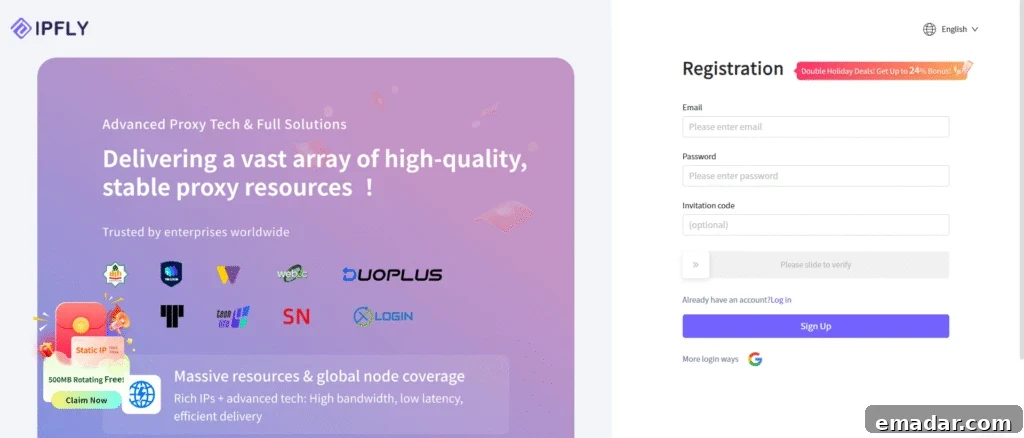
Step One: Register an Account
Create an account on the IPFLY platform to begin the purchase process.
Step Two: Navigate to the Residential Proxy Product
Choose the product type that matches your needs—dynamic pools for rotation, city-level targeting when locality matters, or static ISP-registered addresses for persistent use.
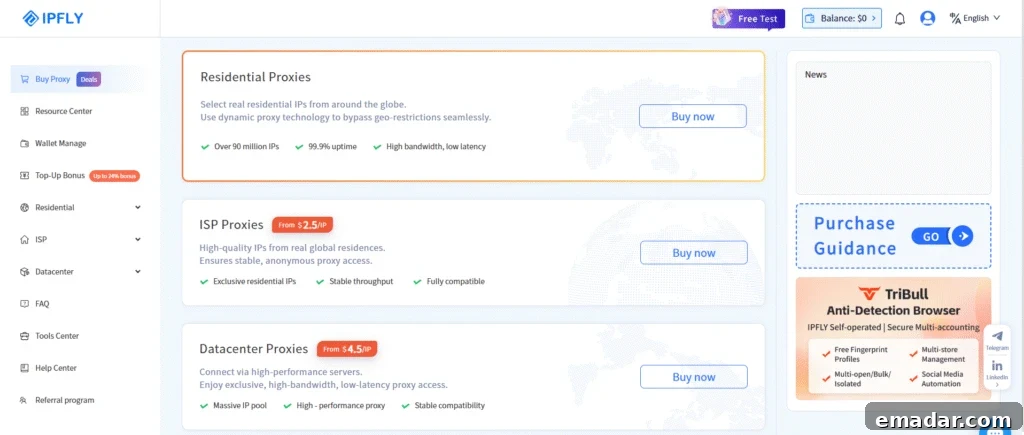
Step Three: Configure the Plan Parameters
Select the country and city-level targeting you need, estimate bandwidth requirements, and adjust rotation and session settings to suit your workflow. Confirm that the plan supports the protocols you will use.
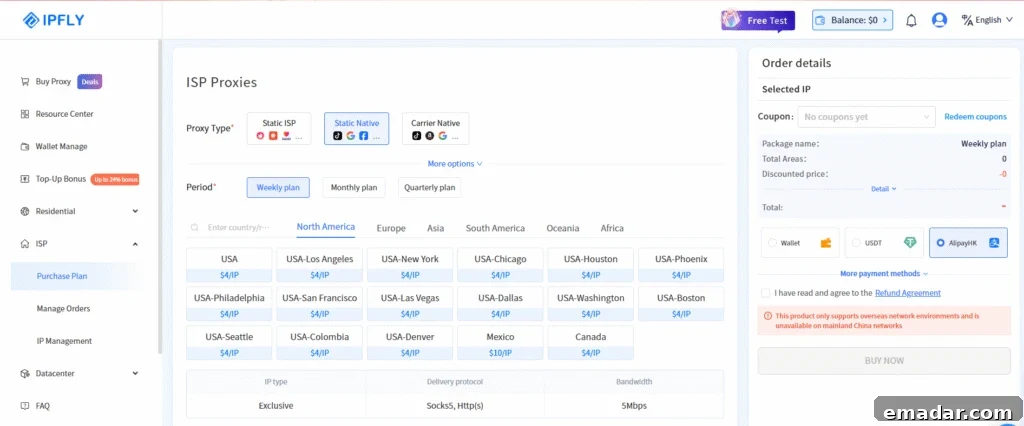
Step Four: Complete the Purchase and Retrieve Credentials
After checkout, retrieve the proxy credentials from the platform’s IP management area. For dynamic proxies, the platform provides host, port, username, and password as a connected set of parameters ready for integration.
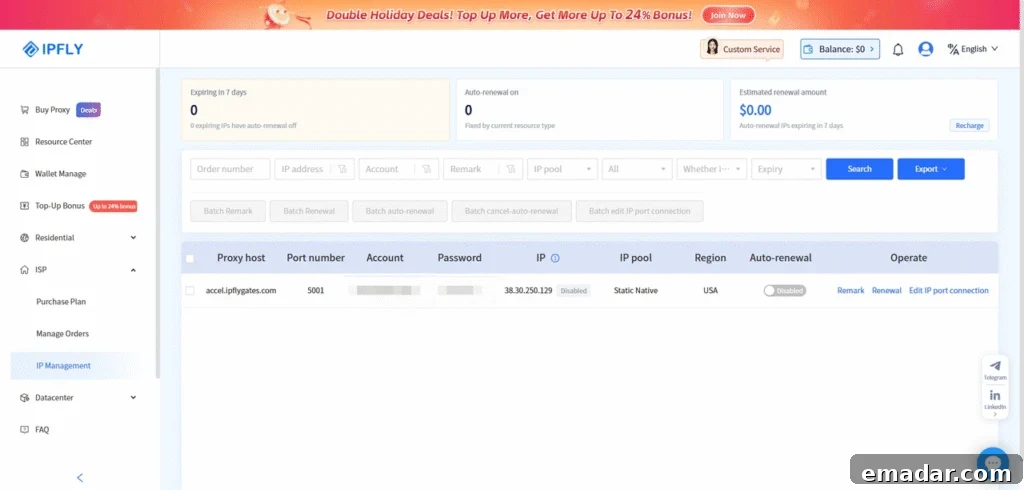
Step Five: Integrate with Your Application
Insert the extracted credentials into your application’s proxy configuration. For browser workflows, update the browser’s proxy settings or use a profile manager. For programmatic usage, pass the host, port, username, and password to your HTTP client library. Confirm protocol support (HTTP, HTTPS, SOCKS5) and test rotation control if your workflow requires dynamic switching.
Configuring Rotation Correctly After Purchase
Matching Rotation Mode to Workflow Type
Choose rotation mode based on the nature of your requests. Independent, stateless requests benefit from per-request rotation to distribute load across the pool. Sequential workflows—login, navigation, form submission, checkout—require sticky sessions that maintain one IP for the entire sequence. Selecting the wrong mode is a primary cause of detection.
Session Duration and Request Distribution
Set sticky session duration to the minimum needed to complete the workflow. Sessions that persist longer than necessary hold IPs out of rotation and increase the risk of overuse. After a workflow completes, expire the session so the IP returns to the pool, preserving effective pool size and keeping per-IP request rates within human-like patterns.
Geographic Signal Alignment
When targeting a specific city or country, align all application-level signals with the IP’s location. Language headers, browser timezone, locale, and currency should match the IP’s geography. A misaligned application signal paired with a residential IP creates a detection trigger that anti-bot systems easily spot.
Summary: Buy With Verification, Configure With Discipline
Buying residential proxies is only the first step. Whether the addresses you buy produce usable data depends on pool quality and disciplined configuration. Common failures fall into two categories: acquisition errors—paying for non-residential or contaminated IPs—and configuration errors—routing traffic through good IPs in patterns that trigger detection.
Prevent acquisition errors with ASN checks, blacklist screening, and pool reuse assessment. Prevent configuration errors with proper rotation mode selection, strict session duration control, and careful geographic signal alignment. A platform that offers pool diversity, city-level targeting, and session management tools makes it far easier to apply these disciplines and transform a purchased plan into reliable production infrastructure.
Start Your Residential Proxy Setup with IPFLY
If you are ready to move from learning to building, IPFLY’s platform provides the controls and infrastructure to configure a working setup. Registration and credential extraction are designed to be quick, and the platform’s rotation and session settings let you match IP behavior to your workflow rather than forcing your workflow to adapt to the proxy.
Create your IPFLY account → and explore dynamic residential proxy pools with per-request and sticky session control, or choose static ISP-registered addresses when you need a persistent, dedicated IP. Datacenter options remain available for high-concurrency targets where strict residential verification is not required.