
Managing multiple social media accounts can quickly become overwhelming. Constantly switching between physical devices, configuring different network connections, publishing content, and repeating routine tasks consumes time and resources.
TikSales combines AI-driven automation with cloud-based real-device environments to streamline multi-account social media management. Paired with proxy services like IPFLY, TikSales delivers a scalable workflow for managing TikTok, Instagram, and other platforms from a single interface.
What Is TikSales?
What Is a Social Media Cloud Phone?
TikSales offers cloud-hosted Android phone environments that let you remotely access and control multiple independent device instances from one dashboard. Instead of buying and maintaining large numbers of physical smartphones, you create and manage cloud phone environments that match your operational needs. Each environment behaves like a standalone device suitable for social apps, account administration, content publishing, and automated workflows.
This cloud-phone approach is particularly useful for agencies, marketers, creators, and businesses that must manage many social media accounts securely and efficiently.
Key Features of TikSales
Secure Real-Device Environments
TikSales provides high-quality cloud phone instances that offer independent, stable device environments tailored for social media work.
Multi-Account Management
Manage many accounts from a single platform. Organize devices into groups, assign tasks, and monitor account and device status centrally.
AI-Powered Automation
Automate repetitive workflows such as account login, warm-up, daily engagement, profile maintenance, content publishing, and monitoring.
AI Content Creation Assistant
Built-in AI tools assist with content ideas, script optimization, publishing strategies, and discovering new content opportunities.
These features significantly reduce manual, repetitive work and make it easier to manage large portfolios of accounts.
Why Use Cloud Phones for Multi-Account Social Media Management?
The Limitations of Physical Devices
Using physical smartphones for every account becomes impractical as account numbers grow. Teams must buy and maintain many devices, handle different network setups, swap between phones, and repeat manual tasks—raising operational costs and complexity.
How Cloud Phones Simplify Multi-Account Operations
Cloud phones centralize device management in the cloud. With TikSales, you can spin up multiple Android environments, access them remotely, group devices, and run automation tasks from one console. This makes scaling social media operations simpler and more cost-effective without the need for dozens of physical phones.
How to Get Started with TikSales
Step 1. Create a TikSales Account
Create an account on the TikSales platform, then log in to access the cloud phone dashboard and begin setting up your social media environments.
Step 2. Create a Cloud Phone Environment
TikSales offers trial options for new users, including timed and monthly device plans. Choose the device type that fits your needs, create your cloud phone instance, and connect to it remotely. From there you can install and log into social apps such as TikTok and Instagram.
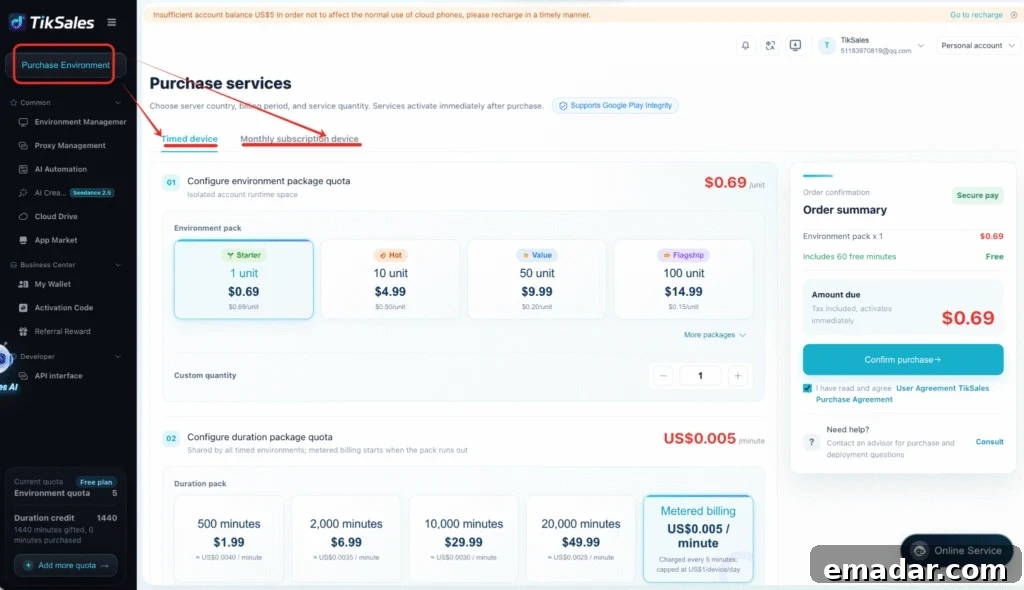
Step 3. Configure Your Proxy with IPFLY
Network configuration is a critical part of multi-account operations. IPFLY provides proxy solutions that integrate with TikSales cloud phone environments to support geographically diverse and isolated network sessions.
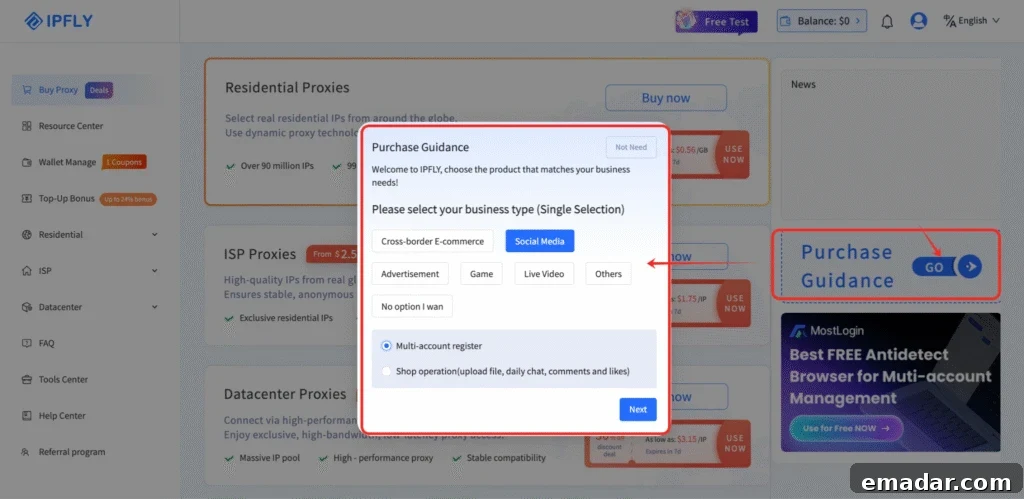
(1) Choose the right proxy with IPFLY’s guidance
IPFLY offers a guided selection process to help identify the best proxy option for your use case. Answer a few questions about your needs and network preferences to get a tailored proxy recommendation.
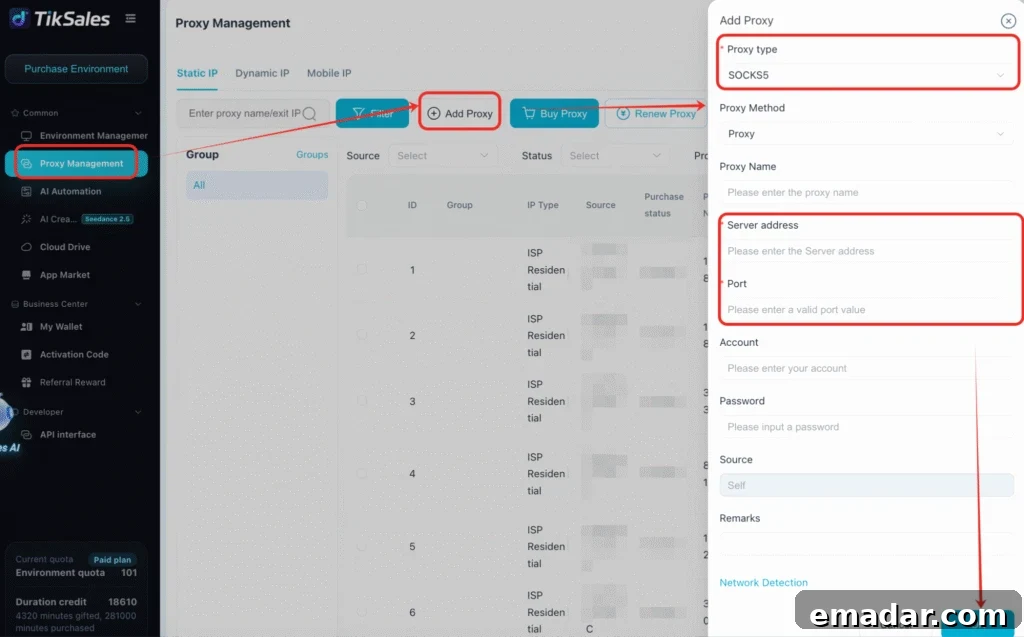
(2) Add and bind your proxy in TikSales
After purchasing a proxy from IPFLY, export the proxy details and add them in TikSales’ Proxy Management section. Click “Add Proxy,” enter the proxy host, port, username, and password, then use the built-in connection check to verify the proxy. Once verified, bind the proxy to the desired cloud phone environment to complete the configuration.
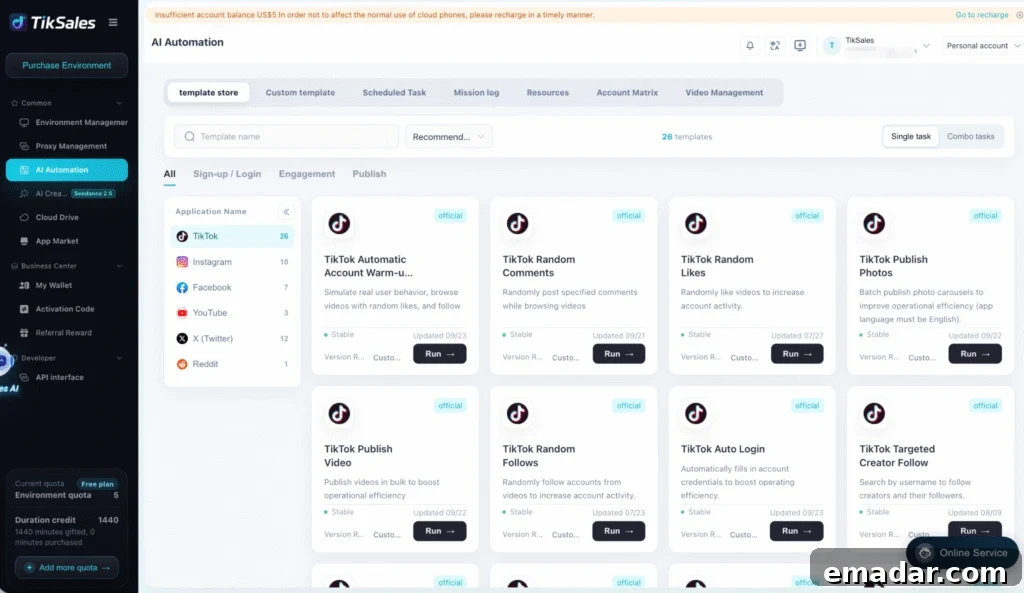
Step 4. Execute AI Automation Templates
With your cloud phone and network set up, use TikSales’ automation templates to handle repetitive social media tasks. Select accounts or device groups, choose a template, configure parameters, and run the task. Templates cover common operations such as warm-up routines, engagement patterns, publishing schedules, and monitoring.
How to Use IPFLY Proxies with TikSales
Step 1. Choose a Proxy
Select an IPFLY proxy solution that aligns with your target markets and operational needs, considering factors such as location, concurrency, and performance.
Step 2. Get Your Proxy Details
After purchase, collect the connection details: proxy host, port, username, and password.
Step 3. Add the Proxy to TikSales
Enter the proxy information into your TikSales cloud phone network configuration to enable routing through the chosen IPFLY proxy.
Step 4. Assign the Proxy to a Cloud Phone
Bind the configured proxy to the relevant cloud phone instance so that traffic from that environment flows through the assigned proxy.
Step 5. Start Managing Your Accounts
With environment and proxy configured, power on the cloud phone instances, log in to your social accounts, and manage them through the TikSales platform.
Pricing
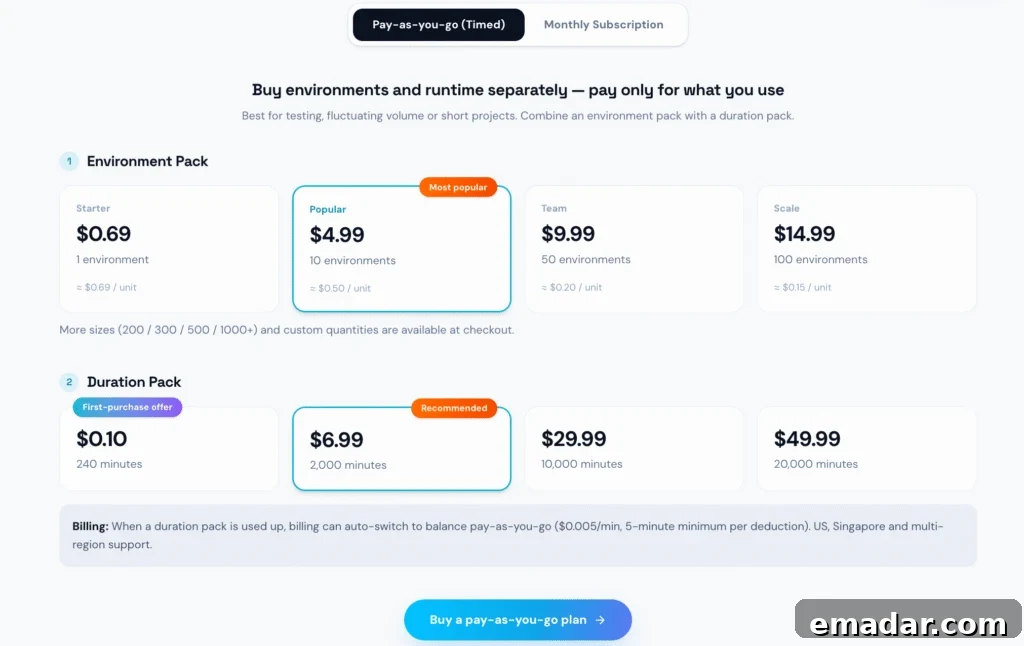
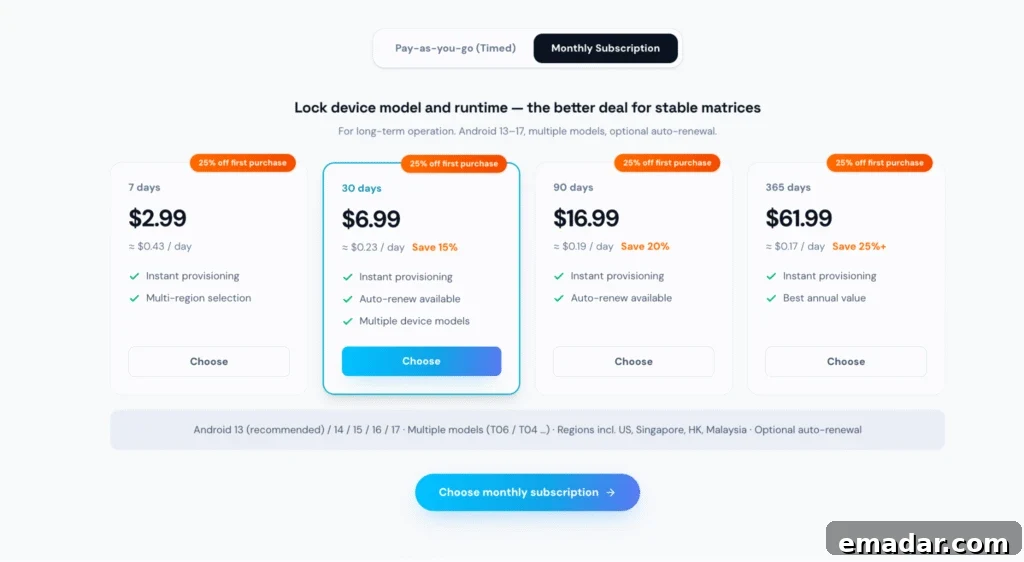
TikSales offers flexible device options, including timed devices and monthly cloud phone plans. Choose the plan that best matches your usage, team size, and account management needs. New users can often access free trial devices to evaluate the platform before committing to a paid plan.
Pros and Cons of TikSales
Pros
- Centralized multi-device and multi-account management
- Cloud-based Android environments that act like real devices
- AI-powered automation to reduce repetitive work
- AI-assisted content creation tools
- Flexible timed and monthly device options
- Scalable for agencies, marketing teams, and creators
- Compatible with third-party proxy solutions such as IPFLY
Cons
- Initial setup requires familiarization with cloud phones and proxies for some users
- Advanced automation and large-scale workflows may need configuration and testing
- Proxy service fees are separate from cloud phone fees when using third-party providers
Who Benefits from TikSales + IPFLY?
Social Media Agencies
Centralize client account management and streamline operations across multiple brands.
Affiliate Marketers
Operate numerous accounts efficiently and automate repetitive account and content tasks.
E-commerce Teams
Manage social accounts for different products, brands, or regional markets with consistent workflows.
Content Creators
Scale multiple creator accounts while reducing repetitive administrative work.
Global Marketing Teams
Build flexible, market-specific social media workflows and manage diverse account portfolios.
Conclusion
Managing multiple TikTok and Instagram accounts no longer requires maintaining dozens of physical smartphones. TikSales supplies cloud phone environments, centralized account management, AI automation, and content assistance, while IPFLY provides proxy solutions to handle network separation and geolocation needs.
Together, TikSales and IPFLY enable businesses, agencies, marketers, and creators to build scalable, efficient workflows for multi-account social media operations.
Ready to get started?
Try TikSales
Explore IPFLY