
The Ultimate Guide to Proxy IP Configuration: Avoiding Common Pitfalls
The core concept of a proxy IP is simple: the target website sees the proxy server’s IP address, not your real IP address.
However, the real challenges lie in the “configuration details.”
While some users can reliably run their operations with proxy IPs, others encounter 403 errors, verifications, and account bans immediately after connecting. The difference isn’t in the tools themselves, but in whether the configuration method aligns with real-world network logic.
I. Three Prerequisites Before Configuring a Proxy IP
Many tutorials start by instructing you on “how to fill in the IP address,” which is the wrong approach.
Before you begin, you must confirm three things; otherwise, all subsequent operations will be ineffective.
1. Define the Proxy Type (This is a Mandatory First Step)
Different proxy types require completely different configuration methods:
- HTTP / HTTPS Proxy
- SOCKS5 Proxy
- Static IP / Dynamic IP
- Whether Account Authentication is Required
Here’s a real-world cautionary tale:
Someone used a SOCKS5 proxy but selected HTTP in their browser settings. As a result, it “showed as connected,” but all traffic still went through their local IP.
The conclusion is straightforward: Selecting the wrong proxy type = having no proxy at all.
2. Ensure Complete Proxy Information
A usable proxy IP should include at least:
- IP Address
- Port
- Protocol Type (HTTP / SOCKS5)
- Whether a Username and Password are Required
Missing even one item can lead to a “fake connection.”
3. Define the Use Case
What are you using the proxy for?
- General Web Browsing
- Overseas Platform Login
- Multi-Account Management
- Programs / Web Scraping
- API Requests
Different scenarios have completely different requirements for proxy stability, cleanliness, and IP attributes, which will directly affect whether stricter settings are needed later.
II. Configuring a Proxy IP in Your Browser
Let’s take Windows + Chrome as an example, a common scenario.
Correct Steps (The Order Matters)
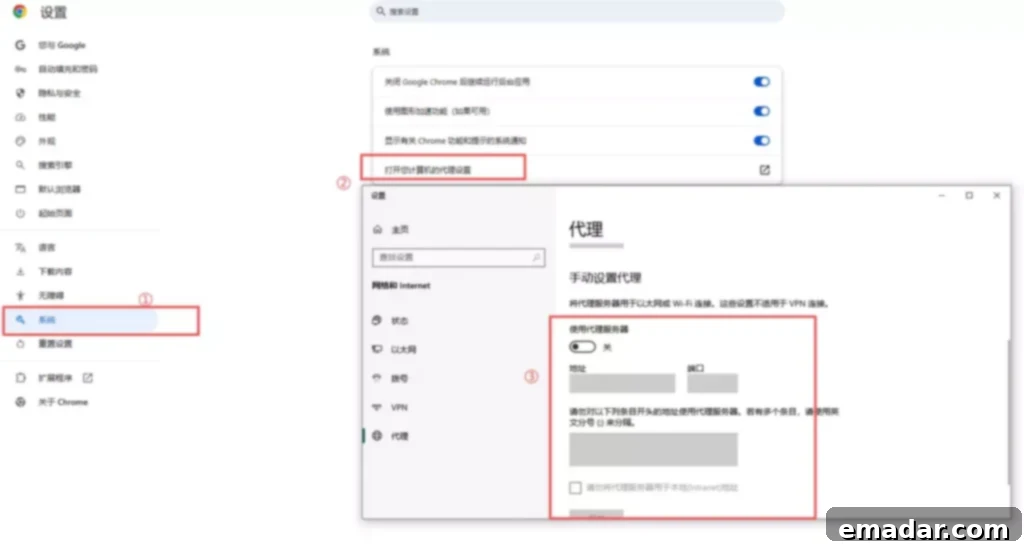
Step 1:
Open Chrome → Settings → System → Open “Open your computer’s proxy settings”
Step 2 (System Level):
Enter the Windows proxy settings interface and select “Manual proxy setup”
Step 3:
Enable the proxy server and fill in the following information:
- Address: Proxy IP
- Port: Proxy Port
- Protocol: If it’s an HTTP proxy, the system proxy is sufficient; if it’s SOCKS5, you must use a tool or plugin that supports SOCKS5
Step 4 (Critical): If the proxy requires a username and password, the system proxy itself cannot fill them in. You must use:
- Browser Proxy Plugin
- Dedicated Proxy Client
- Anti-Detect Browser
Many people get stuck here:
The IP is correct, but the authentication method is wrong, resulting in all requests being rejected by the proxy server.
How to Verify That the Proxy is Actually Working?
Don’t rely on “feeling”; always verify.
There is only one way:
Open an IP lookup website and see if the displayed IP has changed, and:
- Is the country correct?
- Does the network type match expectations (Residential / Datacenter)?
If the IP has changed, but accessing the target website is still abnormal, the problem isn’t “whether there’s a proxy,” but in the proxy quality or behavioral characteristics.
III. How to Correctly Configure Proxy IPs in Anti-Detect Browsers / Multi-Account Tools
This is the most crucial type of setup in cross-border e-commerce, social media marketing and other multi-account scenarios.
The Standard Correct Process is as Follows:
Create a new browser environment
→ Set up the proxy IP first
→ Then generate the browser fingerprint
→ Finally, log in to the account
If the order is reversed, the risk is immediately maximized.
Four Details to Pay Attention to When Configuring a Proxy
First, bind only one IP to one environment. Do not share the same proxy across multiple environments, even if it’s a static IP.
Second, the IP and fingerprint region should match.
A US IP + Chinese system + Asian time zone is inherently a high-risk combination.
Third, control the switching frequency of dynamic IPs.
It’s not “the more frequent, the safer”; frequently changing IPs is more like abnormal behavior.
Fourth, proxy stability is more important than “speed.”
Disconnections, IP drifting, and short-term unavailability will all be recorded by the platform.
In actual operations, many teams use proxy resources with higher stability and IP attributes closer to real user networks, such as residential proxies, to reduce the probability of environmental abnormalities. Services like IPFLY, which provide multi-region residential and dynamic IPs, often come into play in these multi-account environments, but the premise is still reasonable configuration and usage.
IV. Configuring Proxy IPs in Programs / Web Scrapers
If you’re in a technical scenario, the configuration logic is actually clearer.
General Logic Explanation (Non-Code)
The core is only three points:
- Explicitly specify the proxy address in the request
- Match the correct proxy protocol
- Ensure the request headers align with the proxy IP’s behavior
Common mistakes include:
- Only configuring a proxy for HTTP requests, not HTTPS
- Ignoring whether DNS resolution goes through the proxy
- Forgetting to handle proxy authentication
The result is:
Some requests go through the proxy, some connect directly, and the local IP is completely exposed.
V. Why is “Proxy IP Set Up,” But Still Being Blocked / Flagged?
This is the ultimate question when searching for this keyword.
The answer is also very realistic:
Proxy IPs are just tools, not a “get out of jail free card.”
The following situations can all cause problems:
- IP being reused by multiple people
- IP having a poor historical reputation
- Abnormal frequency of behavior
- Mismatch between fingerprint and IP
- Using an obvious datacenter IP
This is also why, on some platforms that are extremely sensitive to risk control (such as overseas social media, AI tools, and cross-border e-commerce backends), simply being “able to connect to the proxy” is far from enough.
In actual operation, many people pay more attention to whether the IP is clean, whether it is stable in the long term, and whether there is a reasonable rotation strategy. This is also one of the reasons why some users choose proxy services like IPFLY that emphasize IP cleanliness and controllability.
VI. Conclusion: The Correct Logic for Proxy IP Configuration in One Sentence
It’s not “just filling in the IP and being done,” but making your network behavior look like a normal person.
Review the truly important points:
- The proxy type must be selected correctly
- The authentication method must match
- The setup order cannot be reversed
- IP, fingerprint, and behavior must be consistent
- Verify the results instead of believing the interface prompts
As long as you follow this logic to configure your proxy, most problems like “proxy invalid,” “blocked immediately,” and “always 403” will naturally disappear.
Not sure which solution is suitable for your business? Register with IPFLY and consult our experts for assistance!