

You open your browser, go to chat.openai.com, the page spins a few times, and then displays a single line: “Not available in your country.” Or worse: it times out halfway through loading, or the login page never appears.
This problem is common in mainland China, parts of Hong Kong, Iran, Russia and several other regions. The root cause is that OpenAI enforces access restrictions at the network level for certain IP address ranges. This article explains how that system works, which specific issue you’re likely encountering, and how to correctly configure an IP address that the platform recognizes as coming from a supported country — a reliable, long-term fix rather than a temporary workaround.
Why ChatGPT may be inaccessible
Many assume the issue is their browser or local network, but in most cases ChatGPT access failures stem from your IP address, not connection speed.
OpenAI’s access control works like this:
When you make a request, OpenAI’s servers first check the geographic origin of your IP address. If the IP belongs to a region that OpenAI does not support, the request is rejected outright and never proceeds further. That’s why clearing your browser cache, switching browsers, or rebooting your router often has no effect — your public IP has not changed.

As of 2026, OpenAI explicitly does not support access from these regions:
- Mainland China
- Hong Kong (in some cases)
- Russia
- Iran
- Cuba
- North Korea
- Belarus
If your exit IP is from one of these regions, access will be blocked regardless of which device you use, your account status, or your connection speed.
Common error messages and what they mean
Users often see different error messages without knowing the underlying cause. Below are the most common messages and how to interpret them:
| Error message | Meaning | Primary cause |
| Not available in your country | Region not supported | IP belongs to a restricted region |
| Access denied | Access blocked | IP identified as high-risk or as a datacenter IP |
| ChatGPT is at capacity right now | Capacity limit | Temporary load; retry shortly |
| Your account has been flagged | Account flagged | Frequent logins from different regions triggered a security check |
| Unable to load chat | Load failed / connection timeout | Network routing issues or IP has been blocked |
| Please try again later | Rate limited | Too many requests in a short period |
The first two errors are the most critical — they won’t resolve on their own and require changing your IP address to a supported one.
Why using a datacenter IP often fails
A common pitfall is assigning an overseas IP only to still receive “Access denied.” The reason is the IP type.
IP addresses generally fall into two categories by origin:
- Residential IP: Assigned by ISPs to home broadband customers, usually associated with consumer providers like AT&T or Comcast.
- Datacenter IP: Issued by cloud and hosting providers such as AWS, Google Cloud, or Alibaba Cloud — typically associated with server farms.
OpenAI’s risk detection checks an IP’s ASN (Autonomous System Number) when it receives a request. If the ASN indicates a datacenter, OpenAI is likely to reject the request, because datacenter IPs match automation or bulk-usage patterns. Even if the country is permitted, a datacenter IP can still be blocked.
That’s why you need not just any overseas IP, but a residential IP that belongs to a real home broadband provider.
Why residential IPs are accepted
Residential IPs are treated differently because their “identity” matches typical consumer usage: a request from a U.S. ISP looks the same as a real home user opening ChatGPT.
This acceptance is based on three factors:
- Trusted ASN — Residential IPs map to consumer ISPs; risk systems recognize them as ordinary user networks and do not apply datacenter rejection rules.
- Clean usage history — Quality residential IPs come from real user pools with normal browsing histories and lower risk of being blacklisted.
- Consistent geography and account context — When your IP shows as coming from a supported country (for example, the U.S.), the platform’s access checks pass and normal operation continues.
How IPFLY residential IPs solve ChatGPT access issues
IPFLY provides residential IP services across 190+ countries, including the U.S., UK, Germany, Japan and other regions supported by ChatGPT.
IPFLY offers two main solutions tailored to different usage patterns:
Plan A: Dynamic residential proxies (best for daily use and frequent switching)
IPFLY dynamic residential proxies use a pool of real home broadband IPs and assign a new residential IP per request or session.
Best for:
- Individual daily ChatGPT usage where a fixed IP is not required
- Users who need to switch between multiple countries
- API callers who want to distribute requests across many IPs to avoid rate detection
Key specs:
- IP pool size: 90+ million
- Coverage: 190+ countries with city-level targeting
- Protocol support: HTTP / SOCKS5
- Connection: username/password auth or IP whitelist
Plan B: Static residential (ISP) proxies (best for stable, long-term use)
IPFLY static residential (ISP) proxies provide fixed residential IPs that remain the same for the rental period and belong to real broadband ASNs.
Best for:
- Users who need a consistent IP for a single account
- Scenarios where conversation history or account settings should remain tied to a stable IP
- Enterprise use where predictable access is required
Key specs:
- IP type: real ISP residential IP, fixed
- Availability: rented monthly, no rotation during the lease
- Performance: low-latency network built on datacenter-grade infrastructure
- Regions: major supported countries such as the U.S., UK, Germany, Japan
Recommendation: For most individuals, dynamic residential proxies offer the best value. For enterprise accounts or situations that require a consistent login history, a static residential IP is more appropriate.
Configuration steps: from signup to access
Below is a complete step-by-step guide from account creation to successful ChatGPT access.
Step 1: Sign up and obtain proxy credentials
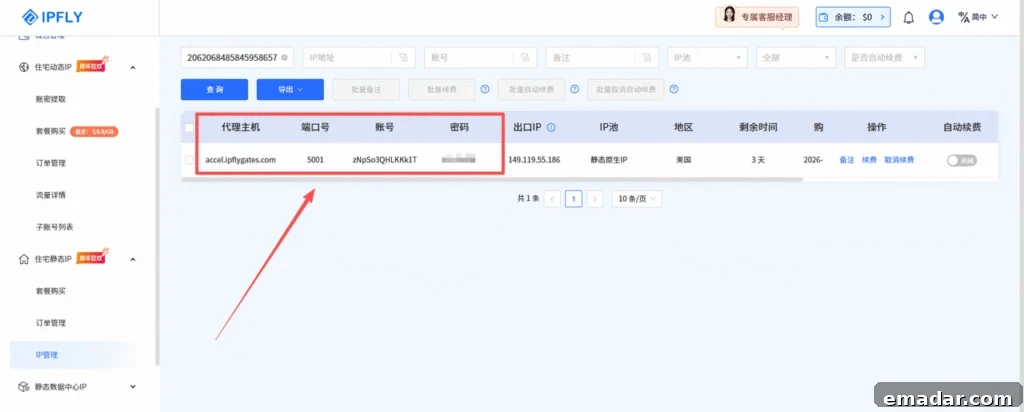
Register on the IPFLY site and choose a plan. In the console under “IP Management,” you will find the details you need:
- Proxy host (Host)
- Port (Port)
- Username (Username)
- Password (Password)
- Target country (pick the U.S. or another ChatGPT-supported country)
Step 2: Configure the proxy in your browser
Chrome (Windows):
- Go to Settings → System → Open your computer’s proxy settings.
- Enable “Use a proxy server.”
- Enter the host and port provided by IPFLY.
- Save and refresh your browser.
Chrome (Mac):
- System Settings → Network → select your active network → Advanced → Proxies.
- Check “Web Proxy (HTTP)” and “Secure Web Proxy (HTTPS).”
- Enter the IPFLY host and port.
- Apply and save.
Step 3: Verify the IP is active
Before opening ChatGPT, visit a site that displays your public IP and country (for example ipinfo.io) to confirm your location has switched to the target country. If the displayed country is correct, chat.openai.com should load normally.
Step 4: Configuring API usage
If you call OpenAI via API, configure your HTTP client or library to use the residential proxy. Example using Python and httpx:
import openai
import httpx

# Configure requests to use an IPFLY residential proxy
proxy_url = "http://username:password@host:port"

client = openai.OpenAI(
    api_key="your-api-key",
    http_client=httpx.Client(proxies={"all": proxy_url})
)

response = client.chat.completions.create(
    model="gpt-4o",
    messages=[{"role": "user", "content": "Hello"}]
)
print(response.choices[0].message.content)
Replace username, password, host and port with the credentials provided in your IPFLY console.
Still failing to access? Troubleshooting checklist
Follow this sequence to isolate the issue:
1. Check whether your network is already routed through a supported country
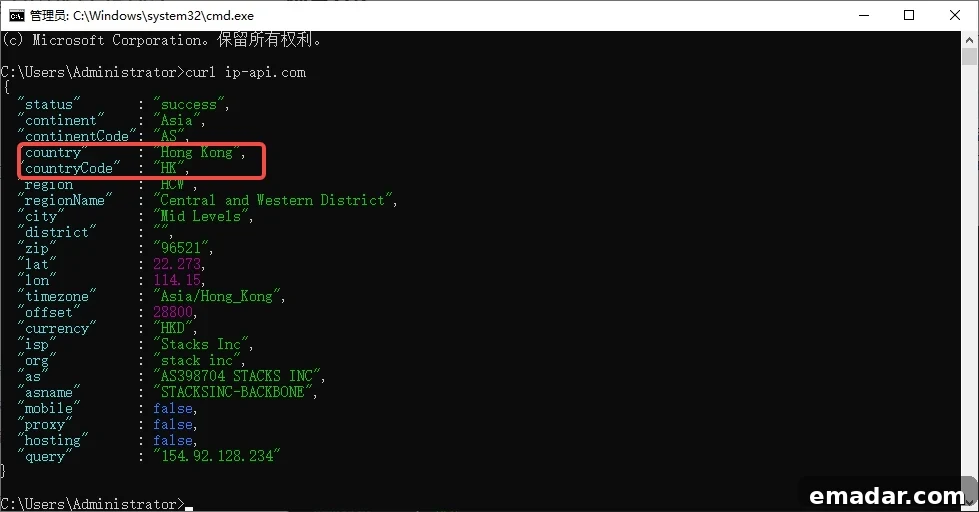
On Windows, press Win+R, open CMD and run a curl to ip-api.com or ipinfo.io to view your public IP. If the returned country code is “CN”, your network exit is in mainland China. In that case, IPFLY may not work without first switching to a permitted network environment.
2. Confirm the IP has changed Visit ipinfo.io and verify the country now shows the target nation. If it still shows your original country, your proxy settings did not take effect.
3. Confirm you are using a residential IP On ipinfo.io check the “org” field. If it reports AWS, Google Cloud, Azure or another cloud provider, you have a datacenter IP and should switch to a residential IP.
4. Try a different target country Acceptance rates vary slightly by country. The U.S. usually has the highest success rate, followed by the UK, Germany and Japan. If one country is unstable, try another.
5. Check your account status If the IP looks correct but the account is flagged, contact OpenAI support or create a new account and register it using an IP that matches your chosen country.
6. Clear browser cache and cookies Cached site data can cause the service to remember an old location. Clear chat.openai.com cookies and reload after switching IPs.
Enterprise scenario: team IP strategy
For teams that need multiple members to use ChatGPT without repeatedly reconfiguring proxies or sharing a single IP, the recommended approach is:
- Assign each team member an independent static residential IP (one IP per user).
- Configure each user’s workstation once with their assigned IP for long-term stability.
- Use sub-account management (if supported) to issue and centrally control credentials per user.
This approach preserves individual account stability and avoids account association risks from shared IPs.
FAQ
Q: After configuring a new IP, will my existing ChatGPT account still work? A: In most cases yes. But if your account was registered in a different country than the one shown by the new IP, you may trigger a security check that requires email confirmation. It’s best to keep the IP region stable when signing in for the first time after a change.
Q: Dynamic residential proxies assign different IPs each session — will that affect usage? A: For web usage, IPs may change between sessions, but as long as they remain within the same country (for example, the U.S.), this typically does not cause issues. If you need high stability, use a static residential IP.
Q: Can IPFLY IPs be used for production API calls? A: Yes. Dynamic residential proxies can handle high concurrency and are suitable for API batch calls. Datacenter proxies provide lower latency for scenarios where platform risk checks are less strict.
Q: Can I test before buying? A: IPFLY offers trial credits for new users. After registering, you can test connectivity for target countries before selecting a paid plan.
Conclusion
The underlying reason ChatGPT is inaccessible is that your IP address does not meet OpenAI’s regional access requirements. Switching browsers or clearing cache will not fix this.
The reliable solution is to use a residential IP in a country OpenAI supports.
IPFLY offers residential IP coverage across 190+ countries with both dynamic and static options for personal and enterprise needs. Once configured, your traffic will appear indistinguishable from a local residential user in the target country, allowing stable access through OpenAI’s admission checks.
→ Register now on IPFLY to get trial credits