
In today’s hyper-connected world, your home is likely brimming with a diverse array of internet-connected devices: smartphones, laptops, smart TVs, gaming consoles, and more. Each of these gadgets operates within your Wi-Fi network, assigned its own unique internal identifier. But have you ever considered what happens when these devices venture out to access the vast external internet? From the perspective of a distant website server, who are they?
The answer is simple yet profound: all your devices share a single identity. This collective identity is represented by your home network’s unique “front door” to the outside world – your “public IP address,” often referred to as your “export IP.”
Regardless of how many devices are connected within your home or office network, they all communicate with the global internet through this solitary “exit point.” Understanding this concept is fundamental to grasping your digital footprint and navigating the complexities of online privacy and access.
Decoding Your Digital Gateway: Public IP Address Explained
To truly grasp the concept of your public IP address, let’s use a common analogy. Imagine your home Wi-Fi network as a secure, self-contained “residential complex” or a private estate. Within this estate:
- Every device you own (your smartphone, laptop, smart home gadgets) is like an individual house or apartment within the complex. Each of these houses has its own unique “internal house number” or “street address” (e.g.,
192.168.1.101). These are known as your “private IP addresses.” These addresses are only meaningful within your local network and cannot be seen by the outside world. - Your router, the central hub of your home network, acts as the “main gate” to this complex. This main gate possesses a single, universally unique, and publicly visible address (e.g.,
208.80.154.224). This is your “public IP address,” the very same address we often call your “export IP” or “external IP.”
The critical mechanism that enables this sharing is called Network Address Translation (NAT). NAT allows multiple devices on a private network to share a single public IP address. When a device inside your network sends a request to the internet, your router modifies the outgoing packet, replacing the device’s private IP with the router’s public IP. When the internet sends a response, the router intelligently forwards it back to the correct internal device. This not only conserves the limited pool of public IP addresses but also adds a layer of security by making your internal network structure invisible to the outside.
In essence: The term “network export IP” is simply a more descriptive and intuitive way of referring to your “public IP address.” It serves as the unique identifier for your entire local area network (be it your home or company network) on the vast public internet.
Static vs. Dynamic Public IPs: What’s the Difference?
It’s important to note that public IP addresses can be either static or dynamic:
- Dynamic IP Addresses: Most home users are assigned dynamic IP addresses by their Internet Service Provider (ISP). This means your public IP address can change periodically – typically every few days, weeks, or whenever your router restarts. While this offers some basic anonymity by making it harder to track a single user over time, it also means any services relying on a consistent IP address (like hosting a personal server) can be challenging.
- Static IP Addresses: Businesses or users requiring a permanent, unchanging online presence often opt for a static IP address. This address remains constant unless manually changed by the ISP. Static IPs are essential for running dedicated servers, VPN services, or any application that needs a fixed online identifier. They typically come at a higher cost due to their dedicated nature.
How to Quickly Find Your Public IP Address
Discovering your public IP address is remarkably straightforward. You don’t need any special technical skills. Simply open a web browser on any device connected to your network (your phone, laptop, tablet, etc.) and perform one of these simple actions:
- Google Search: Type “what is my IP address” directly into the Google search bar. Google will usually display your public IP address right at the top of the search results page.
- Dedicated IP Lookup Websites: Many websites are designed specifically for this purpose. Popular examples include whatismyipaddress.com, IPPAPA (as mentioned in the original context), or simply “my IP address” search. These sites not only show your IP but often provide additional details like your ISP and approximate location.
It’s important to remember that these methods will show your public IP address. If you look up your IP address using your device’s operating system settings (e.g., ipconfig on Windows or ifconfig on macOS/Linux), you will see your private IP address, which is internal to your local network and not visible to the internet.
What Secrets Does Your Public IP Address Reveal?
Your public IP address acts as a unique “digital fingerprint” or “online identity card” for your entire network. Far from being just a technical string of numbers, it can divulge significant information about your internet connection. Specifically, it reveals at least these three core pieces of information:
1. Your Geographical Location
Thanks to sophisticated IP geolocation databases, your public IP address can be precisely matched to your approximate physical location. These databases map IP address blocks to specific countries, regions, cities, and sometimes even down to a particular neighborhood or postal code. This is why:
- You see localized weather forecasts when browsing news sites.
- Websites can automatically display content in your local currency or language.
- Streaming services enforce “geo-blocking,” restricting access to certain content based on your detected location (e.g., “This content is not available in your region”).
- Online advertisers use your location to deliver highly targeted advertisements, assuming your IP is tied to your physical presence.
While not pinpointing your exact street address, IP geolocation provides a powerful tool for businesses, governments, and even malicious actors to understand where you are accessing the internet from.
2. Your Internet Service Provider (ISP)
IP addresses are allocated in large blocks to Internet Service Providers. By looking up your public IP address, it’s very easy to identify which company provides your internet service – whether it’s AT&T, Comcast, Vodafone, Deutsche Telekom, China Telecom, or any other provider. This information is publicly available and often used for:
- Troubleshooting: Your ISP can use this to identify your connection during support calls.
- Network Analysis: Researchers and analysts can map global internet traffic patterns.
- Content Delivery Networks (CDNs): CDNs use ISP information to route traffic efficiently and deliver content from servers closest to you, enhancing speed and performance.
3. Your “Network Reputation Score”
In the digital world, your public IP address carries a “reputation history.” Just like a credit score, an IP’s reputation reflects its past behavior on the internet. If this IP address (or previous users of this dynamic IP) has been involved in malicious activities such as sending spam, launching cyber-attacks (DDoS), engaging in fraudulent behavior, or even just exhibiting bot-like patterns, it can be added to an “IP blacklist.”
A low-reputation IP can lead to several frustrating experiences:
- Frequent CAPTCHAs: You might be constantly asked to prove you’re not a robot when visiting many websites.
- Blocked Access: Some websites might outright deny your access, flagging your IP as suspicious or malicious.
- Email Delivery Issues: Emails sent from servers with a poor IP reputation are more likely to end up in spam folders or be rejected entirely.
- Reduced Functionality: Certain online services might limit your features or access based on your IP’s score.
Maintaining a good IP reputation is vital for smooth and unrestricted internet access.
Why “Manage” Your Public IP Address? The Power of Proxy IPs
Given the significant information your public IP address can reveal, there are many scenarios where actively “managing” or “changing” it becomes not just beneficial but essential. This is where the concept of a “proxy IP” comes into play.
Scenario One: Safeguarding Privacy and Achieving Anonymity
You might not want every website you visit to know your genuine geographical location, your internet service provider, or to track your online activities across different sites using your unique IP. A proxy provides a crucial layer of separation, shielding your real identity from the websites you interact with. This is vital for journalists, researchers, or anyone concerned about their digital privacy footprint.
Scenario Two: Overcoming Geo-Restrictions and Censorship
Imagine you need to access a website or streaming service exclusively available to users in the United Kingdom, or you want to conduct market research by viewing content as if you were located in Japan. If your actual public IP address originates from another country, you’ll be blocked. To circumvent these “geo-blocks,” you need your “export IP” to appear as if it originates from the desired region.
Scenario Three: Web Scraping and Data Collection
For businesses and researchers who need to collect large amounts of public data from websites (e.g., for price comparison, market trend analysis, or news aggregation), repeatedly accessing a site from the same IP address can quickly lead to being blocked or “rate-limited.” Using a pool of diverse proxy IPs allows for efficient and continuous data collection without triggering anti-bot measures.
Scenario Four: Market Research and Ad Verification
Companies need to see how their products, ads, and pricing appear in different geographical markets. By routing their traffic through proxies located in various countries, they can accurately simulate local user experiences, verify ad placements, and gather competitive intelligence.
The Solution: Professional IP Proxy Services
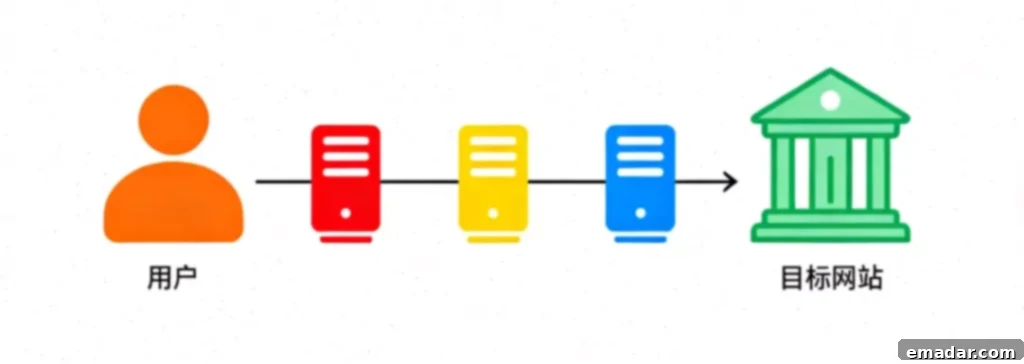
This is precisely where proxy IP services shine. A proxy server acts as an intermediary between your device and the internet. Instead of your request going directly from your device to the target website, it first goes to the proxy server. The proxy server then forwards your request to the website using its own IP address. The website sees the proxy’s IP, not yours.
How Proxy IPs Work: An Example
- Working Principle: Let’s say you’re connected through a professional proxy service like IPFLY. When you send a request to a website, your request is first securely routed to one of IPFLY’s servers, which are strategically located across the globe.
- The Effect: If you select an IPFLY server based in Tokyo, Japan, that server will then use its own genuine Japanese IP address to access the target website on your behalf. Consequently, from the perspective of the destination website, your “network export IP” now appears to be a Japanese IP address. This sophisticated technique is at the heart of successful cross-border e-commerce operations, global market research, and unrestricted digital content access.
Types of Proxy IPs for Diverse Needs:
- Residential Proxies: These are real IP addresses assigned by Internet Service Providers to genuine home users. They are highly valued because they appear as legitimate users to websites, making them exceptionally difficult to detect and block. Ideal for sensitive tasks like geo-targeting, web scraping, and social media management. They can be static (fixed) or rotating (changing frequently).
- Datacenter Proxies: These IPs originate from commercial servers housed in data centers. They are fast, cost-effective, and provide high bandwidth, making them suitable for tasks where anonymity isn’t the absolute top priority, such as general browsing, speed-critical operations, or bypassing less stringent restrictions.
- ISP Proxies (Static Residential Proxies): A blend of residential and datacenter proxies. They are static, meaning they don’t change, and are hosted by an ISP, giving them the legitimacy of a residential IP without the rotation. Perfect for long-term projects requiring a consistent, undetectable IP.
Your Public IP: The Cornerstone of Your Digital World
By now, you should have a comprehensive understanding of what your “network export IP” truly signifies. It’s more than just a technical address; it’s a fundamental aspect of your online presence.
- It is Your Public IP: The singular, external address shared by all devices within your network, serving as your gateway to the global internet.
- It is Your Digital Identity: It profoundly influences your online location, how you’re identified, and your reputation in the vast digital realm.
- It is a Key to Access: Managing it effectively unlocks global content, protects privacy, and enables critical business operations.
For individuals and businesses navigating the complexities of the internet – whether for enhanced privacy, accessing geo-restricted content, conducting global market research, or managing international e-commerce – the ability to control and vary your public IP address is invaluable. Professional proxy services offer the tools to achieve this with efficiency and reliability.
IPFLY – Your Trusted Partner for Professional Proxy Services in the Cross-Border Industry:
- ✔ Extensive global coverage across 190+ countries;
- ✔ Supports a diverse range of proxy types: static/dynamic residential, native IPs, and datacenter proxies;
- ✔ Offers exclusive, pristine IPs for dedicated, private use;
- ✔ Ensures zero-logs and high anonymity, with seamless integration for browser fingerprinting tools;
- ✔ Provides robust API support for effortless batch configuration and management.
👉 Claim Your Exclusive Discount and Access Premium Proxy IPs Today!