

For cross-border e-commerce sellers, social media marketers, and digital entrepreneurs operating on global platforms like TikTok, Facebook, Reddit, Amazon, Pinterest, and many others, a persistent and deeply frustrating challenge often arises: accounts being frequently rate-limited, suspended, or outright banned. Despite meticulously adhering to platform guidelines and operating what feels like a legitimate setup, the system inexplicably flags you as a “bot” or identifies suspicious activity.
If this sounds familiar, don’t second-guess yourself. The culprit is almost certainly your IP address and browser environment. These digital footprints can inadvertently expose your non-local operations, triggering sophisticated anti-fraud and anti-spam algorithms designed to maintain platform integrity.
Today, we will delve into the critical solution that many successful international operators leverage:
👉 How to combine a robust US Residential IP with an advanced Fingerprint Browser to create the most authentic, “human-like” account farming and management environment possible!
Unlocking Global Success: Mastering Account Management with US Residential IPs and Fingerprint Browsers
1. Why Are US Residential IPs Indispensable for Global Platforms?
Platforms operating in the US market, whether they are social media giants, e-commerce marketplaces, or advertising networks, share a fundamental characteristic: an intense focus on identifying and prioritizing “local user behavior.” Their algorithms are meticulously crafted to distinguish genuine local users from potential spammers, bots, or those attempting to circumvent regional restrictions.
These platforms assess several critical dimensions to determine if “you are a real person” and, more importantly, a legitimate local user:
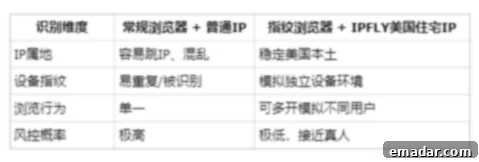
The image above conceptually illustrates these factors. A mismatch in any of these areas can raise red flags. For instance, if you’re trying to manage a TikTok account targeting the US audience from an IP address in a different country, or if your browser’s digital fingerprint reveals inconsistencies, the platform’s automated systems will likely detect this anomaly. This detection often leads to reduced reach (shadowbanning), temporary suspensions, or permanent account termination, severely impacting your operational efficiency and potential revenue.
👉 Therefore, if your strategic objective involves operating US-centric accounts—be they TikTok profiles, advertising accounts, or e-commerce storefronts—the industry-recognized gold standard is to utilize a combination of a pure, high-quality US native or residential IP address alongside a sophisticated fingerprint browser. This powerful duo creates an environment that closely mimics a genuine local user, offering unparalleled stability and protection against platform detection mechanisms. Unlike datacenter IPs, which are easily identified and often blacklisted, residential IPs are assigned by internet service providers (ISPs) to real homes, making them inherently more trustworthy in the eyes of these platforms.
2. Essential Tool Preparation Checklist for Seamless Operation
To embark on this journey of secure and stable account management, you’ll need to assemble a small but powerful toolkit. These tools are designed to work in synergy, providing a robust defense against advanced anti-bot and anti-fraud systems:
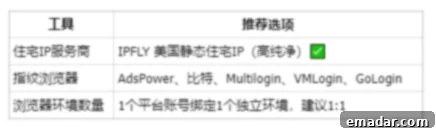
Specifically, your preparation list should include:
- A Reliable Residential Proxy Service: This service will provide you with genuine US residential IP addresses. Look for providers that offer static residential IPs, as these offer greater stability compared to rotating ones, especially during the crucial account warming and initial setup phases. High pureness and anonymity are key for long-term account health.
- An Advanced Anti-Detection Fingerprint Browser: This specialized browser allows you to create unique, isolated browser profiles, each with its own distinct digital fingerprint. It spoofs various browser parameters (like user agent, canvas fingerprint, WebGL, fonts, time zone, language, screen resolution, etc.) to prevent platforms from linking multiple accounts to a single user. AdsPower is an excellent example of such a browser.
- Your Target Platform Accounts: While not a tool, having your accounts ready for management is the ultimate goal. This setup is applicable whether you are registering new accounts, reactivating old ones, or managing existing, active profiles across various social media and e-commerce platforms.
Investing in these foundational tools is the first critical step toward establishing a resilient and scalable strategy for cross-border digital operations, minimizing the risk of disruptions and maximizing your operational longevity.
3. Detailed Configuration Tutorial: Leveraging AdsPower with IPFLY
This section provides a comprehensive, step-by-step guide to integrate a US residential IP from IPFLY with an AdsPower fingerprint browser. This synergy creates an impenetrable digital fortress for your online accounts.
Step 1: Obtain Your US Residential IP Information from IPFLY
IPFLY is a reputable provider of high-quality proxy services, offering a range of IP types suitable for various cross-border operations. For stable account management, their static residential IPs are highly recommended.
- Navigate to the IPFLY website.
- Register for an IPFLY account: Follow the prompts to create your new account.
- Purchase or Request a Trial for a Static Residential IP: Within your IPFLY dashboard, locate the option to acquire a static residential IP. Choose a US location to ensure geo-compliance for your target platforms. Many providers offer trial periods, which can be useful for testing the service.
- Once your IP is active, you will be able to retrieve the essential connection details. This information is crucial for configuring your fingerprint browser:
- IP Address: The unique numerical identifier of your proxy.
- Port Number: The specific communication endpoint for the IP address.
- Protocol Type: Typically HTTP/HTTPS or Socks5. This dictates how your browser will communicate with the proxy. Socks5 is often preferred for its higher level of anonymity and broader compatibility.
- Username & Password: Credentials required for authenticating with the proxy server, ensuring secure and authorized access to your purchased IP.
Keep these details handy, as you will need to input them into AdsPower.
Step 2: Initiate a New Browser Profile within AdsPower
AdsPower is a leading anti-detection browser that allows you to manage multiple unique browser environments, each with its own digital fingerprint and proxy settings, all from a single dashboard. This prevents cross-profiling by platforms.
- Log in to your AdsPower dashboard: Access your account using your credentials.
- Click on “New Browser Profile”: This button, usually prominently displayed, will start the process of creating a fresh, isolated browsing environment.
- Configure Basic Profile Information:
- Account Remark Name: Assign a clear and descriptive name to your new profile (e.g., “TikTok US Account 1,” “Amazon Seller Profile”). This helps immensely with organization when managing many accounts.
- Select System Fingerprint: Choose the operating system (Windows/Mac/Random) that you want this browser profile to emulate. Selecting “Random” can add an extra layer of stealth. It’s often best to stick to common operating systems like Windows or macOS.
- Choose Browser Kernel: Depending on the platform you’re targeting, select the appropriate browser kernel (e.g., Chrome or Firefox). Most platforms are optimized for Chrome-based browsers, but some niche cases might benefit from Firefox.
These initial settings are vital for crafting a unique and consistent digital identity for your account.
Step 3: Configure Proxy Parameters (The Core Connection)
This is the most critical step, linking your AdsPower profile to the US residential IP you obtained from IPFLY.
- Proxy Type: Select either Socks5 or HTTP/HTTPS from the dropdown menu. Ensure this matches the protocol type provided by IPFLY. Socks5 is generally recommended for better anonymity and performance.
- Host (IP Address): Enter the IP address you received from IPFLY into this field.
- Port: Input the specific port number provided by IPFLY.
- Account/Password Authentication (if applicable): If your IPFLY proxy requires authentication, enter the username and password in the designated fields. Most residential proxies, especially static ones, will require these credentials to ensure only authorized users access them.
✅ After accurately entering all the proxy details, locate and click the “Check Proxy” or “Test Connection” button. This crucial step verifies that your proxy settings are correct and that the browser profile can successfully establish a connection through the IPFLY residential proxy. A successful test confirms that your digital traffic will now be routed through your chosen US residential IP, effectively masking your true location.
Step 4: Save Configuration and Launch Environment for Testing
With all settings configured, it’s time to bring your new, secure browsing environment to life and verify its integrity.
- Save Configuration: Click the “Save” or “Create Profile” button within AdsPower to store all your settings for this new browser profile. This ensures that the profile is ready for future use without needing to reconfigure it every time.
- Launch Environment: From your AdsPower dashboard, select the newly created profile and click the “Launch” or “Start” button. This action will automatically open a new, isolated browser window with all your specified fingerprint and proxy settings pre-applied.
- Verify IP and Location: Once the browser window opens, immediately navigate to a reliable IP checking website such as ipinfo.io. This site will display the IP address, geographical location, and other network details detected for your browsing session.
- Confirm US IP: Verify that the displayed IP address is indeed a US residential IP and that the geographical location is within the United States, ideally matching the region you selected from IPFLY.
- Check for Consistency: Ensure that there are no leaks or discrepancies (e.g., WebRTC leaks revealing your real IP). A good anti-detection browser combined with a robust proxy should show a consistent US profile.

This verification step is crucial. It confirms that your setup is working as intended, providing the desired US residential identity to any website or platform you visit. You are now ready to operate your accounts with a significantly reduced risk of detection and suspension.
4. Pro Tips for Stable Account Warming and Long-Term Management
While having the right tools is fundamental, success in stable account management also heavily relies on adopting best practices and mimicking genuine user behavior. These tips are vital for ensuring the longevity and health of your accounts:
- Strict Isolation: One Account = One IP + One Fingerprint Environment
This rule is non-negotiable. The primary reason accounts get flagged is due to interconnected activity. Platforms use sophisticated algorithms to detect patterns. If multiple accounts share the same IP address or exhibit identical browser fingerprints, they can be easily linked and flagged as suspicious.
- Never let multiple accounts share the same IP address or fingerprint browser profile. Each digital identity must be entirely distinct and isolated from others to prevent cross-contamination and maintain the illusion of being separate individuals. This is the cornerstone of effective anti-detection strategies.
- Opt for Static Residential IPs Over Rotating IPs for Stability
While rotating residential IPs have their uses for tasks like data scraping, they are generally unsuitable for consistent account management, especially during critical phases.
- Especially during platform registration and the “cold start” (account warming) phase, stability is paramount. A static residential IP ensures that the account consistently logs in from the same virtual location. Frequent IP changes from a rotating proxy can appear erratic to platform security systems, triggering alerts and leading to premature account flagging or suspension. Static IPs establish a consistent, trustworthy history for your account.
- Avoid Frequent IP Address Switching
Once an account is associated with a specific IP address, it’s best to maintain that association as much as possible, particularly for established accounts.
- Platform risk control systems are highly sensitive to sudden and frequent changes in login location. Such behavior is often characteristic of compromised accounts or bot activity. Switching IPs too often, even within the same country, can lead to your account being flagged for “abnormal login activity” or security checks, requiring verification that can interrupt your operations or even lead to suspension. Consistency builds trust.
- Cultivate “Human-like” Daily Operational Behavior
Beyond technical configurations, the behavioral patterns exhibited by your accounts are crucial. Platforms analyze user engagement to distinguish genuine users from automated scripts.
- Avoid purely transactional or inactive behavior. If an account only logs in to post content or perform a specific task without any broader interaction (e.g., browsing the feed, liking posts, watching videos, engaging with comments, searching for content), it appears unnatural. Systems are designed to “cold-process” or reduce the reach of accounts that don’t display organic, diverse engagement. Mimic how a real user would interact with the platform: vary your login times, spend reasonable amounts of time browsing, engage authentically, and explore different features of the platform. Gradual and natural activity is key to long-term account health.
5. Frequently Asked Questions (FAQ) About This Setup
Q: My AdsPower profile shows “proxy connection failed.” What should I do?
👉 This is a common issue, but usually straightforward to resolve. First, meticulously double-check if the IP address, port number, and protocol type (HTTP/Socks5) from IPFLY have been entered correctly into AdsPower. Even a single typo can prevent a successful connection. Secondly, ensure that if your IPFLY proxy requires a username and password for authentication, these credentials are also correctly entered in AdsPower. Lastly, confirm that your local network or firewall isn’t blocking the Socks5 or HTTP/HTTPS protocols, which can sometimes happen with strict network settings. Sometimes a simple restart of AdsPower or your computer can also resolve temporary glitches.
Q: Which platforms are IPFLY’s proxies compatible with?
👉 IPFLY provides highly versatile and anonymous residential IP addresses designed for broad compatibility. They fully support and are ideal for managing accounts across virtually all major international social media and e-commerce platforms. This includes, but is not limited to, TikTok, Amazon, Meta (Facebook, Instagram, WhatsApp), Reddit, Pinterest, Google (including Google Ads and YouTube), LinkedIn, eBay, Shopify, and many other online services that require a stable, local presence. Their high purity and residential nature make them undetectable by most platform security systems, enabling seamless operation across diverse digital landscapes.
Q: Can a single fingerprint browser like AdsPower manage multiple account environments?
👉 Absolutely, this is one of the core strengths and primary functionalities of advanced anti-detection fingerprint browsers like AdsPower, Multilogin, and others. These tools are specifically engineered to support the creation and management of an unlimited number of isolated browser profiles. Each profile acts as a completely separate browsing environment, with its own unique digital fingerprint (user agent, canvas, WebGL, timezone, etc.) and, critically, its own dedicated proxy connection. The key prerequisite, as emphasized in our best practices, is that each individual account environment must be paired with an independent, dedicated IP address (preferably static residential) to maintain its distinct identity and prevent any digital cross-linking by target platforms. This capability is what makes them indispensable for large-scale account management and scaling operations.
🧩 6. Concluding Thoughts: The Ultimate Strategy for Undetected Operations
The combination of a reliable US residential IP and a sophisticated fingerprint browser has firmly established itself as one of the most stable and effective solutions for long-term account warming, management, and scaling in the challenging landscape of cross-border digital operations. This powerful synergy offers an unparalleled level of anonymity and authenticity, making it incredibly difficult for even the most advanced platform detection systems to differentiate your managed accounts from genuine local users.
This setup is particularly well-suited and highly recommended for a diverse range of digital professionals and businesses, including:
- Cross-border E-commerce Sellers: Managing multiple Amazon, Shopify, or eBay stores with region-specific pricing and inventory.
- Overseas Social Media Marketers: Growing and managing TikTok, Facebook, Instagram, or Reddit accounts for international audiences.
- Advertising Professionals/Media Buyers: Running targeted ad campaigns on platforms like Google Ads or Facebook Ads from a local US perspective.
- Data Scrapers and Researchers: Performing localized web scraping without being blocked or receiving inaccurate, non-local data.
- Local SEO Specialists: Verifying local search rankings and business profiles from a true US location.
- Affiliate Marketers: Promoting offers that are geo-restricted to the US market.
✅ While the initial configuration might seem intricate, it is surprisingly straightforward once you understand the basic principles. The core of this strategy lies in three critical pillars: selecting the correct type of IP, meticulously setting up your browser environment, and consistently adhering to human-like operational behaviors. Master these, and you will unlock unprecedented stability and scalability for your online ventures.
Key Advantages of IPFLY Proxies for Your Operations:
- Extensive Global Network: Access to 190+ countries and regions, offering a vast selection of static and dynamic residential IPs, giving you unparalleled global reach.
- High Purity & Anonymity: Designed for stealth, IPFLY proxies boast high purity and anonymity levels, making them ideal for long-term management of sensitive cross-border accounts without detection.
- Lightning-Fast & Stable Connections: Experience near-instantaneous connection speeds and rock-solid stability, ensuring no drops or interruptions during critical account activities.
- Comprehensive Protocol Support: Full compatibility with HTTP, HTTPS, and SOCKS5 protocols, offering flexibility for integration with various tools and applications.
- Universal Platform Compatibility: Seamlessly integrate with all leading fingerprint browsers, operating system settings, custom scripts, and automation tools, providing a versatile solution for all your needs.
👉 Don’t let account limitations hinder your global ambitions. Claim your special offer today and acquire premium IPs to elevate your cross-border operations to the next level of security and efficiency.