
Ultimate Guide to Downloading and Registering Telegram for Seamless Global Business Expansion
In recent years, the landscape of cross-border e-commerce and global trade has witnessed unprecedented growth. An increasing number of individuals and businesses are setting their sights on international markets, presenting a new challenge: how to effectively acquire high-quality overseas clients. In this dynamic environment, international social media applications, such as Telegram, have become indispensable tools for expanding operations and fostering communication with a global customer base. While Telegram offers immense potential, many users encounter difficulties finding reliable channels to download and register the application. This comprehensive guide meticulously outlines effective and practical download and registration methods for various devices, empowering users to seamlessly access Telegram and embark on a path to efficient client acquisition.
Why Telegram Stands Out as a Preferred Communication Tool
Telegram is a cutting-edge instant messaging and social media application renowned for its speed, security, and versatility. It empowers users to send messages, photos, videos, and a wide array of file types over the internet. A standout feature is its generous 2GB file attachment limit per file, a significant advantage for businesses sharing large documents or media. Crucially, Telegram maintains excellent communication quality even under challenging network conditions, providing unparalleled convenience for vital business communications.
For cross-border sellers and businesses engaged in international trade, Telegram represents a vital avenue for client acquisition and market penetration. Its robust features facilitate direct engagement with overseas markets and streamline foreign trade channels. To leverage these benefits, users must first successfully download and install the application. Below are several proven methods to get Telegram on your device.
Detailed Methods to Download Telegram
1. Downloading Telegram on Android Devices
Android smartphone users often find that their device’s default app store may not readily feature global social media applications like Telegram due to regional restrictions. The most straightforward and recommended approach involves utilizing the Google Play Store. If direct access to Google Play is limited in your region, an alternative method using APK files is also available.
Method A: Via Google Play Store
This is the official and most secure way to download Telegram on Android devices with Google Play services enabled:
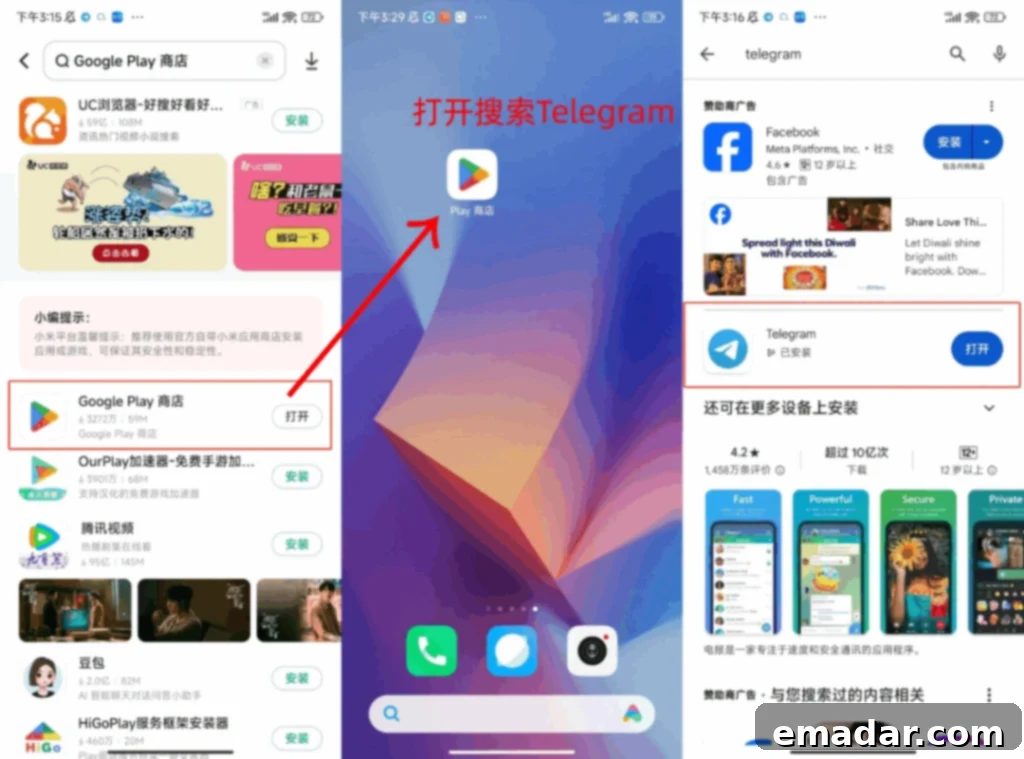
- Step 1: Access Google Play Store. Open your phone’s default app store (e.g., Huawei AppGallery, Xiaomi GetApps) and search for “Google Play Store.” For most users, this will be discoverable. If already installed, proceed directly to the next step. Download and install it if prompted.
- Step 2: Search and Install Telegram. Launch the “Google Play Store.” In the search bar at the top, type “Telegram” and press enter. Locate the official “Telegram Messenger” app from the search results, tap on it, and then click “Install.” The application will download and automatically install on your device. Ensure you have a stable internet connection for a smooth download process.
Method B: Using an APK File
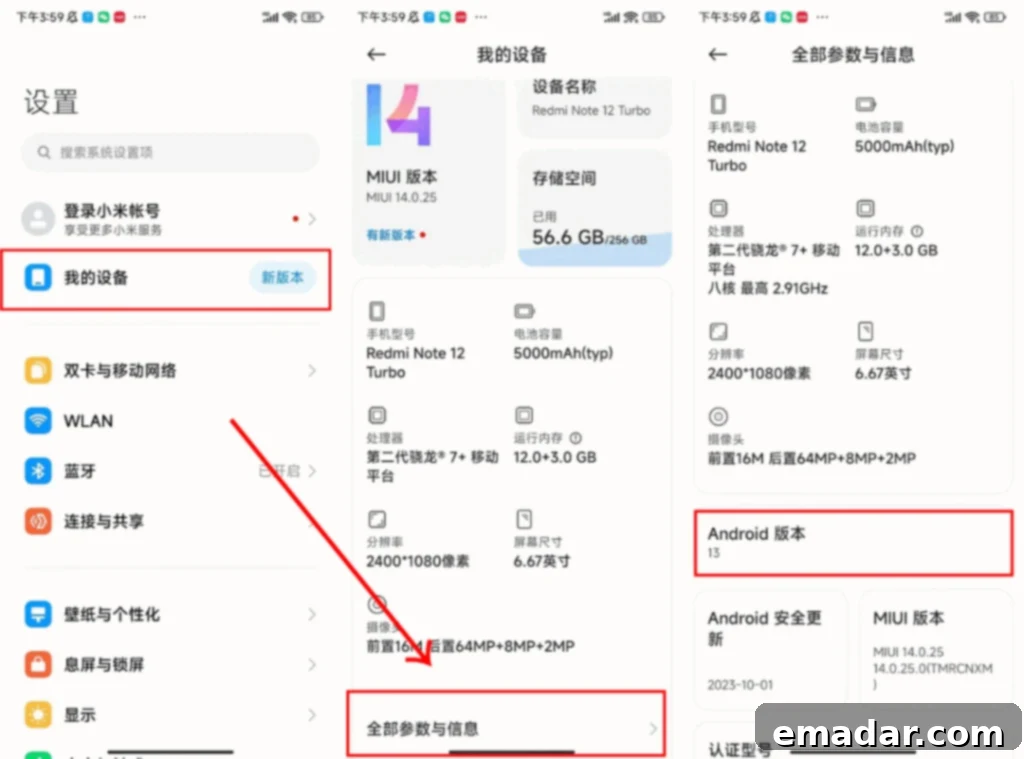
If direct access to Google Play is not feasible or your device’s app store restricts Google Play installations, downloading Telegram via its APK (Android Package Kit) file is a viable alternative. Before proceeding, it’s advisable to check your phone’s Android version to ensure compatibility with the Telegram APK you download.
- Step 1: Choose a Reputable APK Source. APK files can be quickly downloaded using reliable third-party platforms. Websites like Apkpure, APKMirror, or Uptodown are widely recognized for hosting legitimate APKs. It is crucial to only download from trusted sources to avoid potential security risks.
- Step 2: Download the Telegram APK. Navigate to your chosen third-party website (e.g., Uptodown.com or Apkpure.com) using your device’s web browser. Search for “Telegram” and select the desired version of the application package for download.
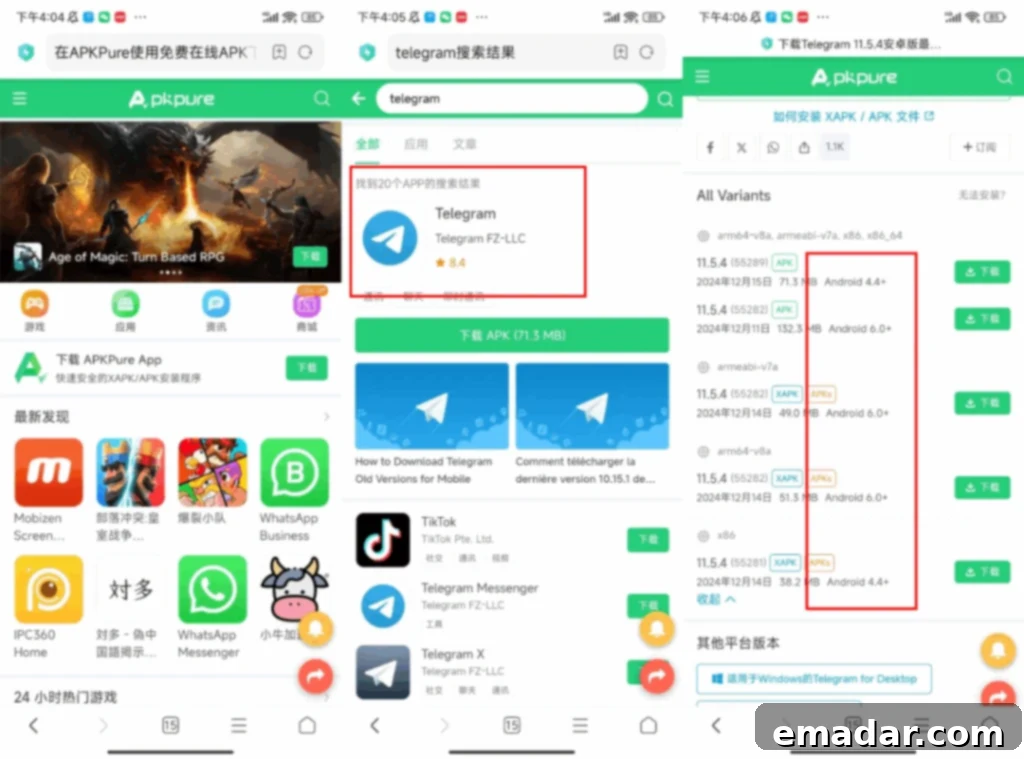
- Step 3: Enable Installation from Unknown Sources. Before installing an APK, you must grant permission for your device to install apps from sources other than the Google Play Store. Go to your phone’s “Settings,” then “Security” or “Apps & Notifications,” and enable “Install unknown apps” or “Unknown sources” for your browser (e.g., Chrome).
- Step 4: Install the APK File. Once the download is complete, open your browser’s “Download Manager” page or navigate to your phone’s “Downloads” folder. Tap on the Telegram APK file. Follow the on-screen prompts to complete the installation.
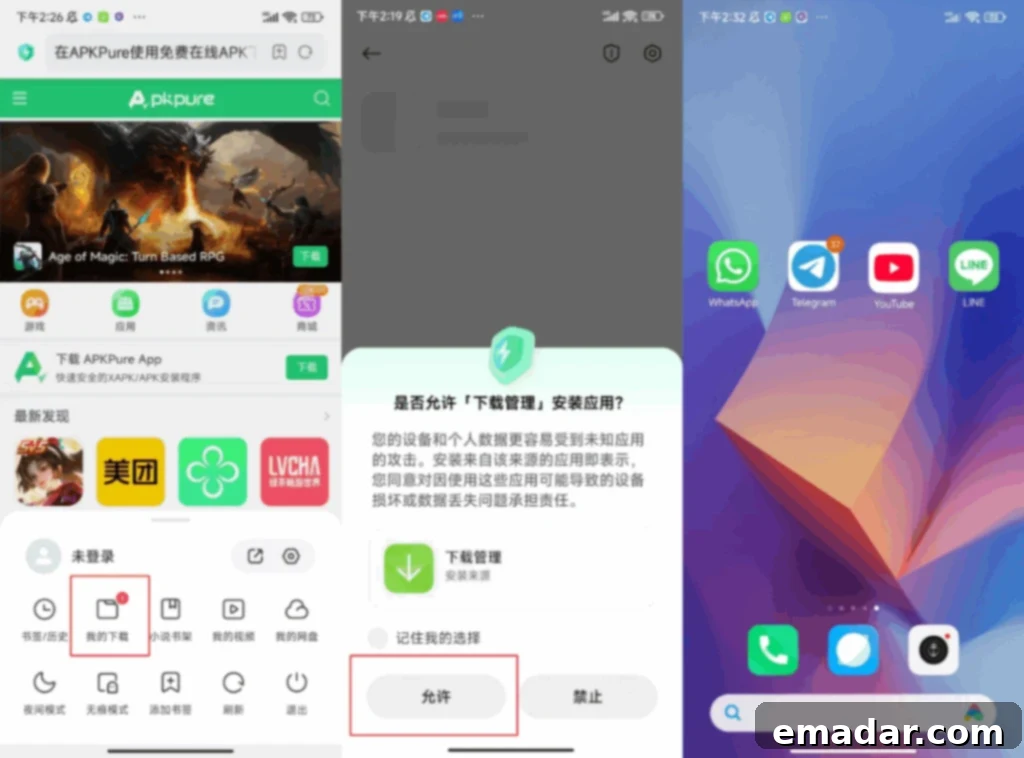
2. Downloading Telegram on Apple (iOS) Devices
For Apple iPhone users, accessing certain international social media applications like Telegram might require a specific regional Apple ID, such as a U.S. Apple ID, due to geo-restrictions in some App Stores. Creating a U.S. Apple ID typically involves providing a U.S. phone number, a valid U.S. address, and often utilizing a U.S. IP address (via VPN) during the creation process. You will also need an email address to receive verification codes. Here’s a step-by-step guide:
- Step 1: Sign Out of Your Current Apple ID. On your iPhone, open “Settings,” tap on your Apple ID (your name at the top), and scroll down to select “Sign Out.”
- Step 2: Begin Creating a New U.S. Apple ID. Open the “App Store” application. Attempt to download any free app (this often prompts you to create a new Apple ID). Choose “Create New Apple ID.”
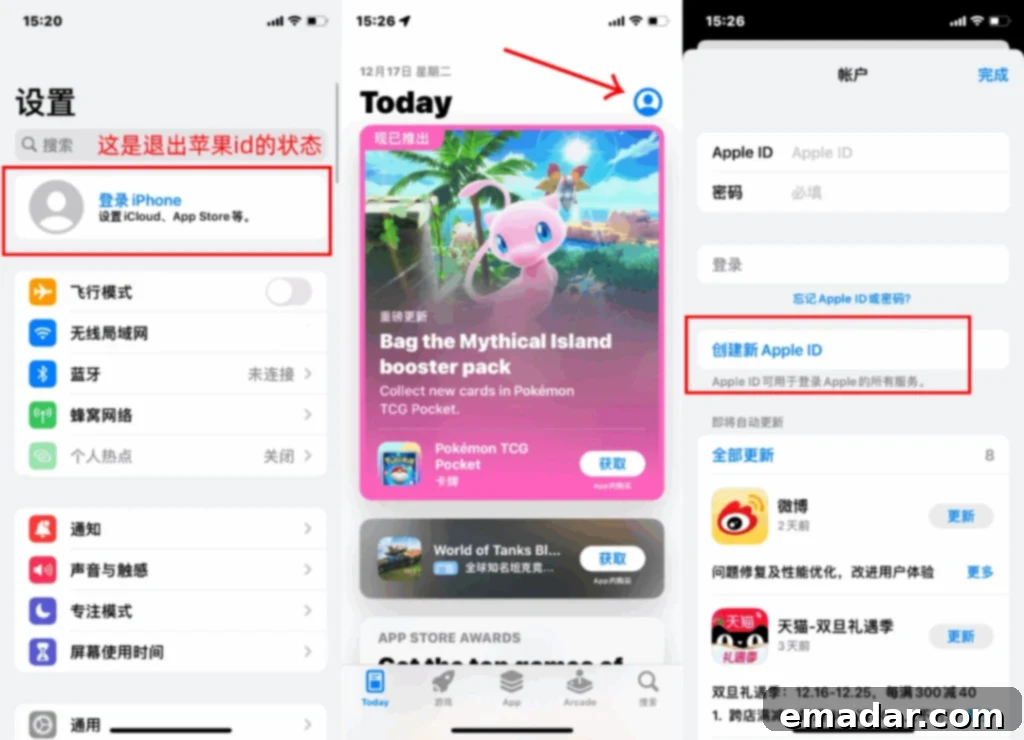
- Step 3: Fill in Account Information. Follow the prompts to enter your email address and ensure you select “United States” as your country/region.
- Step 4: Provide Personal and Payment Details. Enter your name, a valid U.S. phone number, and a U.S. address. For payment method, you can often select “None” if you don’t intend to make purchases. If a U.S. phone number or address is a challenge, consider using publicly available information for a hotel in a U.S. state (ensure it’s valid for Apple’s system) or temporary virtual numbers (use with caution). Connecting to a U.S. VPN server during this step can also help in successfully creating the account.
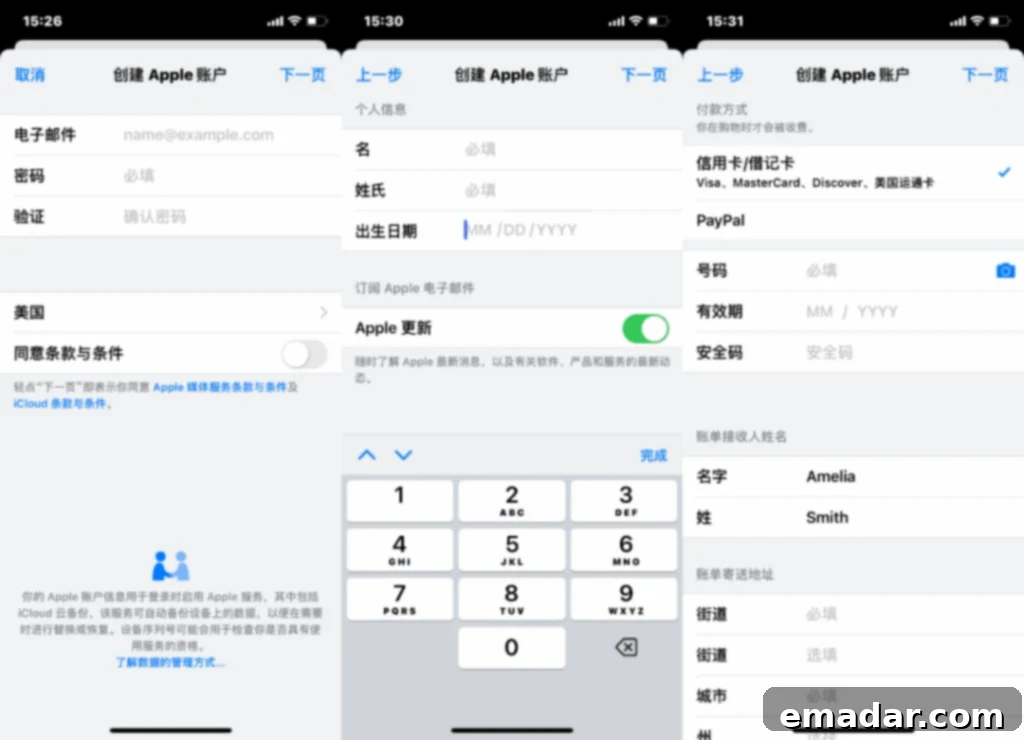
- Step 5: Email Verification. Apple will send a verification email to the address you provided. Open this email and follow the instructions to complete the verification process.
- Step 6: Log In and Download. Once your new U.S. Apple ID is successfully created and verified, sign in to the App Store with this new ID. You can now search for “Telegram” and proceed with the installation.
3. Utilizing DuoPlus Cloud Phone for Telegram Download
For users involved in cross-border e-commerce or those requiring multiple Telegram accounts for business operations, a cloud phone solution like DuoPlus Cloud Phone offers a highly efficient and secure method for downloading and managing Telegram. As a specialized cross-border cloud phone product, DuoPlus is designed to smoothly run over 100 overseas applications. It provides advanced features such as one-click device resetting, proxy configuration, and integration with IPFLY global residential IPs. This combination ensures seamless batch account operations, minimizes the risk of account bans, and serves as an exceptionally efficient tool for overseas multi-account management. Here are three distinct methods to download Telegram using DuoPlus Cloud Phone:
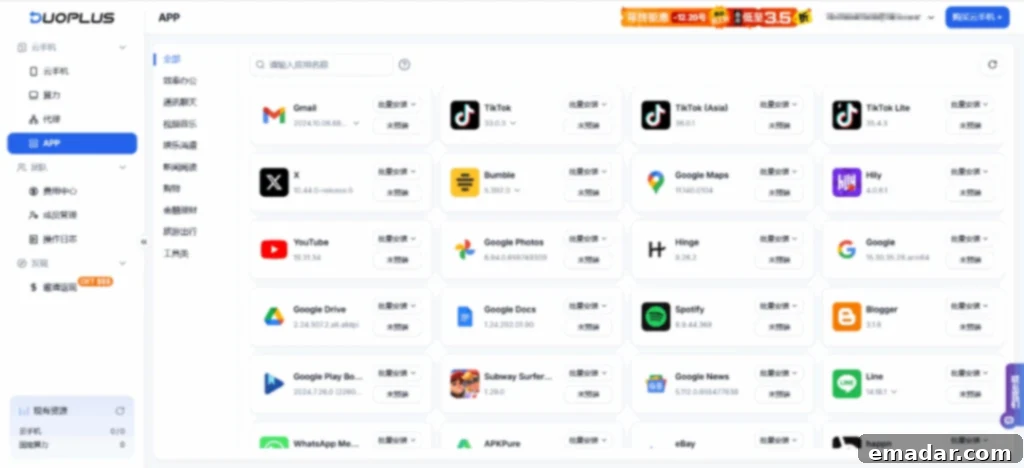
Method 1: Direct Search via Cloud Phone’s App Management
This is the most straightforward way within the DuoPlus environment, leveraging its integrated app repository.
- Step 1: Access App Management. On your DuoPlus Cloud Phone interface, locate and open the “App Management” section.
- Step 2: Search and Install Telegram. Utilize the search bar within App Management to look for “Telegram.” Once found, click on the application and select “Install.” The cloud phone will handle the download and installation automatically.
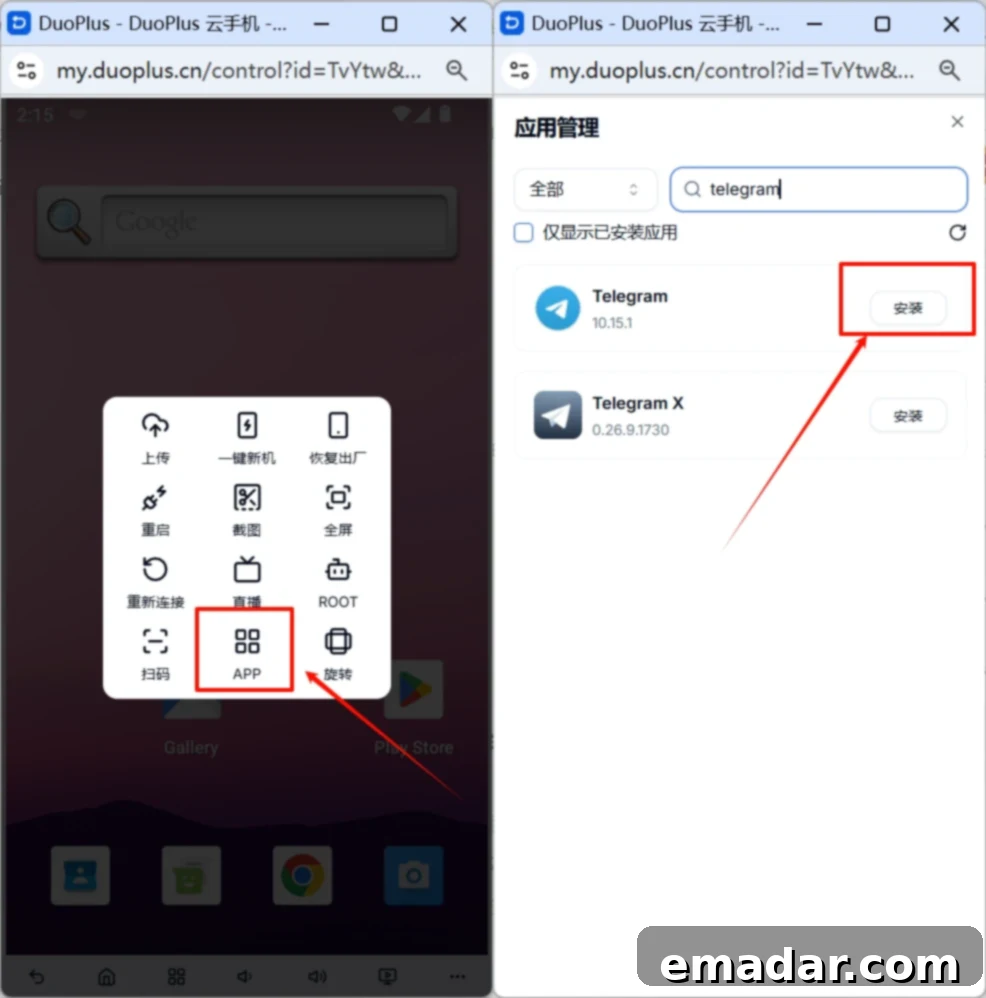
Method 2: Download via Uptodown within the Cloud Phone
If Telegram isn’t directly available in App Management or if you prefer a different source, you can use a trusted third-party app store like Uptodown within the DuoPlus Cloud Phone.
- Step 1: Install Uptodown. First, go to the “App Management” section of your DuoPlus Cloud Phone and search for “Uptodown.” Install the Uptodown app store.
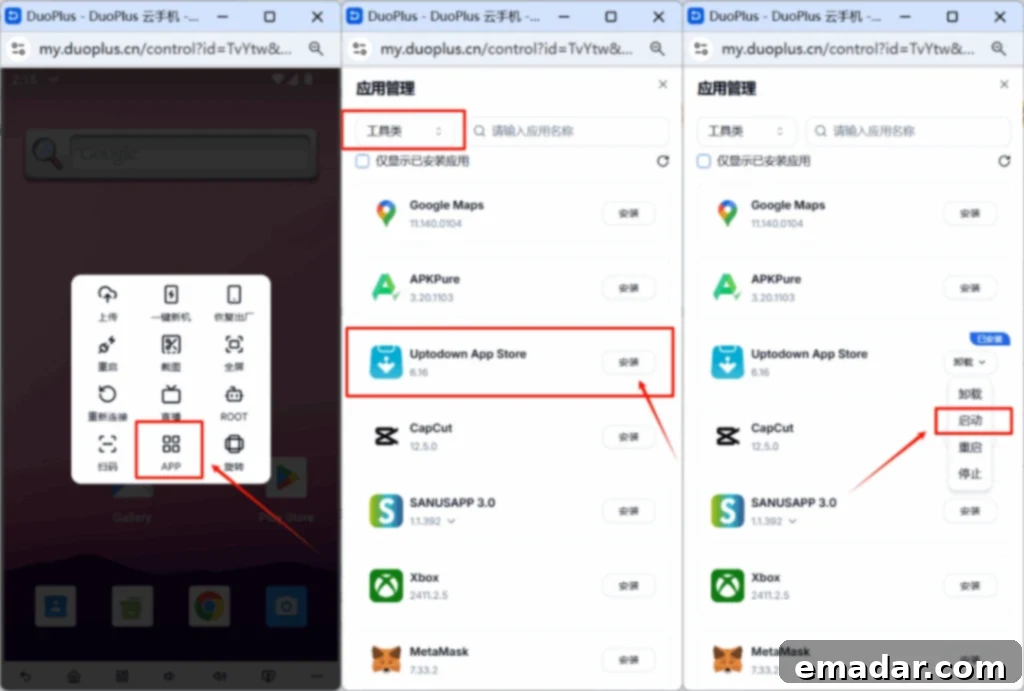
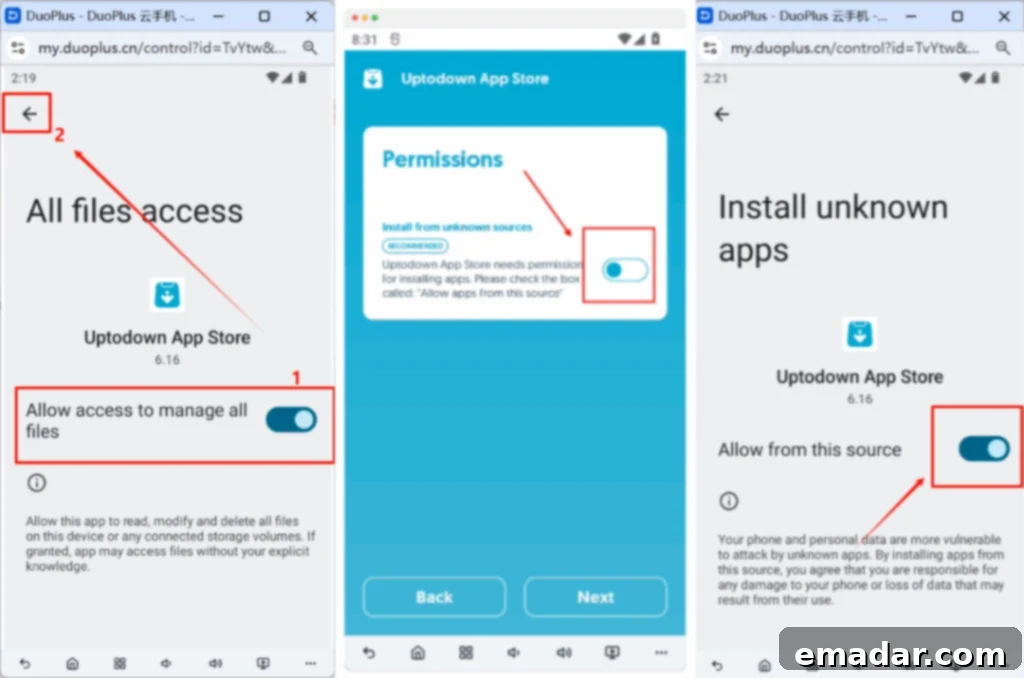
- Step 2: Grant Permissions. After installation, launch Uptodown. You will be prompted to grant necessary permissions, such as “access file permissions” and “install APK permissions.” Allow these for Uptodown to function correctly.
- Step 3: Search and Install Telegram. Within the Uptodown app, use the search function to find “Telegram.” Select the appropriate version and proceed with the download and installation.
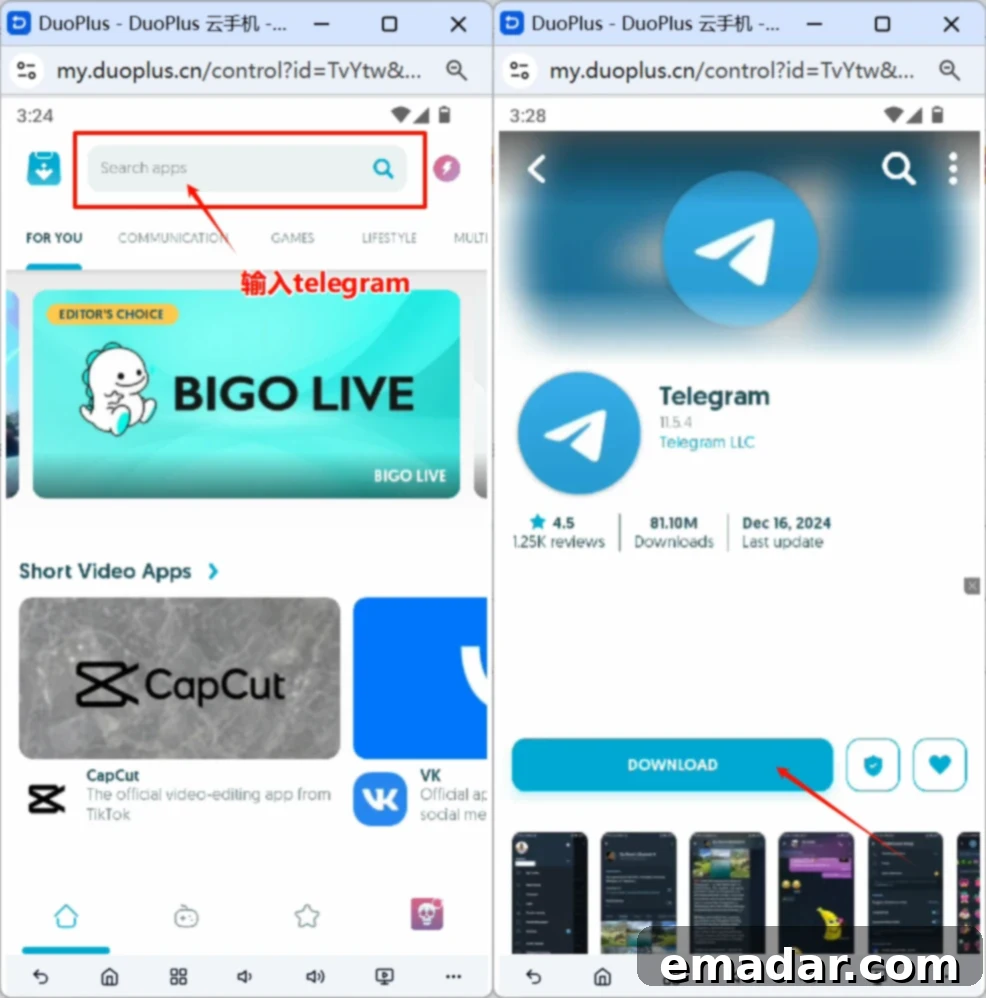
Method 3: Uploading an APK File to the Cloud Phone
This method provides maximum flexibility, allowing you to source a Telegram APK from your preferred website on your local computer and then transfer it to the cloud phone for installation.
- Step 1: Download APK Locally. Begin by downloading the Telegram APK file to your local computer from a trusted third-party APK download website. Recommended sites include: Uptodown (highly recommended) or APKMirror.
- Step 2: Upload to DuoPlus Cloud Phone. DuoPlus provides a feature to upload local files to your cloud phone. Use this functionality to transfer the downloaded Telegram APK file from your computer to the DuoPlus virtual device.
- Step 3: Install on Cloud Phone. Once the APK file is successfully uploaded to the cloud phone, navigate to the file manager within the DuoPlus environment. Locate the uploaded APK and tap on it to initiate the installation process. Follow any on-screen instructions to complete the setup.
Registering Your Telegram Account
Once you have successfully downloaded and installed Telegram on your chosen device, the next crucial step is account registration. Possessing a Telegram account opens up direct communication channels with overseas clients, facilitating business expansion and fostering global connections.
Registration Steps:
- Open Telegram. Launch the Telegram application on your device.
- Enter Your Phone Number. You will be prompted to enter your phone number. If you are using a Chinese number, input “+86” followed by your number. For international numbers, select the corresponding country and dial code from the provided list.
- Email Verification (Optional/Situational). Depending on the region and specific Telegram policies at the time of registration, you might be asked to enter an email address to receive a verification code. Fill in your email and input the code you receive. This step enhances account security.
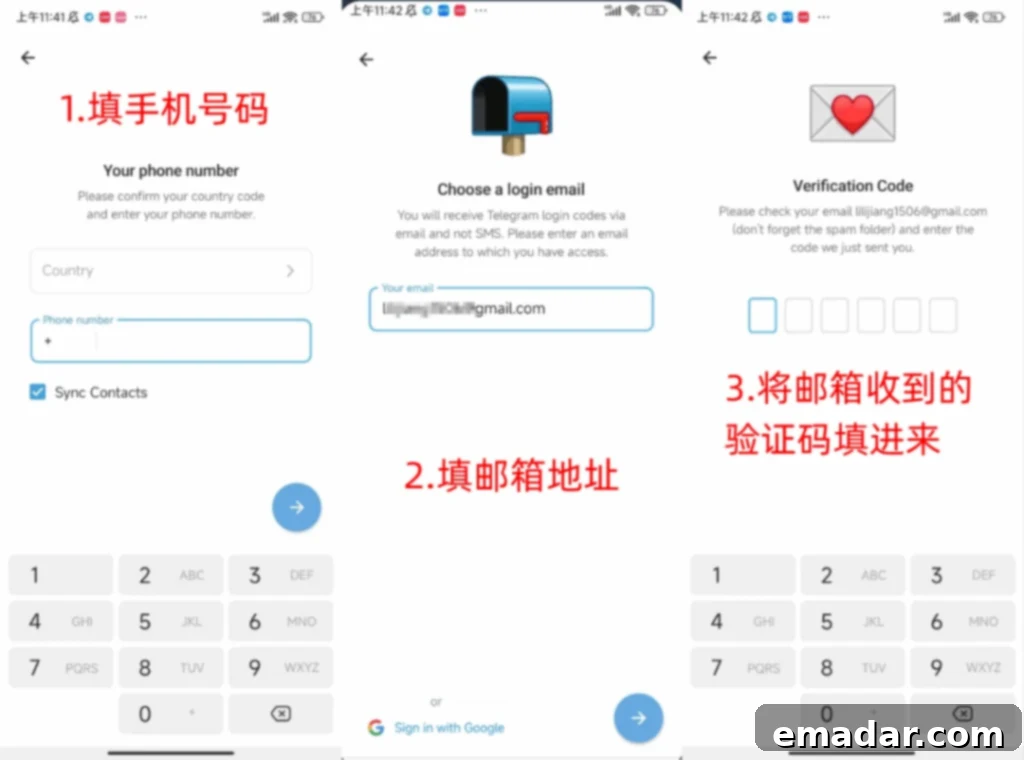
- Phone Number Verification. Telegram will send a verification code via SMS to the phone number you provided. Enter this code into the Telegram app when prompted.
- Create Your Telegram Name. Finally, you will be asked to create your Telegram name (which will be visible to your contacts) and an optional username. Choose a professional or easily recognizable name, especially if you plan to use Telegram for business. Once this step is completed, your Telegram account is successfully registered and ready for use!
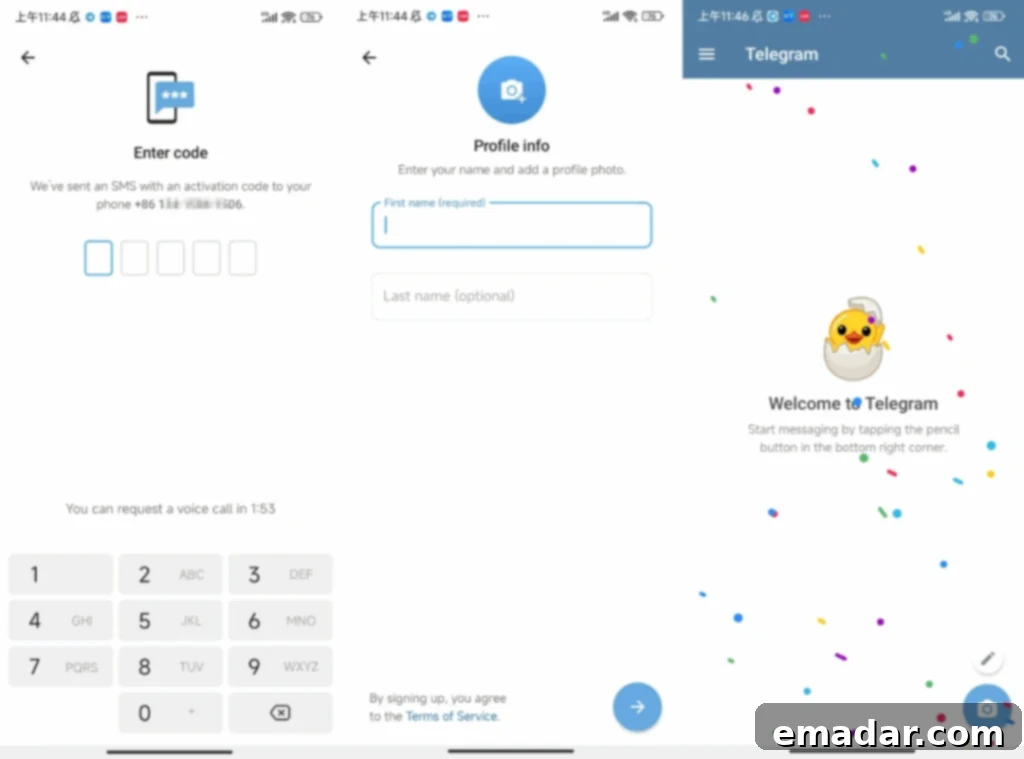
Important Note on Verification Codes: Users with certain domestic phone numbers, especially from specific regions, may occasionally experience issues receiving verification codes. If you encounter this, do not despair. Telegram typically has a high registration success rate. Try using a different phone number, or wait a short period before requesting a new code. Sometimes, network congestion or carrier filtering can temporarily prevent codes from being delivered. Using a virtual phone number service might also be an option for those facing persistent issues, though always ensure these services are reputable.
Adding Friends and Expanding Your Network
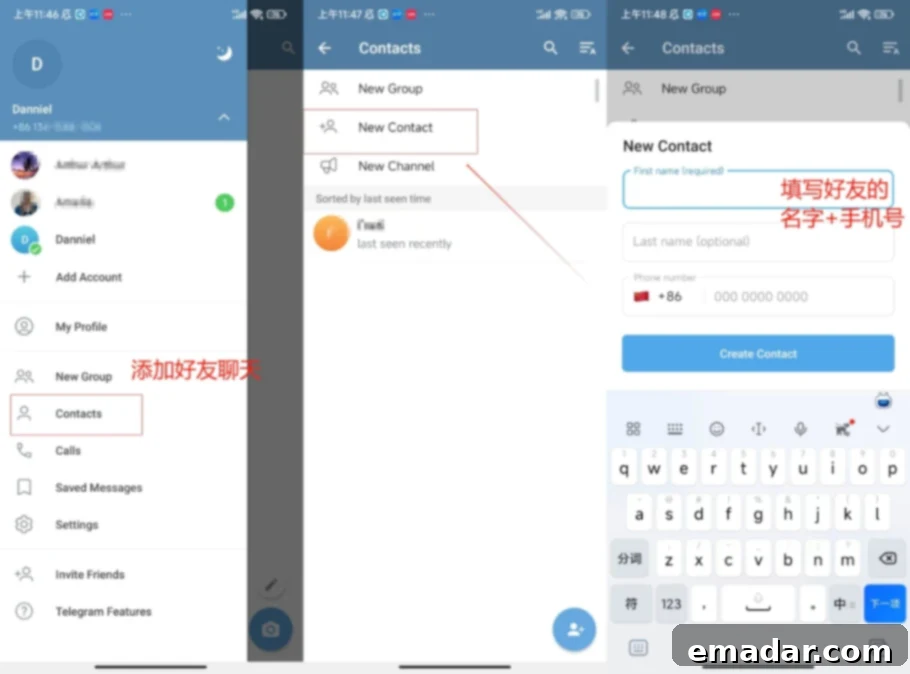
Connecting with clients and partners on Telegram is straightforward. You can add contacts using their phone number or their unique Telegram username. The steps are as follows:
- Click on “Contacts” (usually found in the left sidebar or bottom navigation).
- Select “New Contact.”
- Input the relevant information, such as their name and phone number or username.
Conclusion: Empowering Your Global Business with Telegram
Mastering Telegram download and registration is a pivotal step towards unlocking new opportunities in cross-border trade and client acquisition. Whether you choose the direct app store method, APK installation, or leverage the sophisticated capabilities of DuoPlus Cloud Phone, gaining access to this powerful communication tool will significantly enhance your global reach. Telegram’s secure, fast, and feature-rich environment makes it an indispensable asset for modern businesses aiming to thrive in international markets. Explore its channels, groups, and direct messaging features to build robust connections and streamline your international operations.
Thank you for engaging with this DuoPlus Cloud Phone cross-border special. The development of high-quality accounts and successful business expansion are intrinsically linked to effective operational strategies and the right tools. We are committed to providing you with more valuable content, practical insights, and the latest news on cross-border operations in the future.
Exclusive Offer: DuoPlus is currently offering users a free 1-month cloud phone trial! Seize this opportunity to experience seamless global communication and account management: https://www.duoplus.cn/share/IB2Djl