
In the rapidly evolving landscape of mobile privacy and secure browsing, SocksDroid has emerged as a standout solution for Android users seeking enhanced control over their online activity. This remarkably lightweight and efficient application empowers users to effortlessly configure SOCKS5 proxies on their Android devices, all without the complex and often risky requirement of root access. This makes SocksDroid an exceptionally flexible and accessible option for anyone looking to bolster their digital identity, bypass geographical restrictions, or meticulously route specific application traffic through secure, private proxies.
But what exactly defines SocksDroid, how does it function at a fundamental level, and what are the optimal strategies for setting it up effectively? More importantly, how can combining SocksDroid with truly reliable proxy services elevate your mobile browsing experience from basic security to a professional-grade level of anonymity and performance?
This comprehensive guide will delve into the core functionalities of SocksDroid, unraveling its operational mechanisms, and illustrating why it’s becoming an indispensable tool for privacy-conscious Android users. We’ll explore its benefits, walk you through a detailed setup process, and highlight how choosing the right proxy provider can unlock its full potential, ensuring a seamless and secure mobile experience.
Understanding SocksDroid: A Gateway to Mobile Anonymity
SocksDroid is an innovative, open-source Android application specifically designed to facilitate the routing of your mobile internet traffic through a SOCKS5 proxy server. Unlike traditional Virtual Private Network (VPN) applications that establish a system-wide encrypted tunnel, SocksDroid operates with a more granular approach. It does not create a blanket secure connection for your entire device. Instead, its strength lies in its ability to manage traffic on a per-app basis, especially when integrated with companion tools like ProxyDroid or by leveraging Android’s native proxy settings.
The strategic advantage of SocksDroid is multifaceted, making it particularly valuable for a variety of online activities:
- Bypassing Internet Censorship and Geo-restrictions: In regions with strict internet controls or for accessing content locked to specific geographical locations, SocksDroid provides a discreet bypass.
- Masking IP Addresses for Enhanced Privacy: It effectively conceals your actual IP address, making it significantly harder for websites and online services to track your digital footprint.
- Reducing Online Tracking and Data Collection: By obscuring your originating IP, SocksDroid helps minimize the amount of data collected about your browsing habits by third parties.
- Customizing Mobile Traffic Routing: Users gain precise control over which applications utilize the proxy, allowing for optimized performance and privacy for specific tasks.
- Accessing Geo-Blocked Content on a Per-App Basis: This is crucial for streaming services, social media apps, or localized news platforms that are restricted to certain countries.
A key differentiator and significant advantage of SocksDroid is its operational independence from root access. This means users can benefit from its powerful features without needing to modify their phone’s firmware, which often voids warranties and introduces potential security vulnerabilities. This simplicity and non-invasiveness make SocksDroid an ideal choice for the average Android user and privacy enthusiast alike.
SOCKS5 Proxies vs. VPNs: Navigating Your Privacy Choices
Before embarking on the SocksDroid setup journey, it’s essential to grasp the fundamental distinctions between SOCKS5 proxies and VPNs. While both offer methods to reroute your internet traffic, they serve different primary purposes and offer varying levels of security and flexibility.
- SOCKS5 Proxy: A SOCKS5 proxy acts as an intermediary server, routing your internet traffic through it. Crucially, a SOCKS5 proxy typically does not encrypt your data. Its primary benefits are speed and flexibility. It’s an excellent choice for tasks where speed is paramount, such as high-definition streaming, online gaming, or when you need to route specific application traffic without impacting your entire device’s internet connection. It operates at a lower level of the network stack, making it versatile for different types of traffic (HTTP, HTTPS, FTP, etc.).
- VPN (Virtual Private Network): A VPN, by contrast, creates an encrypted tunnel for *all* your internet traffic, routing it through a secure, remote server. This encryption provides a robust layer of privacy and security, protecting your data from eavesdropping, even on unsecured public Wi-Fi networks. While offering superior privacy, VPNs can sometimes introduce a noticeable speed reduction due to the encryption and decryption processes and the overhead of maintaining a system-wide secure tunnel.
The choice between a SOCKS5 proxy and a VPN depends heavily on your specific needs. If your goal is to simply reroute traffic for particular Android applications—such as dedicated browser apps, social media platforms like TikTok, communication tools like Discord, or specific streaming services—without affecting your entire system’s connection, a SOCKS5 proxy utilized with SocksDroid is often the more efficient, faster, and more targeted solution. It provides the necessary IP masking and geo-unblocking capabilities with minimal performance overhead.
Comprehensive Guide: How to Use SocksDroid on Android
Getting started with SocksDroid is a straightforward process, designed for accessibility. Follow these steps to configure your Android device for secure, proxied browsing:
Step 1: Download and Install SocksDroid Securely
The first step is to acquire the SocksDroid application. Given its open-source nature, the most reliable and secure sources are F-Droid (a reputable open-source Android app repository known for its commitment to privacy and security) or directly from its official GitHub repository. Exercise extreme caution when considering unofficial APK download sources, as these can often contain malicious code, compromising your device’s security and privacy. Always verify the source before installing any application.
Step 2: Obtain a Reliable SOCKS5 Proxy Service
To use SocksDroid, you will need active SOCKS5 proxy details. This typically includes a proxy IP address (or hostname), a specific port number, and, if your chosen proxy requires it, authentication credentials (username and password). The reliability and quality of your proxy service are paramount to your experience. Inferior proxies can lead to slow speeds, frequent disconnections, and compromised privacy.
At IPFLY, we specialize in providing premium static residential and high-performance datacenter proxies fully compatible with the SOCKS5 protocol. Our extensive network offers users around the world fast, stable, and secure connections with unparalleled IP control. Designed for seamless integration with mobile setups like SocksDroid, our proxies deliver exceptional speed, robust stability, and vast global IP coverage, ensuring your mobile activities are always smooth and uninterrupted.
Step 3: Configure SocksDroid with Your Proxy Details
Once SocksDroid is installed on your device, launch the application. You will be presented with fields to input your proxy information. Carefully enter the following details:
- Host: Input the IP address or hostname of your SOCKS5 proxy server.
- Port: Enter the specific port number designated for your SOCKS5 proxy (common SOCKS5 ports include 1080, 1081, or others provided by your proxy provider).
- Username/Password: If your chosen proxy service requires authentication, enter the provided username and password in the respective fields. If not, these fields can be left blank.
After accurately entering all the necessary details, tap the “Start” button within the SocksDroid app to initiate the proxy connection. SocksDroid will attempt to establish a connection to your proxy server.
Step 4: Route Specific App Traffic (Optional but Recommended)
While SocksDroid itself can route traffic through a local SOCKS port, to achieve true per-app routing, meaning only specific applications use the proxy while others connect directly, you may need a companion application. ProxyDroid is a popular choice for this purpose, offering granular control over which apps utilize the proxy connection provided by SocksDroid. This dual-app approach enhances your mobile proxy setup, allowing for precise control and optimization of your network traffic. Alternatively, some Android devices or custom ROMs might offer system-level proxy settings that can be configured to point to SocksDroid’s local proxy, thus affecting selected apps or the entire system based on configuration.
Unlocking Potential: Best Use Cases for SocksDroid
The strategic combination of SocksDroid with high-quality SOCKS5 proxies unlocks a vast array of possibilities, empowering Android users with unprecedented control, privacy, and access:
1. Access Geo-Restricted Applications and Services
Many popular streaming services, social media platforms, and news applications like Hulu, HBO Max, BBC iPlayer, or region-specific news outlets implement geo-restrictions, limiting access based on your geographical location. By leveraging SocksDroid with a proxy IP located in the desired region (e.g., a U.S.-based proxy for Hulu), you can seamlessly bypass these blocks and enjoy unrestricted access to content from anywhere in the world, transforming your mobile device into a global content hub.
2. Fortify Privacy on Unsecured Public Wi-Fi Networks
Public Wi-Fi networks in cafes, airports, and hotels are notorious for their lack of security, making users vulnerable to data interception and tracking. While a SOCKS5 proxy doesn’t encrypt data directly, routing specific app traffic through SocksDroid helps mask your originating IP address from the network operator and potential eavesdroppers. This adds a crucial layer of anonymity, making it significantly harder for malicious actors to link your online activities back to your physical location or device, thereby safeguarding your mobile privacy in potentially hostile network environments.
3. Bypass App-Level Restrictions and IP-Based Blocks
Certain applications and online services employ sophisticated mechanisms to throttle connections, display different content, or outright block users based on their IP address or perceived IP reputation. This can occur due to rate limits, bot detection, or regional content policies. A clean, fresh proxy IP from a reputable provider like IPFLY, routed via SocksDroid, can effectively bypass these filters. This ensures consistent access and optimal performance, especially for tasks that might trigger automated security systems.
4. Empower Mobile Data Scraping and Market Testing
For digital marketers, business analysts, and developers, SocksDroid is an invaluable tool for mobile data scraping and testing. It allows them to simulate user experiences in different geographical regions directly on an Android device. This is crucial for collecting localized pricing data, analyzing competitor strategies, monitoring search engine results, or testing mobile application functionalities in various markets. By rotating proxies through SocksDroid, they can gather vast amounts of public data efficiently and without triggering IP blocks, providing critical insights for strategic decision-making.
The Foundation of Success: Choosing the Right Proxy for SocksDroid
The effectiveness of your SocksDroid setup is directly proportional to the quality of the SOCKS5 proxy you utilize. Not all proxies are created equal, and for optimal performance and reliable anonymity on Android, users need proxies that meet specific criteria:
- SOCKS5 Protocol Support: Essential for compatibility with SocksDroid and for handling various types of internet traffic efficiently.
- High Speed and Low Latency: Crucial for a smooth user experience, especially for streaming, gaming, or rapid data exchange. High latency can lead to noticeable delays and frustration.
- Stable, Clean IPs: Proxies with a good reputation are less likely to be blacklisted by websites or services, ensuring consistent access and avoiding CAPTCHAs or blocks. Stability means fewer disconnections.
- Global Coverage for Region-Based Targeting: A diverse pool of IP addresses across numerous countries allows you to access geo-restricted content from virtually anywhere.
- Compatibility with Mobile Apps and Environments: The proxy service should be optimized to work seamlessly with mobile operating systems and applications, avoiding conflicts or performance issues unique to mobile networks.
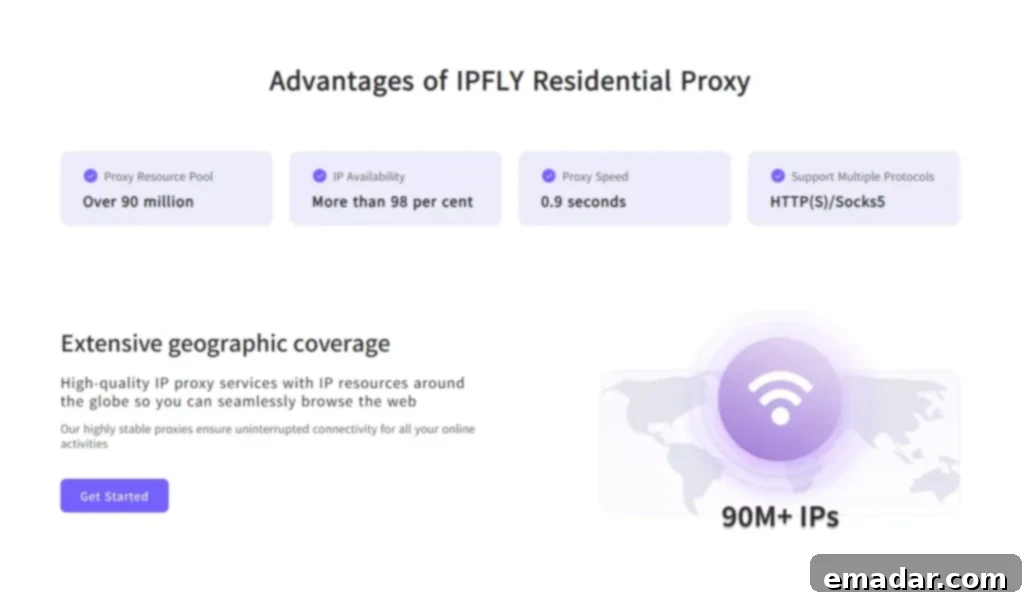
This is precisely why services like IPFLY are consistently preferred by discerning developers, privacy advocates, and mobile marketers. With an expansive network boasting over 90 million IPs, our static residential and dynamic proxies are rigorously tested for optimal compatibility with Android environments. They are meticulously optimized for performance, ensuring lightning-fast speeds, rock-solid stability, and the clean, reputable IP addresses you need for any mobile proxy task, from casual browsing to intensive data operations.
Expert Tips for Optimal SocksDroid Performance
To maximize the efficiency and security of your SocksDroid and SOCKS5 proxy setup, consider these expert recommendations:
- Steer Clear of Free SOCKS Proxies: While tempting, free proxies are often unreliable, extremely slow, and frequently blacklisted. More concerningly, they can pose significant security risks, potentially logging your activity or injecting malware. Investing in a reputable paid service is crucial for both performance and peace of mind.
- Utilize Rotating Proxies for Automation: If your tasks involve web scraping, bulk account management, or any form of automation, employing rotating proxies is highly recommended. These proxies automatically switch your IP address at set intervals, significantly reducing the likelihood of detection and IP bans, thus ensuring the continuity of your operations.
- Routinely Test Your Proxy IP: Before conducting sensitive or important tasks, always verify your proxy connection. Use trusted online tools like IPInfo.io or WhatIsMyIP.com to confirm that your IP address has indeed changed to the proxy’s location and that your anonymity is intact. This simple step can prevent critical data leaks or operational failures.
- Periodically Restart SocksDroid: Like any network application, SocksDroid can sometimes benefit from a fresh restart. If you experience slowdowns, disconnections, or unusual behavior, restarting the application can often resolve minor connectivity issues and help maintain a fresh, stable connection to your proxy server.
Common Issues and Effective Troubleshooting Strategies
Even with the most robust tools, occasional issues can arise. Here are some common problems encountered with SocksDroid and practical troubleshooting steps:
- Application Not Connecting: The most frequent cause is incorrect proxy details. Double-check your proxy IP address (or hostname), port number, and authentication credentials (username and password). Ensure there are no typos or extra spaces. Also, confirm that your proxy service is active and not experiencing downtime.
- Slow Performance or Frequent Disconnections: This can stem from several factors. Your current proxy IP might be overloaded, geographically too distant, or of low quality. Try switching to a different proxy IP address, opting for a server closer to your physical location, or selecting a high-performance datacenter proxy from your provider, which typically offers superior speeds.
- Proxy Rejected or Traffic Not Routing: Verify that the application you are trying to use actually supports SOCKS5 proxies. Some applications might only work with HTTP/HTTPS proxies, or they might ignore system-wide proxy settings. If using ProxyDroid or similar, ensure the specific app is correctly configured to use the proxy. Also, confirm that your proxy provider supports SOCKS5 on the port you are using.
Should you encounter persistent issues, remember that a reliable proxy provider’s support team is your best resource. IPFLY, for example, offers responsive 24/7 customer support and provides comprehensive setup guides specifically tailored for mobile use cases, ensuring you always have expert assistance when you need it.
Final Thoughts: Empowering Your Mobile Experience with SocksDroid
SocksDroid stands as an exceptionally powerful and versatile tool for Android users who demand finer control over their mobile traffic without the overhead, performance impact, or system-wide tunneling inherent in full VPN solutions. Its ability to provide app-level proxy routing without root access fills a critical niche for privacy, accessibility, and specialized online tasks. When judiciously paired with high-quality, dependable SOCKS5 proxies like those offered by IPFLY, SocksDroid transforms into an incredibly flexible and reliable solution. It empowers users for a diverse range of applications, from sophisticated app testing and meticulous data scraping to seamless content unblocking and robust, on-demand privacy protection.
Ready to Upgrade Your Mobile Browsing Experience?

Don’t let digital restrictions or privacy concerns hinder your mobile productivity and freedom. Take the definitive step towards a more controlled, secure, and efficient mobile online presence. Get started with IPFLY’s premium SOCKS5-compatible proxies today. With our vast network of millions of pristine IPs, unparalleled global coverage, and dedicated 24/7 technical support, we are perfectly equipped to help you unlock the absolute full potential of your mobile proxy setup. Whether you are enhancing your daily browsing with SocksDroid or architecting intricate custom Android automation tools, IPFLY provides the robust infrastructure and expert assistance you need to succeed.
Visit IPFLY.net to explore your diverse options and embark on a superior mobile browsing journey now.