

In the dynamic worlds of cross-border e-commerce, where every flash sale sprint counts, in data collection, where every second is critical, and in remote work, which demands seamless connectivity beyond geographical boundaries, SOCKS5 proxy IPs have emerged as an indispensable “network superpower” for savvy professionals. This advanced proxy protocol offers unparalleled flexibility and anonymity, making it a cornerstone for secure and efficient online operations. But how exactly does it achieve high-level anonymity? What are the key considerations when selecting a compatible service? And what common pitfalls should you avoid during the configuration process? This comprehensive guide will demystify the principles and practical applications of SOCKS5, empowering you to leverage its full potential.
Unlocking Potential: Why SOCKS5 is Your Ultimate Network Ally
As the fifth generation of the “session layer proxy protocol,” SOCKS5 transcends the limitations of traditional HTTP proxies, offering a robust and versatile solution for a wide array of online activities. While HTTP proxies are generally confined to web browsing, SOCKS5 extends its reach to nearly any internet-based application. Whether you need to securely send and receive international emails via a dedicated client, manage large downloads through P2P software, or enhance the speed and stability of online gaming on foreign servers, an HTTP proxy might fall short. SOCKS5, however, shines in these scenarios, thanks to its comprehensive support for both TCP (Transmission Control Protocol) and UDP (User Datagram Protocol), enabling seamless adaptation across diverse network applications.
The core advantages of SOCKS5 are evident across three critical dimensions, making it a preferred choice for advanced users seeking enhanced performance and security:
- Fortified Privacy Shield: SOCKS5 excels in privacy protection by masquerading your entire network connection, ensuring that target websites only detect the IP address of the proxy server. This full-link IP spoofing significantly reduces the risk of your actual IP address being exposed, with real-world tests demonstrating over a 90% reduction in exposure risk compared to direct connections. This robust anonymity is crucial for sensitive operations, protecting your identity and digital footprint from surveillance and tracking.
- High-Performance, Low-Latency Engine: Engineered with intelligent routing technologies, SOCKS5 minimizes data transmission hops and optimizes network pathways. This results in notably faster response times, especially vital in data-intensive tasks like cross-border data scraping. Empirical data indicates that request response speeds can increase by an average of 40% when using SOCKS5 proxies compared to conventional HTTP proxies, leading to more efficient and timely data acquisition. The optimized routing ensures that your data travels the most direct path, cutting down on unnecessary delays.
- Universal Application Compatibility: One of SOCKS5’s most compelling features is its unparalleled versatility. Unlike HTTP proxies that are protocol-specific, SOCKS5 acts as a general-purpose proxy, capable of handling virtually any type of network traffic. This means whether you’re managing multiple accounts on e-commerce platforms, accessing geographically restricted academic databases, or running specialized business software, SOCKS5 provides a “one-protocol-fits-all” solution. It bypasses content filters, geo-restrictions, and network blocks with ease, providing seamless access to global resources.

Avoiding Pitfalls: Your Five-Step Guide to Selecting a Premium SOCKS5 Proxy Provider
Choosing the right SOCKS5 proxy service is paramount to the success of your online operations. A high-quality provider ensures not only optimal performance and reliability but also robust security and privacy. Here’s a detailed five-step guide to help you navigate the selection process and avoid common pitfalls:
1. Understanding the Essence of IPs: Residential vs. Datacenter Proxies
The type of IP address you use profoundly impacts your online footprint. Residential IPs are sourced from real internet service providers (ISPs) and assigned to genuine home broadband connections. They mimic the behavior of typical human users, making them ideal for high-sensitivity applications such as e-commerce operations, social media marketing, and ad verification. For instance, a cross-border seller reported a dramatic reduction in Amazon account association rates from 15% to a mere 2% after switching to residential SOCKS5 proxies. These IPs are highly trusted by target websites, significantly reducing the likelihood of detection or blocking. In contrast, Datacenter IPs originate from commercial server farms. While generally more affordable and offering faster speeds, they are often easier for sophisticated websites to identify and block due to their distinct IP ranges. They are best suited for tasks where anonymity requirements are lower, such as general web scraping, bulk content delivery, or testing environments.
2. Global Node Network: The Breadth of Coverage Dictates Possibilities
A superior SOCKS5 proxy provider should boast an extensive global network of proxy nodes, functioning like a highly efficient international transportation system. The wider the geographical spread, the greater your operational flexibility. For example, a service like IPFLY, offering SOCKS5 proxies across 80+ major regions worldwide, empowers users to precisely target optimal nodes. Whether your objective is to verify the effectiveness of an advertising campaign in Tokyo, conduct large-scale financial data collection in New York, or access region-specific content in London, a diverse node network ensures you can always secure a local IP address. This broad coverage is essential for geo-targeting, bypassing restrictions, and achieving truly localized online presence.
3. The Iron Rule of Stability: 99% Uptime is the Absolute Minimum
Stability is non-negotiable for critical online tasks. You should meticulously evaluate a provider’s historical IP uptime records, ideally reviewing data from the past 30 days, to assess their reliability. A truly robust SOCKS5 service will guarantee at least 99% uptime, indicating a consistent and dependable connection. Providers that support multi-threaded concurrency and offer unlimited bandwidth further ensure that intensive tasks like continuous data scraping can run uninterrupted 24/7. Furthermore, an intelligent routing system capable of automatically switching to alternative nodes in the event of a failure is crucial for maintaining business continuity and preventing costly downtime. This proactive approach to stability is what differentiates a reliable service from a subpar one.
4. Robust Technical Backend: Comprehensive Documentation and Responsive Support
The quality of a SOCKS5 provider’s technical support and documentation is as vital as the proxies themselves. Comprehensive API documentation, complete with practical code examples, empowers technical teams to quickly integrate and automate proxy usage into their workflows. More importantly, responsive and knowledgeable customer support is indispensable for addressing unforeseen challenges, such as IP blacklisting, connection issues, or specific application compatibility problems. A provider with a dedicated support team that offers rapid assistance, ideally 24/7, ensures minimal disruption to your operations. Without clear guidance and prompt help, even the most advanced proxy service can become a source of frustration.
5. Security Features and Scalability: Protecting Your Assets and Growing Your Operations
Beyond basic anonymity, consider the security features offered by a SOCKS5 proxy provider. Look for features like strong encryption, secure authentication methods (username/password), and protection against DNS leaks to ensure your data remains confidential and your true IP hidden. Furthermore, evaluate the service’s scalability. Can it seamlessly accommodate your growing needs, whether you require a handful of proxies or thousands? A flexible pricing model that allows for easy scaling up or down, along with a transparent usage policy, is essential for businesses with fluctuating demands. A provider that prioritizes both stringent security and adaptable scalability ensures your long-term success and protection.
Practical Application: Multi-Scenario SOCKS5 Configuration Walkthrough
Effectively configuring SOCKS5 proxies is crucial for leveraging their benefits across various devices and applications. Here, we provide step-by-step instructions for setting up SOCKS5 on both mobile (Android) and desktop (Windows) platforms, along with verification methods.
(一)Mobile Device Configuration (Example: Android)
Configuring a SOCKS5 proxy on an Android device allows you to route all internet traffic through the proxy, enhancing privacy and bypassing geo-restrictions for all apps. Follow these detailed steps:
- Navigate to your phone’s “Settings” menu and select “Network & internet,” then “Wi-Fi.” Long-press on the name of your currently connected Wi-Fi network. From the pop-up options, choose “Modify network.”
- On the network modification screen, you’ll see various settings. Tap on “Advanced options” to expand the hidden settings. Locate the “Proxy” setting and change its status from “None” or “Direct” to “Manual.”
- You will then be prompted to input proxy details. Carefully enter the SOCKS5 proxy IP address provided by your service provider into the “Proxy hostname” field and the corresponding port number into the “Proxy port” field. If your proxy service requires username and password authentication, ensure you accurately fill in these credentials in the respective fields.
- After entering all details, tap “Save” to apply the settings. To verify successful configuration, open your device’s web browser (e.g., Chrome) and visit an “IP address checker” website (e.g., whatismyip.com). If the displayed IP address matches your SOCKS5 proxy IP, your configuration is successful, and your device’s traffic is now being routed through the proxy.
(二)Desktop Configuration (Example: Windows)
Setting up a SOCKS5 proxy on a Windows computer allows you to control specific application traffic or system-wide connections, providing flexibility for various tasks. Here’s how:
- Open your computer’s “Settings” application. You can do this by clicking the Start button and then the gear icon, or by searching for “Settings.” Within the Settings window, select the “Network & Internet” option.
- In the left-hand menu pane, click on “Proxy” to access the proxy settings page. This section allows you to manage manual and automatic proxy configurations.
- Under the “Manual proxy setup” section, ensure the “Use a proxy server” toggle is set to “On.” Then, select “Socks5” as the protocol type. In the provided fields, enter the SOCKS5 proxy server’s IP address and its corresponding port number, which you obtained from your proxy service provider.
- If your SOCKS5 proxy requires authentication, check the box labeled “Don’t use the proxy server for local (intranet) addresses” (optional, depending on your needs). Crucially, ensure you enable the “Requires authentication” option and then input the associated username and password into the designated fields.
- Click “Save” to finalize your settings. To confirm the proxy is working correctly, open any web browser (e.g., Edge, Chrome, Firefox) and visit an IP lookup website. If the displayed IP address is that of your SOCKS5 proxy server, your setup is complete and effective. For users with more advanced needs, leveraging specialized “fingerprint browsers” (also known as anti-detect browsers) for each individual account can provide an isolated “one-account-one-environment” setup. This significantly enhances account security and streamlines management efficiency, preventing account association and improving overall operational integrity.
Troubleshooting Common Issues: Solutions for Seamless SOCKS5 Operations
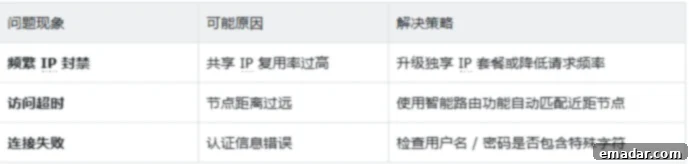
Even with careful setup, you might encounter issues. Here are solutions to common SOCKS5 proxy problems:
- Issue 1: Proxy Not Connecting or Slow Speeds.
Solution: First, double-check your SOCKS5 IP address, port, username, and password for any typos. An incorrect digit or character can prevent connection. Next, verify your internet connection is stable without the proxy. If slow, the issue might be with the proxy server itself or its distance. Try switching to a different proxy server or a node geographically closer to your target website or your location. Also, ensure your proxy subscription is active and not expired.
- Issue 2: IP Blacklisting or Detection.
Solution: If websites are detecting your proxy or blocking your access, it’s likely your IP address has been flagged. This is more common with datacenter IPs. The most effective solution is to switch to a fresh residential SOCKS5 IP. For sensitive tasks, rotating IPs frequently or using sticky residential IPs (that maintain the same IP for a longer duration) can help. Always ensure your proxy provider offers a wide pool of clean, undetectable residential IPs.
- Issue 3: Applications Not Using the Proxy.
Solution: Some applications might bypass system-wide proxy settings. For specific software, check its individual network or proxy settings. Many P2P clients, browsers, and specialized tools have their own proxy configuration options. Ensure you select SOCKS5 as the protocol within these applications. If an application doesn’t support SOCKS5 directly, you might need to use a proxy client like Proxifier (Windows) or ProxyChains (Linux) to force traffic through the SOCKS5 proxy.
- Issue 4: Authentication Errors.
Solution: This typically indicates an incorrect username or password. Re-enter your credentials carefully, paying attention to case sensitivity. If you’re copying and pasting, ensure no extra spaces are included. If the problem persists, reset your proxy password through your provider’s dashboard or contact their support for assistance. It’s also possible your account might be temporarily locked due to too many failed login attempts.
- Issue 5: DNS Leaks Exposing Your Real IP.
Solution: A DNS leak occurs when your computer bypasses the proxy for DNS requests, revealing your actual IP. To check for DNS leaks, visit a DNS leak test website (e.g., dnsleaktest.com) while connected to your SOCKS5 proxy. If your real ISP’s DNS servers are listed, you have a leak. Some SOCKS5 providers mitigate this automatically, but if not, consider using a VPN in conjunction with your SOCKS5 proxy, or configuring custom DNS servers on your operating system that are public and secure (e.g., Google DNS 8.8.8.8 and 8.8.4.4).
Mastering the correct way to utilize SOCKS5 proxy IPs is akin to equipping your online activities with both a powerful accelerator and an impenetrable shield. It significantly enhances your operational efficiency, safeguards your privacy, and expands your global reach. By carefully selecting a high-quality SOCKS5 proxy provider and diligently following proper configuration and troubleshooting practices, you can unlock a new level of online capability.
IPFLY, for instance, has successfully assisted over 5,000 enterprises in doubling their cross-border business efficiency. They achieve this through an expansive global network of residential IP resources, a millisecond-level intelligent routing system, and developer-grade technical support. Whether your goal is to overcome geographical restrictions, establish a secure and anonymous network environment, or simply optimize your data collection efforts, opting for professional SOCKS5 proxy services will undoubtedly maximize the value and impact of your online endeavors.