
In the dynamic world of cross-border e-commerce, targeted advertising, and extensive data collection, establishing a stable and secure online presence is paramount for business success. You’ve likely heard of the powerful Socks5 Proxy IP, lauded for its ability to anonymize your identity and circumvent geographical restrictions. However, navigating the complexities of its configuration and effective utilization can often feel daunting.
This comprehensive guide aims to demystify the Socks5 Proxy IP, offering a practical, step-by-step breakdown of its setup and application. We’ll walk you through various configuration methods across different platforms and share invaluable practical tips. Our goal is to transform you from someone who merely “knows about” Socks5 proxies to a proficient user, fully leveraging this robust tool to empower your operations.
Understanding Socks5 Proxy IP: More Than Just Changing Your IP Address
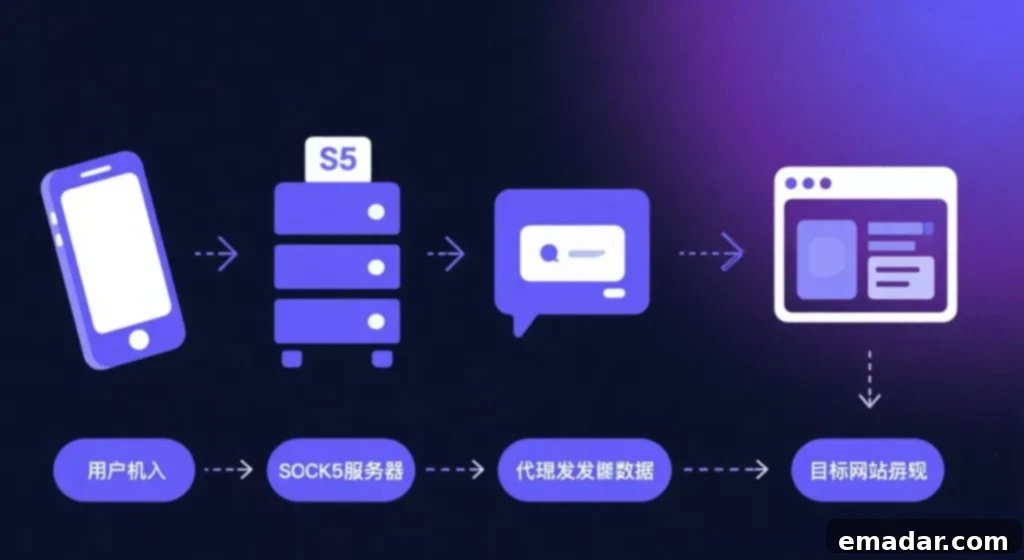
To begin, let’s establish a clear understanding of the fundamental concept behind a Socks5 Proxy IP. At its core, it’s a network proxy service built upon the Socks5 protocol. This protocol stands out significantly from simpler HTTP proxies, which are primarily designed to handle web-based traffic (like browsing web pages). The Socks5 protocol, by contrast, is a versatile and general-purpose network protocol, capable of supporting almost all types of network traffic, including both TCP (Transmission Control Protocol) and UDP (User Datagram Protocol). This broad compatibility makes it an exceptionally flexible and powerful tool for a multitude of online tasks.
- How it Works: When you use a Socks5 proxy, your internet requests are first routed through the Socks5 proxy server. This server then makes the request to the target website or online service using its own IP address. This process effectively creates an “invisible cloak” around your network requests, concealing your true IP address and online identity. By masking your origin, Socks5 proxies enable you to navigate the internet with enhanced privacy and significantly reduce the risk of being identified or blocked. This high level of anonymity is crucial for protecting your digital footprint and ensuring uninterrupted access to online resources.
- Key Advantages: Beyond simple IP masking, Socks5 proxies offer benefits like better performance due to their lower overhead compared to some VPNs, and the ability to handle various types of connections, making them suitable for gaming, streaming, and P2P transfers, in addition to web browsing and data collection. The support for UDP traffic is particularly noteworthy, as it’s essential for applications requiring real-time communication.
Comprehensive Socks5 Proxy Configuration Across Diverse Scenarios
Mastering the configuration process is the initial and most critical step in harnessing the power of a Socks5 Proxy IP. Below, we provide detailed setup instructions tailored for different operating systems and applications, ensuring you can integrate this powerful tool seamlessly into your workflow.
- Configuring Socks5 Proxy on Windows Systems
This method provides a foundational setup that routes your web browser traffic and most system-wide applications through the proxy. It’s an excellent starting point for general use.
- Step-by-Step Guide:
- Begin by opening the Control Panel on your Windows machine.
- Navigate to Network and Internet, then select Internet Options. This will open a new dialog box.
- Within the Internet Properties window, click on the Connections tab. Towards the bottom, locate and click the LAN settings button.
- In the Local Area Network (LAN) Settings window, check the box labeled Use a proxy server for your LAN (These settings will not apply to dial-up or VPN connections).
- With the proxy server option enabled, click the Advanced button.
- You will see fields for HTTP, Secure, FTP, and Socks. Locate the Socks field. Here, meticulously enter the proxy IP address and the corresponding port number provided by your proxy service provider. Ensure no typos.
- Click OK to confirm and save these settings. You may need to click OK again on previous windows.
- For the changes to take full effect, it’s often necessary to restart your web browser (e.g., Chrome, Edge, Firefox) or any other application that you intend to route through the proxy. This refreshes their network configuration.
- Configuring Socks5 Proxy on Mac Systems
Setting up a Socks5 proxy on macOS is equally straightforward, primarily managed through the System Preferences. This method applies system-wide proxy settings for most applications.
- Step-by-Step Guide:
- Click on the Apple icon located in the top-left corner of your screen. From the dropdown menu, select System Preferences.
- In the System Preferences window, click on the Network icon to open network settings.
- On the left-hand side, select the network connection you are currently using (e.g., Wi-Fi, Ethernet). Once selected, click the Advanced button situated in the bottom-right corner.
- Within the Advanced settings, navigate to the Proxies tab.
- In the “Select a protocol to configure” list, check the box next to SOCKS Proxy.
- On the right side, in the “SOCKS Proxy Server” field, accurately input your proxy IP address and port number. If your proxy requires authentication, you may need to check “Proxy server requires password” and enter your credentials.
- Click OK to close the Advanced settings, and then click Apply in the main Network window to save your changes. Your Mac should now route eligible traffic through the Socks5 proxy.
- Browser-Specific Configuration (Using Extensions)
For scenarios where you only wish to route specific browser traffic through a proxy, rather than your entire system, browser extensions offer a highly flexible and convenient solution. This approach allows you to quickly switch between different proxy settings or bypass proxies entirely with ease.
- Step-by-Step Guide for Chrome (using Proxy SwitchyOmega):
- Open your Chrome browser and navigate to the Chrome Web Store. Search for and install a reliable proxy management extension like Proxy SwitchyOmega (a popular choice) or similar alternatives.
- Once installed, click on the extension’s icon in your browser’s toolbar. This will open its configuration interface.
- In the extension’s settings, you’ll typically find an option to create a “New Profile” or “New Scenario.” Select this option.
- For the protocol, choose SOCKS5.
- Carefully enter your proxy IP address and the corresponding port number into the designated fields. If your proxy service requires authentication, make sure to enable the authentication option and input your username and password.
- Save your new profile. After saving, you can conveniently switch between this proxy configuration and your direct connection (or other proxy profiles) directly from the extension’s icon with a single click. This makes it ideal for testing or managing multiple online identities.
- Configuring Socks5 Proxy in Web Scraping Scripts (Python Example)
For developers, particularly those involved in web scraping or automated tasks, integrating proxy settings directly within your code is the industry-standard approach. This allows for dynamic proxy management and robust error handling.
- Python Code Example:
import requests

# Configure proxy servers
# Replace 'proxy_ip:port' with your Socks5 proxy IP and port.
# If authentication is required, include 'username:password@' before the IP.
proxies = {
    "http": "socks5://username:password@proxy_ip:port",
    "https": "socks5://username:password@proxy_ip:port"
}

url = "https://example.com" # The target URL for your request

try:
    # Make a GET request using the configured proxies and a timeout
    response = requests.get(url, proxies=proxies, timeout=10)
    print("Request successful, status code:", response.status_code)
    # You can further process response.text or response.json() here
except requests.exceptions.RequestException as e:
    # Handle various request exceptions (e.g., connection errors, timeouts)
    print("Request failed:", e)
except Exception as e:
    # Catch any other unexpected errors
    print("An unexpected error occurred:", e)
- Important Notes: Remember to replace `proxy_ip:port` with the actual Socks5 Proxy IP address and port you’ve obtained. If your proxy requires authentication, ensure you include `username:password@` directly after `socks5://` in the proxy string. This method is highly flexible for integrating with proxy rotation services, where you can dynamically update the `proxies` dictionary with different IP addresses to avoid detection.
Advanced Applications and Best Practices for Socks5 Proxy IP
While mastering configuration is essential, truly leveraging a Socks5 Proxy IP involves understanding its strategic applications and adopting best practices. This section delves into real-world scenarios where Socks5 proxies provide a distinct competitive edge.
- Cross-Border E-commerce & Social Media Management: Unlocking Independent IP for Anti-Association
Operating multiple accounts on platforms like Amazon, Facebook, Instagram, or TikTok presents a unique challenge: platform algorithms are designed to detect and link associated accounts, often leading to suspensions or bans. These platforms frequently use IP addresses as a primary identifier for account association. By strategically employing a Socks5 Proxy IP, you can assign a unique and dedicated IP address to each of your accounts. This makes each account appear to originate from a distinct, individual user, significantly reducing the risk of being flagged by platform risk control systems.
- Pro Tip: The quality of your proxy matters immensely here. Always prioritize high-quality residential Socks5 Proxy IPs over datacenter IPs. Residential IPs are sourced from real internet service providers and are associated with legitimate home users, making them far more trusted by major platforms. Datacenter IPs, on the other hand, are easily identifiable and often blocklisted by sophisticated anti-fraud systems. Utilizing pure, unshared residential IPs ensures that each of your accounts maintains the highest level of trust and anonymity. For instance, reputable providers like IPFLY offer a global network of pure residential Socks5 proxies across over 190 countries, ideal for maintaining multiple, unlinked identities in complex cross-border business environments.
- Enhanced Security: Beyond just IP, advanced platforms analyze browser fingerprints, cookies, and other digital markers. Integrating Socks5 proxies with anti-detect browsers further fortifies your anonymity, creating a robust shield against sophisticated tracking mechanisms.
- Efficient Data Collection & Web Scraping: Bypassing Restrictions and Boosting Productivity
For large-scale data collection and web scraping tasks, websites’ sophisticated anti-bot and anti-scraping mechanisms are the primary obstacles. These measures include rate limiting, CAPTCHAs, and IP blocking, designed to prevent automated access.
- Strategic Approach: Implement a robust Socks5 Proxy IP pool within your scraping scripts, coupled with an intelligent proxy rotation strategy. The core idea is to change your IP address after a certain number of requests or a specific time interval. This makes your requests appear to originate from a diverse range of users, effectively circumventing rate limits and making it harder for target websites to identify and block your scraping efforts. Combine this with carefully calibrated request delays to mimic human browsing behavior. Such a multi-faceted approach dramatically increases the success rate and efficiency of your data acquisition, allowing you to gather vast amounts of information without interruption.
- Dynamic Proxy Management: Tools and libraries exist that can automatically manage your proxy pool, rotating IPs and even checking their health to ensure you’re always using active and reliable proxies. This automation is key for large-scale, continuous scraping operations.
- Common Issues and Troubleshooting: Navigating Potential Pitfalls
Even with careful setup, you might encounter issues. Knowing how to troubleshoot them effectively can save significant time and frustration.
- Inability to Connect or Proxy Not Working:
- Verification: Double-check the proxy IP address and port number for any typos. Even a single incorrect digit can prevent connection.
- Proxy Status: Ensure your proxy subscription is active and has not expired. Contact your proxy provider to verify the proxy’s current operational status.
- Firewall/Antivirus: Your local firewall or antivirus software might be blocking the connection to the proxy server. Temporarily disable them (with caution) to test if this is the cause.
- Network Issues: Test your internet connection without the proxy to ensure your underlying network is stable.
- Website Still Displays Your Real IP Address:
- Browser Cache & Cookies: Your browser might be retaining old cached data or cookies that expose your real IP. Clear your browser’s cache and cookies thoroughly and then restart it.
- DNS Leaks: Even with a proxy, your DNS requests might bypass it, revealing your location. Use online tools (e.g., dnsleaktest.com) to check for DNS leaks. Many proxy extensions offer built-in DNS leak protection.
- WebRTC Leaks: Web Real-Time Communication (WebRTC) can sometimes reveal your real IP. Browser extensions exist to block WebRTC leaks (e.g., WebRTC Network Limiter).
- Proxy Type: Ensure you are using a high-anonymity Socks5 proxy. Some low-quality or free proxies may not fully mask your IP.
- Receiving Risk Control Warnings or Bans Despite Using a Proxy:
- Proxy Quality: This is almost always an indicator of poor proxy quality. Datacenter IPs are often blacklisted by major platforms. Switch to premium residential Socks5 Proxy IPs.
- Shared IP Usage: If multiple accounts are sharing the same proxy IP, platforms can easily link them. Always use a dedicated, unique proxy IP for each distinct account.
- IP Reputation: The IP address you’re using might have a poor reputation due to previous misuse by others. A reputable proxy provider will offer clean, unflagged IPs.
- Browser Fingerprinting: Platforms also analyze your browser’s unique fingerprint (user agent, screen resolution, installed fonts, etc.). Combine high-quality proxies with anti-detect browsers that modify these fingerprints to create truly unique online personas.
Conclusion: Empowering Your Digital Ventures with Socks5 Proxy IP
The Socks5 Proxy IP is not an arcane technology reserved for IT specialists; it is an accessible and incredibly practical tool that any individual or business can master. Its unparalleled versatility, high degree of anonymity, and robust performance make it an indispensable asset across various digital landscapes, including cross-border e-commerce, advanced data collection, strategic advertising campaigns, and secure browsing.
By diligently applying the configuration methods and practical strategies detailed in this guide, you will be well-equipped to mitigate network risks, enhance your online privacy, and significantly boost your operational efficiency. The key to unlocking the full potential of this technology lies not just in understanding it, but in effectively integrating it into your daily digital activities. Furthermore, selecting a reputable and high-quality provider is paramount. A reliable provider, such as IPFLY, ensures you have access to stable, pure, and high-performance Socks5 Proxy IP resources, providing a solid foundation for your online endeavors and safeguarding your business operations.
IPFLY stands as a premier proxy service provider dedicated to the cross-border industry, offering unparalleled features:
- ✔ Extensive Global Coverage: Access to IPs in over 190 countries worldwide.
- ✔ Diverse Proxy Options: Support for static/dynamic residential proxies, native IPs, and datacenter proxies to meet all specific needs.
- ✔ Exclusive Clean IPs: Provides dedicated and pure IPs, ensuring one IP per account for maximum privacy and anti-detection.
- ✔ Log-Free & High Anonymity: Guarantees no logging of your activities and offers top-tier anonymity, with seamless integration for popular fingerprint browsers.
- ✔ API Integration: Supports API integration for effortless bulk configuration and automated proxy management, streamlining large-scale operations.
👉 Claim your special offer and acquire premium IPs today!