
For anyone deeply involved in cross-border e-commerce, international marketing, or global trade communication, possessing a stable, free US virtual phone number like Google Voice (GV) is an indispensable asset—a true digital infrastructure cornerstone. It empowers you to receive US verification codes, conduct phone calls, and establish a reliable overseas digital identity crucial for various online services and business operations.
However, the Google Voice registration process is no longer a straightforward path. Due to significant upgrades in Google’s sophisticated risk control and fraud detection systems, the vast majority of registration failures can be attributed to one core issue: your perceived network environment is not deemed trustworthy by Google.
This comprehensive guide will not only demystify the complexities of Google Voice registration but also provide a meticulous, step-by-step practical framework. Our “three-phase” approach is designed to help you consistently and successfully activate your desired Google Voice number, safeguarding your efforts against common pitfalls and Google’s stringent security measures.
Phase One: The Strategic Step-by-Step Registration Process
The following detailed procedure is meticulously designed to construct a highly authentic “US user” environment, significantly enhancing your chances of successful Google Voice registration. Every step is crucial in convincing Google’s algorithms that you are a genuine user residing in the United States, rather than an automated script or an individual attempting to bypass regional restrictions.
Step 1: Establishing a Pristine US-Based Network Environment
This foundational step is arguably the most critical element for successful registration. Without a highly convincing and untainted US-based environment, all subsequent efforts are likely to fail. Google’s systems are incredibly adept at detecting inconsistencies, and even minor discrepancies can trigger their fraud prevention protocols.
- Acquire a Pure, Undetected IP Address: Your choice of IP address is paramount. We strongly recommend utilizing IPFLY’s static residential US IP addresses. Unlike VPNs or datacenter proxies, which are often flagged by Google due to their commercial nature and frequent use for illicit activities, static residential IPs originate from actual US households. This provides an unparalleled level of authenticity and trustworthiness, effectively mimicking a real American home internet user. This “clean reputation” is essential for bypassing Google’s initial IP-based filters.
- Configure Comprehensive Environment Consistency: Google examines a multitude of data points beyond just your IP address to verify your location. Ensuring perfect alignment across all these factors is crucial.
- Browser Preparation: Begin by thoroughly clearing all browsing data, including cache, cookies, and site data, from your chosen browser. For enhanced privacy and consistency, use a dedicated fingerprint browser (also known as an anti-detect browser) to create a brand-new, isolated profile specifically for this Google Voice registration. This prevents any digital traces from previous browsing sessions from interfering with your new, pure US environment.
- Time Zone and Language Settings: Manually adjust both your browser’s time zone and your operating system’s time zone to precisely match a US time zone (e.g., Eastern Standard Time (EST) or Pacific Standard Time (PST)). Similarly, ensure that your browser’s default language and your operating system’s primary language are both set to English (United States). Discrepancies here are a major red flag for Google’s systems.
- IP Verification and Leak Check: Before proceeding, it is absolutely vital to verify that your configured environment is truly presenting itself as American. Visit a reliable IP checking website such as
whatismyipaddress.comorwhoer.net. Scrutinize the results to confirm that the displayed IP address, Internet Service Provider (ISP), time zone, and geographic location all perfectly align with your target US region. Pay close attention to any warnings about DNS leaks or WebRTC leaks, as these can reveal your true location despite using a proxy.
- Log into Your Gmail Account: Once your pristine US environment is fully established and verified, open a new tab within that same browser profile and log into your existing Google (Gmail) account. Ensure this login happens *after* all environment settings are in place, reinforcing the consistent US identity.
Step 2: Initiating the Google Voice Application and Number Selection
With your perfectly crafted US environment, you are now ready to access the Google Voice portal and select your desired number.
- Access the Official Google Voice Website: In the same browser profile where you just logged into your Gmail, navigate directly to
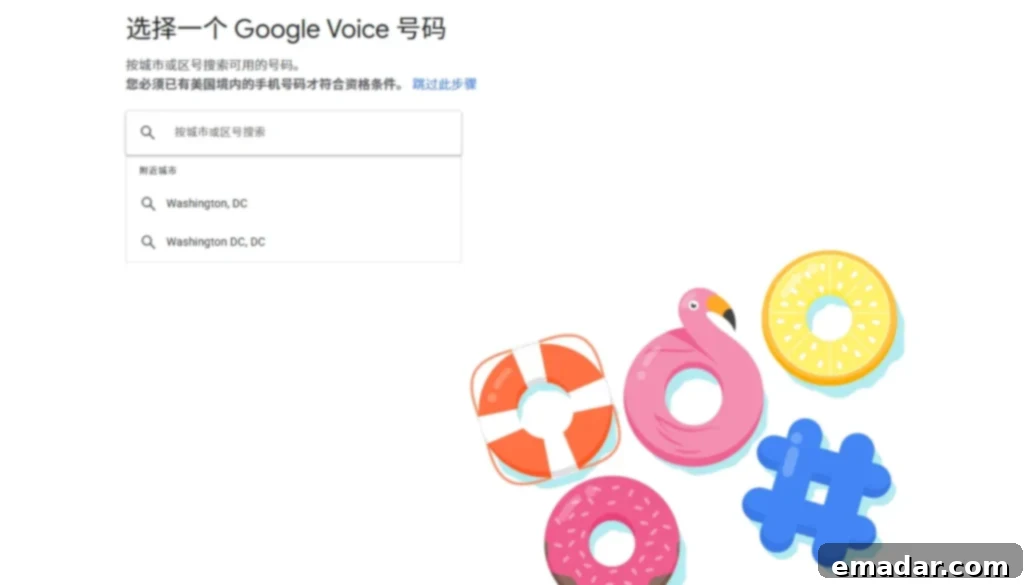
voice.google.com. The page should load correctly, displaying the Google Voice welcome message and options to “Choose a number” or “Get a number.” If you encounter messages like “Google Voice is not available in your country,” it indicates a failure in Step 1, and you must troubleshoot your network environment before proceeding. - Strategically Select Your Google Voice Number: When prompted to search for a number, avoid selecting overly popular or densely populated major US metropolitan areas like Los Angeles, New York, or Miami. Numbers from these cities are often quickly depleted, frequently abused, or more closely scrutinized by Google’s algorithms due to their high demand and potential for misuse. Instead, search for a number in a medium-sized American city, such as Austin, TX; Seattle, WA; Portland, OR; or Denver, CO. These cities often have ample number resources that are less likely to be flagged or associated with suspicious activity.
- Proceed to Verification: After selecting a suitable number, click the “Continue” button. This action will initiate the crucial phone number verification stage, which is the final gatekeeper to activating your Google Voice number.
Step 3: The Crucial Mobile Phone Number Verification and Activation
This is the most critical and often the most challenging step in the entire Google Voice registration process. Google requires verification using a genuine, non-VoIP, and previously unused US mobile phone number to prevent the mass creation of accounts.
1. Enter a Valid US Phone Number: In the pop-up verification box, you will be prompted to enter a US mobile phone number. This number must meet specific requirements: it must be a legitimate, active US mobile number (not a virtual VoIP number or a number from a landline service) and capable of receiving SMS messages. Crucially, this number must not have been previously used to register another Google Voice account. Sourcing such a number can be difficult; options include using a physical US SIM card (if you have access), or utilizing a highly reputable, paid SMS verification service specifically known for providing clean, non-VoIP US numbers.
2. Receive and Input the Verification Code: After entering the US number, click “Send Code.” Google will send a 6-digit verification code to that number via SMS. Promptly enter this code into the designated field on the Google Voice page to complete the verification. Be aware that some services may have delays in delivering SMS codes, so ensure the number you use is reliable.
3. Successful Activation: Upon successful verification of the code, the system will display a confirmation message, typically stating, “Success! Your new Google Voice number is ready.” At this point, your Google Voice number is officially activated and ready for use. You can now access your Google Voice inbox and settings.
Phase Two: Troubleshooting and Expert Avoidance Techniques
Despite following the steps diligently, users may encounter specific issues. Understanding the root causes and implementing advanced solutions is key to overcoming these hurdles and ensuring a stable Google Voice account.
| Common Problem | Underlying Technical Reason | Advanced Solution & Explanation |
| “Google Voice is not available in your country.” | This message indicates that Google’s systems have either failed to geolocate your IP address as being within the US, or your current IP has been flagged as a high-risk datacenter (IDC) or VPN IP, which are commonly associated with attempts to bypass regional restrictions. | Solution: You must exclusively use a high-quality static residential IP address. These IPs mimic genuine home internet connections, possess a cleaner “digital footprint,” and are far less likely to be flagged by Google. Critically, ensure you clear all browser location permissions and disable any system-level location services that might override your IP-based geolocation. Verify your IP’s purity and location with multiple tools (e.g., whatismyipaddress.com, whoer.net) to confirm it is not misidentified or associated with datacenter networks. |
| Verification code not received / Binding failed | The US phone number provided for verification is likely a virtual (VoIP) number, has been previously used for Google Voice registration (even if by someone else), or belongs to a carrier that Google has blacklisted due to abuse. Another factor could be an IP environment mismatch with the phone’s carrier location. | Solution: The most reliable method is to use a physical US SIM card from a major carrier (e.g., AT&T, T-Mobile, Verizon) if accessible. If not, opt for highly reputable, paid SMS verification services that explicitly guarantee clean, non-VoIP US numbers for Google Voice activation. These services often source numbers from legitimate mobile carriers. Furthermore, ensure your chosen IP environment (from Step 1) broadly matches the geographical region of the phone number’s carrier, as inconsistencies here can also trigger suspicion. |
| Successful registration, but the account is banned the next day | This common issue arises when the account was initially registered using a shared IP, a dynamic IP, or a low-quality residential IP. Google’s systems might grant temporary access, but their advanced fraud detection algorithms continuously analyze IP history and user behavior. If the IP is later associated with suspicious activities, or its history reveals inconsistencies, a retrospective ban is applied. | Solution: To prevent this, both registration and all subsequent usage must leverage a dedicated, stable, and exclusive IP address. IPFLY’s static residential IPs are ideal here, as they provide a consistent digital identity that builds long-term trust with Google. Avoid rotating IPs or using shared IPs for GV accounts, especially during the initial ‘stabilization’ period after registration. |
| Frequent login verification requests | This usually signifies that Google’s security systems detect inconsistencies in your login patterns. This can be caused by frequent changes in your IP address, a mismatch between your IP’s geolocation and your device’s browser fingerprint, or logging in from a new, untrusted device/location too often. | Solution: Once your Google Voice account is successfully bound to your Gmail, it is crucial to maintain a consistent login environment. This means using the same IPFLY static residential IP address for all subsequent logins and usage. For users managing multiple GV accounts, it is highly recommended to configure each Google Voice account with its own independent and dedicated IPFLY static residential IP. This creates a secure, physically isolated browsing environment for each account, minimizing cross-contamination and reducing the likelihood of triggering security flags due to shared IP activity or inconsistent digital fingerprints. |
Phase Three: Unpacking the Core Pain Points – The Real Reasons for Registration Failure
While Google Voice registration failures often manifest as generic “region restrictions” or “number anomalies” messages, the underlying truth is far more nuanced. At its core, repeated registration failures stem from your inability to pass Google’s stringent “Trustworthiness Review”. Google employs highly sophisticated AI and machine learning to detect patterns indicative of fraud or policy violations.
1. The Critical Issue of IP Address “Cleanliness” and Digital Footprint
- Compromised and Flagged IP Addresses: The internet is rife with various types of IP addresses, and Google’s systems are well-aware of their origins and typical usage. Cheap VPNs, public proxy servers, shared residential IPs, and especially datacenter IP addresses (IDC IPs) are heavily scrutinized and often blacklisted by Google. Once your connection is identified as originating from one of these, the system will immediately categorize you as a “bot” or a “non-US native user” attempting to circumvent restrictions, leading to instant failure regardless of other factors. These IPs are often shared by hundreds or thousands of users, many of whom engage in activities Google deems suspicious, thus tainting the IP’s reputation.
- Geographic Identity Inconsistency: Google’s scrutiny extends far beyond just your IP address. Its systems perform a comprehensive check of your entire digital footprint. This includes, but is not limited to, your browser’s time zone, the operating system’s language settings, your DNS (Domain Name System) server address, and even WebRTC leak detection. If your IP address points to the US, but your time zone is set to GMT+8 (Beijing time), or your DNS server is located in a different country, these inconsistencies immediately trigger Google’s risk assessment algorithms, leading to a flag and subsequent registration denial. Such discrepancies suggest an attempt to mask your true location.
2. The Pivotal Hurdle: US Mobile Phone Number Verification
The activation of a Google Voice number has one non-negotiable, hard requirement: it must be verified using a genuine, non-VoIP, non-virtual, and crucially, a previously unused US native mobile phone number. This is often the most significant and difficult hurdle to overcome for international users. Google uses this verification step to filter out mass account creators and ensure that only individuals with a demonstrable link to US mobile infrastructure can acquire a GV number. Numbers from virtual SMS services or readily available online temporary numbers are almost universally detected and rejected, as they do not meet Google’s strict criteria for authenticity and uniqueness.
Phase Four: Post-Registration Security and Account Solidification
Successfully registering your Google Voice number is just the beginning. The period immediately following activation is critical for establishing the account’s long-term stability and trustworthiness. Neglecting these steps can lead to account suspension or revocation.
- Maintain a Consistent, Stable Environment: The first 7 to 14 days after registration represent a “quarantine period” during which your account is most vulnerable to scrutiny. During this critical observation phase, it is paramount to consistently log in and operate your Google Voice account using the exact same IPFLY static residential IP address that was used for registration. Engage in light, natural activity such as sending and receiving a few SMS messages or making a short call. This consistent behavior, originating from a stable and trusted IP, helps Google’s systems establish a pattern of legitimate usage, allowing your account to successfully navigate this sensitive observation period. Avoid any drastic changes in IP or login location during this time.
- Enhance Account Trust by Linking Devices and Services: To further bolster your Google Voice account’s credibility and reduce the likelihood of future flags, integrate it with your broader Google ecosystem. Link your GV number to your primary Gmail account, associate it with other Google services like Google Photos or Google Drive, and if applicable, use it for overseas payment tools or verification processes that support GV. This interconnectedness increases the “weight” and perceived value of your account within Google’s framework, signaling legitimate and active usage rather than an isolated, potentially disposable number.
- Implement Regular Account Maintenance: Google Voice accounts, especially those primarily used for receiving verification codes, can be deactivated due to prolonged inactivity. To prevent your hard-earned GV number from being reclaimed, avoid periods of extended dormancy. Make it a practice to log in at least once every 30 days and perform a minor activity, such as sending a text message or making a brief call. Consistent, even minimal, activity demonstrates ongoing use and helps maintain the account’s active status.
👉 Conclusion: Successful Google Voice registration is not merely a technical task; it is a meticulous “environment engineering” endeavor. By rigorously adhering to the principle of environment consistency, securing a pristine IP address, and understanding Google’s stringent verification processes, you can dramatically increase your registration success rate. This methodical approach will equip you with a reliable US communication cornerstone, absolutely essential for navigating the complexities of cross-border e-commerce, international marketing, and global digital presence. Do not underestimate the value of a trusted digital identity in today’s interconnected world.
IPFLY stands as your premier partner in this journey, offering a vast global network of over 90 million high-quality IP resources, specifically tailored to meet the demands of secure and successful online operations:
- ✅ Superior Stability with Static Residential IPs: Our static residential IPs are sourced from genuine households, offering unmatched stability and trust. Customize by country and city to perfectly match your target region.
- ✅ Extensive Dynamic Residential IP Pool: Access millions of dynamic residential IPs, featuring automatic rotation capabilities for diverse operational needs.
- ✅ Unparalleled Purity & Robust Risk Control Bypass: Our IPs boast exceptionally high purity levels, significantly enhancing your ability to circumvent sophisticated risk control systems and account suspensions.
- ✅ Dedicated Customer Support & IP Environment Guidance: Benefit from personalized assistance from our expert customer service team, providing detailed guidance on optimal IP environment configuration for various applications.
Register with IPFLY today and empower your accounts to operate “invisibly” overseas, achieving truly secure and seamless international digital engagement!