
In the vibrant and ever-evolving world of TikTok, live streaming has emerged as a powerful gateway to immense opportunities, particularly in the realm of e-commerce and audience engagement. For aspiring creators and businesses, mastering TikTok Live isn’t just about going live; it’s about strategically leveraging a dynamic platform to connect with millions, build a thriving community, and even monetize your content. This comprehensive guide is meticulously crafted for beginners, offering a detailed roadmap to confidently navigate TikTok’s live streaming ecosystem, ensuring your journey from novice to live stream pro is smooth, successful, and incredibly rewarding.

Getting Started: Fulfilling the Prerequisites for Your First TikTok Live
Before you can captivate audiences with your live content, there are a few essential criteria you need to meet. These prerequisites are designed to ensure a quality and safe environment for all users on the platform. Fortunately, they are straightforward to achieve and pave the way for your live streaming adventure.
1. Build Your Audience: The 1,000 Follower Milestone
To unlock the live streaming feature, your TikTok account must have a minimum of 1,000 followers. This threshold is in place to ensure that creators have a foundational audience and are already actively engaging with the platform. While 1,000 followers might seem like a significant number initially, it’s an achievable goal with consistent effort and strategic content creation. Focus on posting high-quality, engaging videos that resonate with your target audience. Utilize trending sounds and hashtags, participate in challenges, and interact with other creators to organically grow your following. The more engaging your content, the faster you’ll reach this important milestone.
2. Age Verification: Ensuring a Safe Live Environment
TikTok prioritizes user safety, especially for its younger audience. Therefore, all live streamers must be at least 16 years old. This age requirement is a standard across many social media platforms to comply with child protection laws and to ensure that individuals engaging in live broadcasts are mature enough to handle the responsibilities and potential interactions that come with it. During the account setup or verification process, TikTok may ask for proof of age to confirm your eligibility.
Beyond these two core requirements, it’s important to note that your account type—whether it’s a personal profile, a dedicated creator account, or a business account—does not affect your eligibility to go live. As long as you meet the follower count and age criteria, you’re all set. Furthermore, if you are 18 years of age or older, you unlock an additional layer of interaction: the ability to receive virtual gifts from your viewers. These gifts, purchased by viewers with TikTok coins, can be converted into real-world currency, offering a direct monetization avenue and adding an exciting element of reward to your live streams.
Effortless Activation: Your Step-by-Step Guide to Going Live
Once you’ve met the necessary conditions, starting a live stream on TikTok is surprisingly simple and intuitive. The platform is designed for user-friendliness, allowing you to go live with just a few taps. Follow these straightforward steps to initiate your broadcast:
1. Launch TikTok and Access the Creation Hub: Open the TikTok application on your smartphone. At the very bottom of your screen, you’ll see a navigation bar. Locate and tap the large “+” icon, which is centrally positioned. This icon is your gateway to creating all forms of content, including live streams.
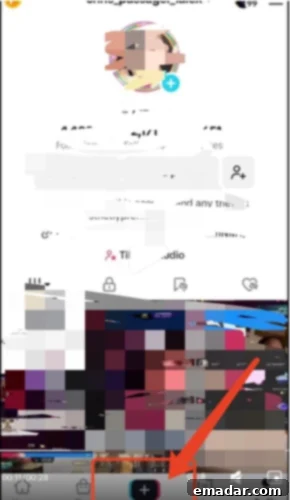
2. Select the “LIVE” Option: After tapping the “+” icon, you’ll be presented with various creation options such as “Camera,” “Templates,” and “LIVE.” In the navigation bar located at the bottom of this screen, scroll to the far right until you find and select the “LIVE” option. This will prepare your device for a live broadcast.
3. Customize Your Live Stream Settings: Before you hit the airwaves, take a moment to set up your live stream for maximum impact. This preparatory stage is crucial for attracting viewers and conveying the essence of your broadcast:
* Upload an Engaging Cover Image: This image is the first thing potential viewers will see in their “For You” page or when browsing live streams. Choose a high-quality, visually appealing image that accurately represents your stream’s content or your brand. It could be your logo, a picture of yourself, or a graphic teasing your topic. A compelling cover image acts like a billboard, inviting users to click and join.
* Craft a Catchy and Informative Title: Your live stream title is vital for discoverability and drawing in viewers. You have up to 32 characters to create a title that is both descriptive and enticing. Incorporate relevant keywords related to your content to improve its SEO (Search Engine Optimization) within TikTok. For example, if you’re demonstrating a new product, include the product name. If you’re hosting a Q&A, mention “Q&A” or “Ask Me Anything.” Don’t hesitate to use popular hashtags within your title to further boost visibility and make it easier for users interested in specific topics to find your stream.
4. Initiate Your Broadcast: “Go Live”!
Once your cover image and title are perfectly set, the final step is to tap the prominent “Go Live” button. A brief countdown will usually appear, and then you’ll officially be broadcasting to the world! Your live streaming journey on TikTok has begun.
After you’ve gone live, TikTok provides a suite of intuitive tools to enhance and manage your broadcast. You can easily flip your camera between front and rear views, apply various filters to enhance your appearance or create a specific mood, and utilize comment moderation features to keep discussions positive and on-topic. For larger streams, you can even invite trusted viewers to become administrators, assisting you in managing the chat and maintaining a welcoming environment. When you’re ready to conclude your stream, simply tap the “X” icon located in the upper left corner of your screen, confirm your choice, and your broadcast will end.
Elevating Your Live Streams: Crucial Details That Drive Success
While the technical aspects of going live are straightforward, transforming a basic stream into a captivating and high-performing broadcast lies in paying meticulous attention to detail. These “bonus points” are the elements that distinguish a good live stream from an exceptional one, leading to increased viewer retention, engagement, and ultimately, growth.
- Strategic Timing: The Golden Hour of Engagement
Understanding your audience’s habits is paramount. Before going live, delve into your TikTok analytics to identify when your followers are most active. While global trends suggest that evenings and weekends often see higher engagement, your specific audience might differ. For instance, if a significant portion of your followers resides in the UK, streaming during their late afternoon to evening hours (which might be late night or early morning in your local time) would be ideal. Experiment with different time slots and track the performance of each stream to pinpoint your optimal broadcasting window. - Optimal Live Duration: Keeping Viewers Hooked
Avoid overly short streams. TikTok’s algorithm often favors longer broadcasts, as they indicate sustained engagement. Aim for a minimum duration of two hours, especially as a beginner. This allows ample time for viewers to join, for you to cover your content thoroughly, and for natural conversation to unfold. Longer streams also give the algorithm more data points to understand your content and recommend it to relevant audiences. However, quality always trumps quantity; ensure you can maintain energy and engaging content throughout the entire duration. - Pre-Stream Hype: Building Anticipation
Don’t just go live unexpectedly. Create excitement and inform your audience in advance. Publish short video teasers or use the Stories feature to announce your upcoming live stream. Highlight what topics you’ll cover, any special guests you might have, or exclusive promotions you’ll offer. This proactive approach allows your followers to mark their calendars, set reminders, and ensures a strong initial turnout when you go live. Utilize engaging visuals and compelling calls to action in your announcements. - Professional Lighting: Illuminating Your Presence
Good lighting can dramatically elevate the production quality of your stream. It makes you look more professional, illuminates your features, and helps create a specific mood. For beginners, a simple ring light is an excellent and affordable starting point. Position it directly in front of you to minimize shadows and ensure even illumination. As you progress, consider investing in more advanced lighting setups like softboxes to achieve a softer, more flattering glow. Avoid harsh overhead lights or backlighting, which can create unflattering shadows or make you appear silhouetted. - Crystal-Clear Audio: The Foundation of Connection
Nothing deters viewers faster than poor audio quality. Ensure your streaming environment is quiet and free from distracting background noise. While your phone’s built-in microphone might suffice for initial tests, investing in an external microphone—even a simple lavalier (clip-on) mic—can significantly improve clarity. Test your audio levels before going live to ensure your voice is clear, crisp, and at an appropriate volume, without any echoes or distortion. - Unwavering Network Stability: A Seamless Experience
A stable internet connection is non-negotiable for live streaming. Nothing disrupts a broadcast more than lag, pixelation, or dropped connections. Before every stream, perform a speed test to ensure both your upload and download speeds are robust. Whenever possible, use a wired Ethernet connection for maximum reliability, or position yourself close to your Wi-Fi router. Minimize other devices using bandwidth during your stream to prevent potential slowdowns. - Static Camera Angle: Professionalism in Framing
A wobbly or constantly shifting camera can be disorienting and unprofessional for viewers. Use a tripod or a stable stand to keep your camera fixed throughout the broadcast. Experiment with different angles to find one that flatters you and your background. Aim for eye-level framing, ensuring your face is clearly visible and you maintain good eye contact with the camera, which simulates direct interaction with your audience. Your background should be clean, clutter-free, and ideally, visually appealing or branded. - Prepared Talking Points: Guiding Your Conversation
While live streams thrive on spontaneity, having a general outline or “talking points” is crucial. This isn’t about memorizing a rigid script, but rather about knowing the key messages you want to convey, the products you want to showcase, or the questions you want to address. Prepare welcome messages, engagement prompts, calls to action, and potential answers to frequently asked questions. Use cue cards or a discreet teleprompter app to keep your thoughts organized, ensuring a smooth and confident delivery without awkward silences or rambling. - Dynamic Interaction: Keeping Your Audience Engaged
Live streaming is a two-way street. Actively engage with your viewers by reading and responding to their comments and questions in real-time. Call out viewers by their usernames to create a personal connection. Incorporate interactive elements like Q&A sessions, polls, quizzes, or even mini-games. Plan for giveaways or special discount codes exclusive to your live stream to incentivize participation and reward your loyal viewers. The more interactive your stream, the more likely viewers are to stay and return. - Proactive Moderation: Cultivating a Positive Space
Maintain a positive and respectful environment in your chat. Before going live, utilize TikTok’s moderation settings to pre-set keywords that will automatically filter out or flag inappropriate comments. If possible, have a trusted friend or team member act as a live moderator to help manage the chat, answer simple questions, welcome new viewers, and address any negative or disruptive comments quickly. A well-moderated chat fosters a welcoming community for everyone. - Leveraging Replay Functionality: Content for the Future
Always enable the live replay function. TikTok typically saves your live streams for up to 90 days. This is invaluable for viewers who missed the live broadcast, allowing them to catch up on demand. More importantly, it’s a goldmine for content repurposing. Download your live stream video shortly after it ends. You can then re-watch it to analyze your performance and identify key moments. Edit these highlights into shorter, engaging TikToks, YouTube Shorts, or Instagram Reels, giving your content a second life and extending its reach beyond the live event.
The Power of Post-Live Analysis: Fueling Future Growth
The work doesn’t end when your live stream does. One of the most critical steps for continuous improvement and accelerated growth is conducting a thorough post-live analysis. This comprehensive review should cover multiple facets of your broadcast, providing actionable insights for your next stream.
- Data Review: Quantifying Your Performance
Dive into your TikTok analytics for the specific live stream. Key metrics to review include total unique viewers, peak concurrent viewers, average watch time, engagement rate (likes, comments, shares), new followers gained, and if applicable, gift revenue. Analyze viewer demographics and geographic locations. These numbers provide objective insights into what worked and what didn’t in terms of attracting and retaining an audience. - Process and Technical Review: Streamlining Operations
Reflect on the technical and logistical aspects of your stream. Were there any internet connectivity issues? Did your microphone or lighting work as expected? Was the camera angle consistent? How smoothly did you transition between topics or segments? Were there any glitches with graphics or on-screen elements? Identifying and documenting technical snags allows you to troubleshoot and prevent them in future broadcasts. - Host Performance Review: Refining Your Delivery
Critically evaluate your own performance as the host. How was your energy level throughout the stream? Were you clear and articulate? How effectively did you engage with the chat and answer questions? Did you handle any unexpected situations gracefully? Did you deliver your key messages effectively? It can be uncomfortable, but watching a replay of yourself can highlight areas for improvement in presentation, pacing, and interaction style.
Regardless of how late it might be after your stream, dedicating time to this summary is paramount. Pinpoint what aspects were executed exceptionally well, identify any key points you might have overlooked, and acknowledge any mistakes or missteps that occurred during the broadcast. Only through this continuous cycle of broadcasting, analyzing, and refining can you truly learn and grow faster as a TikTok Live streamer.
Congratulations, you now possess the comprehensive guide—your very own treasure map—to embark on your TikTok live streaming journey! Remember, success on TikTok Live, much like in any endeavor, hinges on meticulous preparation and an unwavering commitment to detail. By thoughtfully applying these strategies and tips, you’re not just going live; you’re setting yourself up to become a recognized and influential live streaming personality on TikTok. Go forth, create, connect, and captivate your audience!