
In today’s interconnected digital landscape, whether you’re a burgeoning cross-border e-commerce entrepreneur, a seasoned TikTok marketer, or simply an everyday internet user, the term “IP address” is undoubtedly familiar. An IP address serves as your unique digital identifier, akin to a street address in the physical world, broadcasting your location and identity as you browse websites, log into accounts, stream videos, and interact across the internet.
Despite its ubiquitous presence, many users remain unaware of how easily their IP address can be queried and the significant impact it can have on account security, online experience, and even business operations. Furthermore, the two primary forms—IPv4 and IPv6—often cause confusion due to their similar-sounding names yet distinct functionalities and implications.
This comprehensive article aims to demystify IP addresses, providing clarity on several critical aspects:
- How to effortlessly check your IP address.
- The fundamental differences between IPv4 and IPv6 and why they matter.
- How various types of IP addresses influence your online accounts, network environment, and business success.
Understanding the Digital Fingerprint: What Exactly Is an IP Address?
IP, an acronym for Internet Protocol, represents the foundational set of rules that govern how data is sent and received over the internet. Consequently, an IP address is a unique numerical label assigned to every device participating in a computer network that uses the Internet Protocol for communication. Think of it as your device’s primary form of identification when you go online.
Every action you perform on the internet—from sending an email to loading a webpage or streaming a video—involves your IP address. It’s the mechanism that ensures data packets reach their intended destination and that responses return to your specific device. Without IP addresses, the internet as we know it simply wouldn’t function. It’s a critical component for establishing connections and facilitating data exchange across vast global networks.
Key Functions and Roles of an IP Address:
- Device Identification: An IP address uniquely identifies your specific device (computer, smartphone, tablet, router, IoT device) on the network, distinguishing it from billions of other connected devices worldwide.
- Geolocation and Network Positioning: It provides a geographical indicator of your network’s location, pinpointing your general region, country, city, and even your Internet Service Provider (ISP). This data is often used for geo-targeted content, localized services, and security checks.
- Data Packet Transmission and Routing: IP addresses are essential for routing data packets across the internet. When you request information from a server, your IP address acts as the return address, enabling the server to send the requested data back to your device accurately and efficiently. This ensures seamless communication and content delivery.
- Security and Access Control: IP addresses are frequently used by websites and online services for security purposes, such as identifying unusual login attempts, blocking suspicious traffic, or restricting access based on geographical location.
Effortless IP Address Discovery: How to Check Your Own IP
Whether you’re using a smartphone, a desktop computer, or even trying to identify your router’s public-facing address, querying your public IP address is a straightforward process. Knowing your IP can be useful for troubleshooting network issues, verifying your online location, or understanding how websites perceive your connection.
✅ Method One: Utilizing Online IP Lookup Services
The simplest and most popular way to find your public IP address is by using a dedicated IP lookup website. These services are designed to display the IP address that external servers see when your device connects to the internet.
Simply open your web browser (Chrome, Firefox, Edge, Safari, etc.) and visit a reputable IP lookup site such as IPinfo (or similar services like WhatIsMyIP.com, iplocation.net, etc.). Upon loading the page, you’ll immediately see your current public IP address, along with additional details such as its geographical attribution (country, region, city), the type of Internet Service Provider (ISP) you’re using, and sometimes even your approximate location on a map. This method is quick, easy, and requires no technical expertise.
✅ Method Two: Employing Command-Line Tools for Local IP Discovery
For those who prefer a more direct approach or need to find their local network IP address, command-line interfaces offer a powerful solution. It’s important to distinguish that these commands typically show your *local* or *private* IP address within your home or office network, not your *public* IP address that the rest of the internet sees.
For Windows Systems:
To find your local IP address on Windows:
- Press the
Win + Rkeys simultaneously to open the Run dialog box. - Type
cmdand press Enter to open the Command Prompt. - In the Command Prompt window, type
ipconfigand press Enter.
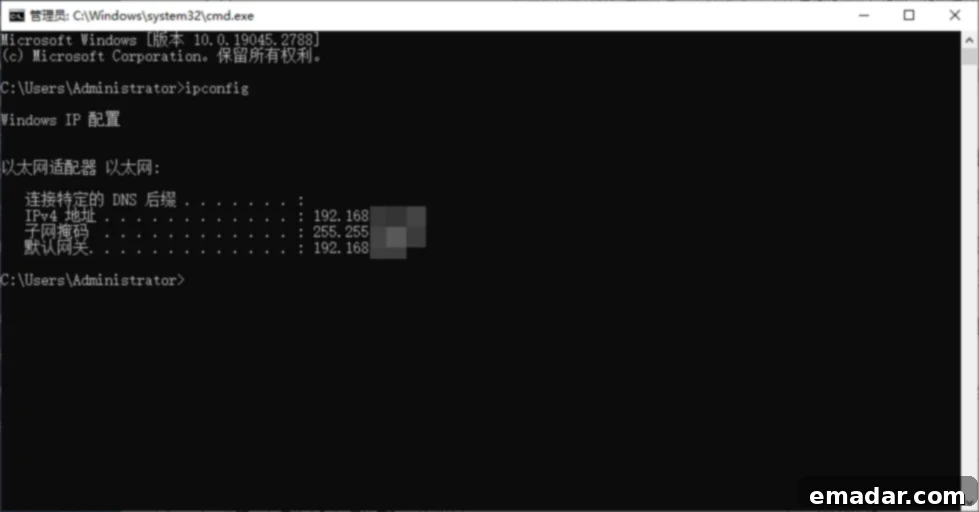
You will see a list of network adapters and their configurations. Look for “IPv4 Address” under your active network connection (e.g., Ethernet adapter or Wireless LAN adapter). This address typically starts with 192.168., 172.16., or 10., indicating a private network IP.
For Mac/Linux Systems:
To find your local IP address on macOS or Linux:
- On Mac, press
Command + Spaceto open Spotlight Search, then typeTerminaland press Enter. On Linux, open your preferred terminal application. - In the Terminal window, type
ifconfigand press Enter. (Note: On some newer Linux distributions,ip addris the recommended command asifconfigis deprecated.)
Similar to Windows, locate your active network interface (e.g., “en0” or “eth0” for Ethernet, “wlan0” for Wi-Fi) and find the “inet” entry, which represents your local IP address.
It is crucial to remember that the commands mentioned above (ipconfig and ifconfig/ip addr) display your local network IP address, which is typically an address like 192.168.x.x. This is distinct from your public IP address, which is assigned by your ISP and seen by the outside world. To check your public IP, the first method using an online lookup website is always the most accurate for external visibility.
The Internet’s Address Systems: Dissecting IPv4 vs. IPv6
Currently, all IP addresses globally fall into one of two primary formats: IPv4 and IPv6. While both serve the fundamental purpose of identifying devices on a network, they differ significantly in their design, capacity, and capabilities, reflecting different eras of internet development.
| Feature | IPv4 | IPv6 |
| Format Example | 192.168.0.1 | 2001:0db8:85a3:0000:0000:8a2e:0370:7334 |
| Address Length | 32-bit, approximately 4.2 billion unique addresses | 128-bit, providing an astronomically large number of addresses (3.4 x 10^38) |
| Address Availability | Nearing exhaustion, often requires Network Address Translation (NAT) | Abundant, supports a virtually unlimited number of devices and direct communication |
| Adoption Rate | Widely adopted and remains the dominant protocol, strong compatibility | Currently being rolled out globally, increasing adoption, but some legacy services may not fully support it |
| Security Features | Relies on optional IPSec for security | IPSec security is built-in and mandatory for some implementations, offering enhanced encryption and authentication |
| Configuration | Manual or DHCP | Stateless Address Autoconfiguration (SLAAC) or DHCPv6 |
The most pressing difference lies in the number of addresses each protocol can support. IPv4, developed in the early 1980s, uses a 32-bit addressing scheme, which translates to roughly 4.2 billion unique IP addresses. While this seemed vast at the time, the explosion of internet-connected devices—from smartphones and laptops to smart home appliances and IoT sensors—has led to IPv4 address exhaustion. To cope with this, technologies like Network Address Translation (NAT) were developed, allowing multiple devices within a private network to share a single public IPv4 address. However, NAT introduces complexity and can limit certain types of peer-to-peer communication.
IPv6, on the other hand, was designed to address this limitation. Utilizing a 128-bit addressing scheme, it offers an almost unimaginable number of unique IP addresses—approximately 3.4 x 10^38. This vast address space means that virtually every device on Earth could have its own unique, public IP address, eliminating the need for NAT in many scenarios. IPv6 also brings other improvements, such as built-in security features (IPSec), more efficient routing, and stateless address autoconfiguration, making network management simpler.
Practical Examples and Implications:
- Online Content Access: When you open your browser to watch a YouTube video, your device sends a request to YouTube’s servers. If you are on an IPv4 network, the source IP of your communication will be your IPv4 address. The server responds to this address. If you’re on an IPv6 network, the process is similar but uses your IPv6 address. While most major services like YouTube support both, the underlying protocol can influence routing and latency.
- Proxy Usage and Compatibility: In scenarios involving domestic or cross-border proxy IPs, many providers specifically offer and often default to IPv4 proxies. This is because IPv4 still maintains superior compatibility across a wider range of platforms, legacy systems, and online services globally. While IPv6 adoption is growing, its universal compatibility has not yet fully matured, meaning some niche applications or older servers might not support it, leading to connection issues if an IPv6-only proxy is used. For critical business operations, IPv4’s established compatibility often makes it the safer choice.
Beyond Connectivity: The Profound Impact of IP Addresses on Your Business and Online Activities
This section is perhaps the most critical for anyone operating online. Your IP address doesn’t just dictate your internet speed; it can be the difference between a thriving online business and constant account suspensions. The quality, type, and consistency of your IP address significantly influence your digital footprint and the way online platforms perceive your activity.
Scenario 1: Navigating TikTok Operations with Frequent IP Switching
TikTok, like many other social media platforms, employs sophisticated algorithms and stringent risk control mechanisms to detect suspicious activity. Frequent and erratic changes in your IP address, especially when using shared or low-quality proxy IPs, can trigger these security protocols. Imagine logging into an account from New York one minute and then instantly from Tokyo the next. Such rapid geographical shifts, particularly when associated with IP ranges known for abuse (e.g., data center IPs), are red flags for platforms like TikTok. This can lead to various penalties, ranging from shadowbanning (where your content visibility is drastically reduced) to outright account suspension and permanent bans, severely hindering your marketing and operational efforts.
Scenario 2: WhatsApp or Facebook Account Registration Issues Due to IP Blocking
Attempting to register new accounts on platforms like WhatsApp or Facebook with a compromised IP address can be a major hurdle. If the IP range you’re using has a history of spam, fraud, or other malicious activities, these platforms’ advanced detection systems will instantly flag it as originating from a “malicious network environment.” This often results in the inability to receive verification codes, immediate account suspensions upon creation, or persistent CAPTCHAs that make account setup frustrating and time-consuming. Such issues are particularly prevalent with free VPNs or cheap, shared data center proxies, which are often heavily abused.
Scenario 3: Slow Content Loading and Geo-Restrictions on YouTube and Other Streaming Services
Have you ever experienced buffering videos, endlessly loading content, or an inability to access certain shows on YouTube, Netflix, or other streaming platforms? This is often a direct consequence of your IP address. If your local network environment is congested, peering with the content delivery network is poor, or your ISP throttles certain types of traffic, your IP address will reflect these limitations. Furthermore, many services impose geo-restrictions, meaning content is only available to users with IP addresses from specific countries. Using a slow or improperly configured proxy IP can exacerbate loading times, while the right proxy, particularly one with servers strategically located near the content origin, can significantly enhance access speed and bypass geographical content blocks, providing a smoother, unrestricted viewing experience.
Scenario 4: Impact on SEO and Local Search Results
For businesses, an IP address can affect SEO. Search engines like Google tailor results based on your perceived location. If your IP address inaccurately places you, your local search results will be skewed, potentially showing competitors rather than your own local business. For SEO agencies, using distinct, clean IPs for different client tasks (e.g., local keyword research, competitor analysis in specific regions) is crucial to get unbiased data and avoid detection.
Scenario 5: Data Scraping and Web Harvesting Challenges
Businesses involved in market research, price monitoring, or lead generation often rely on data scraping. Websites actively monitor for repetitive requests from the same IP address, quickly identifying and blocking scrapers. Using a single, static IP for extensive scraping will inevitably lead to bans, CAPTCHAs, or IP blacklisting. A robust IP management strategy involving a pool of diverse, rotating, and high-quality IPs is essential to bypass anti-bot measures and ensure successful, uninterrupted data collection.
In essence, your IP address is a crucial factor in your online reliability and operational efficiency. Ignoring its importance can lead to costly disruptions, lost opportunities, and compromised account security across various digital ventures.
Mastering Your Digital Presence: How to Effectively Manage IP Addresses and Ensure Network Isolation
If you’re deeply involved in cross-border business, international marketing, managing multiple social media accounts, or performing data-intensive operations, effective IP management is not just an advantage—it’s a necessity. The key to mitigating risks and ensuring seamless operations lies in utilizing stable, secure, and pristine proxy IP resources. This approach guarantees that each of your online identities or accounts operates within a truly “isolated environment,” leveraging “fixed IP addresses” that originate from “authentic network sources.”
The solution for achieving this level of control and security often involves leveraging specialized proxy services. Among the most effective options are residential proxies, particularly static residential proxies, which combine the authenticity of a residential IP with the stability of a dedicated, unchanging address. These proxies are sourced from real ISPs and assigned to legitimate home users, making them indistinguishable from regular internet users to target websites.
A Recommended Solution: IPFLY’s Static Residential Proxies.
IPFLY provides a comprehensive suite of static residential proxy IP services designed to meet diverse and demanding operational needs. Whether your requirements involve strict environment isolation for multi-account management, seamless IP switching for dynamic tasks, dedicated IP addresses for specific accounts, geo-targeting capabilities for regional marketing, or the need for long-term stability in your connections, IPFLY offers an all-encompassing solution. Their static residential proxies offer a consistent, dedicated IP address that remains yours for the duration of your usage, mimicking a genuine home internet connection and drastically reducing the chances of detection or bans by sophisticated anti-bot systems.
By using IPFLY’s static residential proxies, businesses and individuals can effectively:
- Achieve True Account Isolation: Each account can be assigned a unique, dedicated IP, preventing cross-contamination and the “neighbor effect” often associated with shared proxies.
- Bypass Geo-Restrictions: Access content and services from specific geographical locations by choosing proxies in desired countries or regions.
- Ensure Uninterrupted Operations: The stability of static residential IPs means fewer disconnections and less need for frequent IP changes, leading to more reliable scraping, browsing, and account management.
- Enhance Security and Anonymity: Mask your true IP address and protect your online identity from tracking and surveillance.
- Mitigate Risk Control Triggers: With IP addresses that look and behave like genuine home users, the likelihood of triggering anti-fraud or anti-spam mechanisms on platforms like TikTok, Facebook, and WhatsApp is significantly reduced.
Investing in high-quality, managed proxy services like those offered by IPFLY empowers you to navigate the complexities of the digital world with confidence, ensuring your operations remain secure, efficient, and compliant.
Key Takeaways: Navigating the World of IP Addresses with Confidence
Understanding and effectively managing IP addresses is paramount for anyone engaging with the internet, especially for business operations. Let’s recap the essential points discussed:
- IP Addresses are Your Digital Identity: An IP address is your device’s unique “digital street address” on the internet, crucial for identification, geographical positioning, and data routing. You can easily check your public IP address using online tools or find your local IP via command-line prompts.
- IPv4 vs. IPv6: The Generational Divide: The core difference between IPv4 and IPv6 lies in their address capacity and format. While IPv4 is currently more prevalent and widely compatible, its addresses are depleting. IPv6, with its virtually infinite address space and enhanced features, represents the future of internet connectivity. However, most platforms and proxy services still primarily support IPv4 due to its established universality.
- IP Quality Directly Impacts Business and Account Security: For critical operations such as cross-border e-commerce, social media marketing (TikTok, WhatsApp, Facebook), content streaming, and data scraping, the quality and type of your IP address are decisive factors. A poor-quality IP can lead to account bans, slow loading times, geo-restrictions, and inefficient data collection, directly affecting your operational efficiency and profitability.
- Strategic IP Management with Premium Proxies is Essential: To circumvent risk control systems, ensure account security, improve content loading efficiency, and guarantee stable access, it is highly recommended to use professional and compliant proxy IP services. Solutions like IPFLY’s static residential proxies offer clean, stable IPv4 resources that mimic real user behavior, helping you avoid detection, bypass restrictions, and optimize your online activities.
📌 A Friendly Reminder for Digital Professionals: If you are managing multiple social media accounts, planning extensive WhatsApp campaigns, or overseeing any operation where your online identity matters, take a moment to examine your current IP setup. Is it dynamic or static? Is it shared with others or dedicated? Does it originate from a data center (IDC) or a genuine residential network? The right type of IP address is not just a technical detail; it’s a vital safeguard for every cross-border professional and online entrepreneur.
Experience the Difference with IPFLY Residential Proxies
IPFLY sets itself apart by operating its own robust server infrastructure combined with a sophisticated big data filtering system. This proprietary technology ensures that we deliver only the highest quality IP resources, specifically designed to meet the stringent demands of modern online operations.
- Authentic ISP-Allocated Residential IPs: We provide real IP addresses directly allocated by Internet Service Providers, ensuring that your connections appear as legitimate traffic originating from genuine home users.
- Pristine, Undetected IP Ranges: Our IPs are meticulously screened to guarantee they are clean, unpolluted, and free from any history of abuse or blacklisting. We ensure they are non-shared where dedicated solutions are required, and entirely free from association with malicious activities.
- Advanced IP Detection, Location Filtering, and Multi-Country Switching: Our platform offers powerful tools for IP detection, allowing you to verify the authenticity and location of your proxies. You can easily filter IPs by specific countries and regions and switch between multiple global locations to meet precise geo-targeting needs.
Fortify your operations against risk control mechanisms and secure your online presence. Achieve true IP isolation and unparalleled online freedom with IPFLY today!