
Many individuals and businesses frequently encounter a fundamental question when configuring networks, utilizing proxy IPs, or even registering social media accounts: “Are you using a Public IP or a Private IP?” This distinction, often overlooked, is absolutely critical for understanding your online presence, ensuring security, and optimizing your digital operations. The concept of IP addresses can seem daunting, but grasping the difference between public and private IPs is foundational to navigating the modern internet landscape effectively.
If you’ve ever found yourself wondering, “IPs can be public or private? I had no idea!” then you’ve come to the right place. This comprehensive guide will demystify these core networking concepts in an easy-to-understand manner, equipping you with the knowledge to make informed decisions about your internet connectivity and security.
By the end of this article, you will clearly understand:
- ✅ What exactly is a Public IP address and why is it essential?
- ✅ What is a Private IP address and how does it function within your network?
- ✅ The key differences between Public and Private IPs and their respective advantages and disadvantages.
- ✅ The practical scenarios where each type of IP is most suitable, particularly for global operations and social media management.
- ✅ How to easily determine whether your current connection is utilizing a Public or Private IP.

1. Understanding Public IP Addresses: Your Direct Gateway to the Global Internet
At its core, a Public IP (Internet Protocol) address is a unique identifier assigned to a device that directly connects to the internet. Think of it as your unique postal address on the vast global network. This address allows data to be routed directly to and from your device across the internet, making it globally accessible and recognizable by any other internet-connected device.
Imagine your Public IP as your actual home address. Anyone in the world can use this address to send you mail (or in digital terms, data packets). Without a unique, identifiable public address, other internet users and services wouldn’t know how to reach your specific device.
Public IP addresses are assigned by your Internet Service Provider (ISP) and are critical for any device or service that needs to be directly reachable from the outside world. This includes everything from hosting a website or a game server to establishing a remote access connection to your home network.
Key Characteristics of Public IP Addresses:
- Globally Unique and Reachable: Each public IP address is unique across the entire internet. This uniqueness ensures that data packets always reach their intended destination without confusion.
- Direct Internet Access: Devices with public IPs can communicate directly with any other device on the internet. This direct connectivity is essential for hosting services, making data readily available, and facilitating peer-to-peer connections.
- Versatility in Applications: Public IPs are indispensable for a multitude of advanced online activities. They enable you to host a web server, set up a File Transfer Protocol (FTP) server, access your home network remotely, participate in online gaming with dedicated servers, or even conduct live video broadcasts that need to be universally accessible.
- Dynamic vs. Static Public IPs: Public IPs can be either dynamic or static. Most residential internet users are assigned a dynamic IP, which means it can change periodically. Businesses or users requiring consistent, uninterrupted access to their servers often opt for a static IP, which remains constant.
2. Demystifying Private IP Addresses: The Backbone of Local Networks
Conversely, a Private IP (Internet Protocol) address is, as its name suggests, an IP address used exclusively within a private network, such as your home network or an office Local Area Network (LAN). These addresses are not directly routable on the public internet. Instead, they allow devices within the same local network to communicate with each other.
For example, your smartphone, laptop, smart TV, and printer, all connected to your home Wi-Fi router, typically have private IP addresses. While these devices can access the internet, they do so indirectly. When a device with a private IP needs to communicate with the outside world, its request first goes to the router. The router then uses a process called Network Address Translation (NAT) to send the request out to the internet using its single Public IP address. Responses from the internet are then routed back to the specific private IP address by the router.
Key Characteristics of Private IP Addresses:
- Local Scope and Reusability: Private IP addresses are only unique within their specific local network. The same private IP address range (e.g., 192.168.1.1) can be used simultaneously by millions of different private networks around the world without conflict. This reusability is governed by specific IP address ranges defined in RFC 1918.
- Enhanced Security: Devices with private IPs are inherently more secure from direct external threats because they are not directly exposed to the internet. Any external attempt to access a device with a private IP must first pass through the router and potentially its firewall.
- NAT as the Bridge to the Internet: NAT is the crucial technology that enables multiple devices with private IPs within a LAN to share a single public IP address when accessing the internet. This conserves public IP addresses, which are a finite resource.
- Cost-Effectiveness: ISPs only need to assign one public IP address per household or business, regardless of how many devices are connected within that local network. This makes internet access more affordable and efficient.
3. Public IP vs. Private IP: A Comparative Analysis
The fundamental distinction between Public and Private IP addresses lies in their scope, accessibility, and purpose. While both are essential for network communication, they serve different roles in the grand architecture of the internet.
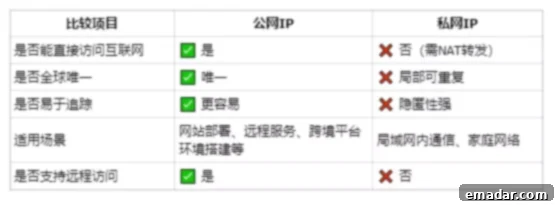
Let’s delve deeper into their core differences:
- Internet Accessibility:
- Public IP: Directly accessible and routable on the global internet. Any device anywhere can initiate a connection to a device with a public IP (provided there are no firewalls blocking it).
- Private IP: Not directly accessible from the internet. Devices with private IPs can initiate connections to the internet, but external devices cannot directly initiate connections to them without port forwarding or NAT traversal mechanisms configured on the router.
- Uniqueness and Scope:
- Public IP: Globally unique. No two devices on the internet can have the same public IP address at the same time.
- Private IP: Unique only within its local network. The same private IP address can exist in millions of different private networks worldwide. Private IP ranges are specifically reserved (e.g., 10.0.0.0/8, 172.16.0.0/12, 192.168.0.0/16).
- Security Implications:
- Public IP: More exposed to direct threats from the internet, necessitating robust firewalls and security measures.
- Private IP: Benefits from an inherent layer of security provided by the router’s NAT and firewall, as it’s not directly visible to the outside world.
- Allocation and Management:
- Public IP: Assigned by Internet Service Providers (ISPs) and managed by regional internet registries (RIRs).
- Private IP: Assigned by your local router (via DHCP – Dynamic Host Configuration Protocol) within your private network.
- Typical Use Cases:
- Public IP: Ideal for web servers, mail servers, VPN endpoints, remote access to devices, CCTV systems, and any service that needs to be directly available from the internet.
- Private IP: Suitable for everyday internet browsing, file sharing within a local network, network printing, and connecting multiple devices in a home or office without exposing them directly to the internet.
4. How to Determine Your Current IP Address Type
Understanding whether you’re using a Public or Private IP is crucial for diagnosing network issues or configuring services. Here’s how you can easily check:
- Find Your Public IP Address:
- The simplest way is to visit a website specifically designed for this purpose, such as WhatIsMyIPAddress.com or IPinfo.io. These sites will display the public IP address that your router is using to communicate with the internet.
- This IP is what the rest of the internet sees as your identity.
- Find Your Private IP Address:
- On Windows: Open the Command Prompt (search for “cmd”) and type
ipconfig, then press Enter. Look for “IPv4 Address” under your active network adapter (e.g., “Ethernet adapter” or “Wireless LAN adapter”). - On macOS/Linux: Open Terminal and type
ifconfigorip addr show, then press Enter. Look for the “inet” address under your active network interface (e.g., “en0” or “eth0”). - On Mobile Devices (iOS/Android): Go to your Wi-Fi settings, tap on the network you’re connected to, and you’ll typically find your IP address listed there.
- On Windows: Open the Command Prompt (search for “cmd”) and type
- Compare and Conclude:
- Once you have both your Public IP (from the website) and your Private IP (from your device settings), compare them.
- If your Private IP address starts with 10.x.x.x, 172.16.x.x to 172.31.x.x, or 192.168.x.x, it’s a private IP address.
- If your private IP is different from the public IP reported by the website, and your local IP falls within one of the private ranges, then your device is behind a router using Network Address Translation (NAT) to access the internet. This is the most common setup for home and small office networks.
- If your ISP has assigned you a Public IP directly to your modem/router, and your router isn’t performing NAT, then your local IP (the one reported by
ipconfig/ifconfig) might actually be a Public IP (less common for residential users but possible for certain business lines).
🔍 In most residential broadband setups, your computer or mobile device uses a Private IP address, which then accesses the external internet via your router’s Public IP address, provided by your ISP.
5. The Critical Role of IP Addresses in Global Business and Online Operations
For individuals and businesses operating in the global digital sphere, particularly those involved in cross-border e-commerce, social media management, or data intelligence, the type and quality of IP addresses they use are paramount. A standard private IP address, while secure for internal use, simply won’t cut it for sophisticated international operations. This is where the strategic use of high-quality public IPs, specifically residential proxies, becomes indispensable.
Why IP Types Matter for Global Operations:
- Cross-border E-commerce & Market Research: Accessing localized content, bypassing geo-restrictions for market analysis, monitoring competitor pricing in different regions, or managing multiple storefronts across various countries requires IPs that appear to originate from those specific locations.
- Social Media Account Management: Registering and managing multiple social media accounts (e.g., TikTok, YouTube, Facebook, Instagram) from a single location with a single IP often leads to account suspension or flagging. Platforms use IP addresses as a key factor in detecting bot activity or policy violations. High-trust public IPs, especially residential ones, are vital for maintaining account integrity and authenticity.
- Remote Work & Secure Server Deployment: For enterprises with global teams, establishing secure and stable remote access environments or deploying servers in specific geographic locations often necessitates dedicated, reliable public IPs.
- Data Scraping & Web Intelligence: Collecting vast amounts of public data for business intelligence, SEO monitoring, or academic research often involves frequent requests to websites. Without diverse and high-quality IP addresses, these requests are quickly blocked or rate-limited.
In these scenarios, the goal is often to appear as a genuine user from a specific geographic location to avoid detection, ensure access, and maintain anonymity. This is precisely why solutions like residential proxies, which provide real Public IPs from real residential internet connections, are highly valued.
6. IPFLY Static Residential Proxies: Your Solution for Advanced Online Needs
For those navigating the complexities of global online operations, IPFLY offers robust solutions, particularly with its static residential proxy IPs. These proxies are designed to provide the highest level of trust and stability, acting as your reliable digital footprint across international borders.
IPFLY Static Residential Proxies are ideally suited for these demanding scenarios:
- Cross-border Platform Account Management: Essential for the successful registration, nurturing, and operation of accounts on major international platforms like TikTok, YouTube, and Facebook. Our proxies help prevent account bans by mimicking genuine user behavior from target regions.
- Enterprise Remote Office Environments & Server Deployment: Facilitate the establishment of secure and stable remote working environments for distributed teams, along with reliable server deployment in various global locations, ensuring seamless operations and data accessibility.
- High-Security Social Media Matrix Operations: Crucial for managing extensive social media matrices where high anti-detection capabilities and trust scores are paramount. IPFLY proxies help bypass sophisticated platform security measures, ensuring long-term account viability.
- Global Search, Data Collection, and Market Intelligence: Perfect for tasks requiring geo-targeted searches, comprehensive data scraping, and in-depth market intelligence across different countries without encountering IP blocks or CAPTCHAs.
IPFLY provides access to genuine public IP addresses sourced from real overseas devices and residential networks. This ensures unparalleled stability and reliability, eliminating dropped connections that can plague less sophisticated proxy services. With support for multi-country node switching, IPFLY is widely utilized for building robust cross-border account environments and executing large-scale data collection projects. Our solutions are compatible with a wide range of configurations, including mobile devices, desktop computers, and advanced anti-detect browsers, offering maximum flexibility for your operational needs.
7. Conclusion: Navigating the Digital World with the Right IP Strategy
In summary, the fundamental distinction between Public IP and Private IP addresses boils down to one critical factor: whether they are directly exposed to and routable on the open internet. Understanding this difference is not just technical jargon; it’s a cornerstone for anyone engaging in online activities that go beyond basic browsing.
The core difference between Public IP and Private IP is: whether they are directly exposed to the internet.
- Public IP: Represents your true “network address” on the internet. It’s indispensable for activities that require direct external communication, such as cross-border business, remote access, hosting services, and any scenario where your online presence needs to be globally accessible and trusted.
- Private IP: Operates entirely within your local area network, offering enhanced security and efficient internal communication. While it allows you to “play” within your local network, it cannot directly “go out” or be directly accessed from the internet without assistance from a router.
For professionals involved in cross-border e-commerce, sophisticated social media management, or global business expansion, simply having internet access isn’t enough. Possessing a stable, secure, and highly trusted Public IP address – especially a residential type like those offered by IPFLY – is not merely an advantage; it is often the crucial first step toward successfully navigating the international digital market, building trust, and ensuring uninterrupted operations.
Choosing the right IP solution tailored to your specific online objectives is paramount. Whether you prioritize security, global reach, anonymity, or high success rates for complex tasks, an informed decision about your IP strategy will significantly impact your digital endeavors.
8. Why Choose IPFLY for Your IP Proxy Needs?
IPFLY distinguishes itself through a suite of advanced technical advantages, specifically engineered to assist users in efficiently configuring and deploying high-quality proxy IPs for their most demanding online tasks. Our commitment to excellence ensures that you have the robust infrastructure needed to succeed in a competitive digital landscape.
Here’s why IPFLY’s solutions are recommended:
- 1. Self-Built Global Server Network: IPFLY operates a proprietary server network spanning major cities across the globe. This self-managed infrastructure guarantees a high degree of IP resource purity, significantly reducing the risk of encountering “blacklisted” or compromised IPs that could hinder your operations. Our expansive network provides diverse geographic options, enabling you to effectively target specific markets and bypass geo-restrictions with confidence.
- 2. Dynamic IP Allocation Mechanism for Optimal Pool Management: While IPFLY specializes in static residential proxies for consistent identity, our underlying system employs a sophisticated dynamic IP allocation mechanism. This means that we actively manage our vast pool of IPs, ensuring that when new static residential proxies are provisioned, they are fresh, clean, and optimized for performance. This systematic approach minimizes the risk of users receiving IPs that have been overused or flagged, contributing to a higher success rate for long-term account management and data collection tasks.
- 3. Multi-Layered IP Filtering and Quality Assurance: We utilize advanced big data algorithms to rigorously filter and evaluate our IP resources. This multi-layered screening process meticulously identifies and discards low-quality or suspicious IPs from our network. By ensuring that only premium, high-trust IPs are available to our users, we significantly enhance the success rate of all proxy-dependent operations, from account registration to complex data scraping.
- 4. Robust Infrastructure and Dedicated Support: Beyond technical specifications, IPFLY is built on a foundation of robust infrastructure designed for maximum uptime and reliability. Our dedicated support team is available to assist you with any configuration challenges or queries, ensuring a smooth and uninterrupted experience as you scale your global operations.
9. Get Started with IPFLY Today!
Unlock the full potential of your online operations with IPFLY’s premium static residential proxies. Experience unparalleled stability, trust, and global reach for your cross-border e-commerce, social media management, and data intelligence needs.
👉 Claim your special offer and access high-quality IPs now!