
Have you ever wondered if your online activities are truly private when browsing the web? Perhaps you’re using a proxy service, confident that your internet traffic is perfectly hidden, yet an unseen “informant” might be revealing your secrets: a DNS leak. Today, we’ll delve deep into understanding what a DNS leak is, how to perform international DNS leak detection, and how to effectively safeguard against this significant privacy threat.
What is a DNS Leak and Why Should You Care?
The Domain Name System (DNS) acts as the internet’s essential “phonebook.” It translates user-friendly website addresses (like example.com) into numerical IP addresses (like 192.168.1.1) that computers use to locate each other on the network. When you type a website address into your browser, your device sends a DNS query to a DNS server, asking for the corresponding IP address. This crucial step is fundamental to how you access any resource online.
A DNS leak occurs when, despite using a privacy-enhancing service like a VPN (Virtual Private Network) or a proxy, your DNS queries are still routed through your local Internet Service Provider’s (ISP) DNS servers, rather than through the secure tunnel provided by your VPN or proxy. Imagine you’re making a confidential phone call through a secure line, but unintentionally, your neighbor overhears you dialing the number and who you’re trying to reach. That’s essentially what happens with a DNS leak: your traffic might be encrypted and routed through a remote server, but the critical information about which websites you’re trying to access is still exposed to your local ISP.
Consider a practical scenario: Sarah is using a proxy to access international content, believing her entire online session is routed through the proxy server. However, due to a DNS leak, her DNS queries are still being sent to her home country’s ISP. Even if the website content itself reaches her via the proxy, the DNS query records clearly show her ISP exactly which foreign websites she is visiting. This defeats the primary purpose of using a proxy or VPN for anonymity and access.
The Critical Importance of International DNS Leak Detection
For users who frequently access international websites, services, or conduct cross-border operations, DNS leak detection is not just recommended; it’s absolutely vital. Its importance is multifaceted:
- Enhanced Privacy Protection: A DNS leak directly compromises your online privacy by revealing your true browsing history. Even with a proxy or VPN, your ISP can log and potentially store these DNS queries, creating a detailed record of your online activities. This data can be used for targeted advertising, sold to third parties, or even accessed by government agencies in some jurisdictions. Preventing DNS leaks ensures that your online footprint remains genuinely anonymous, safeguarding sensitive personal information and browsing habits from unwanted surveillance.
- Effective Geo-restriction Bypassing: Many online services, streaming platforms, and websites implement geographical restrictions, limiting access based on your perceived location. When a DNS leak occurs, your real geographical location is exposed through your ISP’s DNS server, effectively rendering your proxy or VPN useless for bypassing these restrictions. The server detects that your DNS queries originate from your actual region, blocking your access despite your VPN/proxy connection. This frustrates attempts to access international content, conduct global market research, or manage international business operations.
- Mitigating Cybersecurity Risks: DNS leaks can inadvertently increase your vulnerability to various cybersecurity threats. Malicious actors could potentially exploit leaked DNS information to track your online behavior, launch targeted phishing attacks, or even perform man-in-the-middle attacks by redirecting your traffic to malicious servers. Furthermore, if you rely on a VPN or proxy to bypass censorship, a DNS leak can reveal your activities to monitoring authorities, potentially exposing you to legal repercussions or blocking your access to critical information. Protecting your DNS requests is a fundamental step in building a robust cybersecurity posture.

How to Perform DNS Leak Detection
Regularly checking for DNS leaks is a simple yet crucial step in maintaining your online privacy. Here are several effective methods:
Method One: Utilizing Online Detection Tools
The simplest and most user-friendly approach is to use specialized online DNS leak detection tools. Websites like dnsleaktest.com, ipleak.net, or browserleaks.com provide quick and comprehensive analyses of your current DNS setup. These tools typically display vital information, allowing you to ascertain if your privacy solution is working correctly:
- DNS Server IP Addresses: This shows the IP addresses of the DNS servers processing your requests. If you’re using a VPN or proxy, these IPs should belong to your service provider, not your local ISP.
- Server Geographical Location: The displayed location of the DNS servers should match the country of your VPN or proxy server, not your actual physical location.
- Leak Risk Assessment: Many tools will explicitly indicate whether a DNS leak is detected, often with a clear warning.
Detection Steps:
- First, ensure you are connected to your VPN or proxy service.
- Open your web browser and navigate to a reputable DNS leak detection website.
- Click the “Start Test” or “Detect DNS Leak” button.
- Carefully review the detection results. Look for any DNS servers listed that are associated with your actual ISP or your real geographical location. If you see them, you have a DNS leak.
Method Two: Command Line Detection
For more technically inclined users, command-line tools offer a precise way to diagnose DNS leaks. This method allows you to directly query DNS servers and observe the response path.
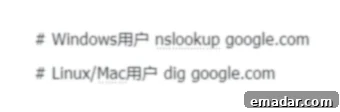
On Windows, you can use the `nslookup` command. For Linux and macOS, the `dig` command is commonly used. To test, open your terminal or command prompt and run a query for a well-known domain. For example, you might type `nslookup example.com` (Windows) or `dig example.com` (Linux/macOS).
After running your VPN/proxy, observe the ‘Server’ or ‘ANSWER SECTION’ in the output. If the IP address listed as the DNS server is your local ISP’s IP address rather than an IP address associated with your proxy or VPN provider, it signifies a DNS leak. A secure connection should show the DNS server IP of your privacy service.
Method Three: Browser Extension Detection
Several browser extensions are designed to monitor network requests, including DNS queries, in real-time. These extensions can provide immediate alerts if a DNS leak is detected, allowing users to take prompt action. They integrate seamlessly into your browsing experience, offering an extra layer of vigilance without needing to visit external websites. Always choose reputable extensions from trusted developers to avoid introducing new security vulnerabilities.
Common Scenarios Leading to DNS Leaks
Understanding the common causes of DNS leaks is essential for effective prevention. Here are some of the most frequent culprits:
- IPv6 Leaks: This is arguably one of the most prevalent types of DNS leaks. Even if your VPN or proxy effectively routes and encrypts your IPv4 traffic, many services are not fully optimized for IPv6. If your operating system is configured for dual-stack (both IPv4 and IPv6), and your VPN/proxy doesn’t handle IPv6 traffic, your device might send IPv6 DNS queries directly to your ISP, bypassing the secure tunnel entirely. This occurs because the system defaults to using the local DNS server for IPv6 requests, even while IPv4 traffic is securely routed.
- WebRTC Leaks: WebRTC (Web Real-Time Communication) is a technology built into modern browsers that enables real-time communication capabilities (like video calls, voice chat, and P2P file sharing) directly between browsers without the need for additional plugins. While beneficial, WebRTC can inadvertently expose your real IP address and, by extension, your DNS information, even when a VPN or proxy is active. It does this by using STUN/TURN servers to discover your public IP address for direct peer-to-peer connections, bypassing the privacy tool.
- Improper Proxy or VPN Configuration: Human error or misconfigured software is a significant source of leaks. This can include:
- Software Bugs: Sometimes, the VPN or proxy client itself might have bugs that lead to DNS leaks.
- Manual Setup Errors: If you’ve manually configured your VPN or proxy, incorrect settings in your network adapter, firewall rules, or DNS server entries can inadvertently cause traffic or DNS requests to bypass the secure tunnel.
- Split Tunneling Issues: While split tunneling allows specific apps to bypass the VPN/proxy, if not configured carefully, it can lead to DNS requests for the “secure” traffic being sent outside the tunnel.
Effective Strategies to Prevent DNS Leaks
Protecting yourself from DNS leaks involves a combination of careful selection, proper configuration, and proactive measures:
- Choose a Reliable VPN or Proxy Service: The foundation of robust DNS leak protection lies in selecting a reputable and high-quality service. Look for providers that explicitly advertise “DNS leak protection,” a “kill switch” feature, and have a strict no-logs policy. A trustworthy provider will manage its own DNS servers, ensuring that all your DNS queries are routed securely through their network and never reach your ISP. IPFLY, as a compliant proxy provider, stands out with significant advantages in IP isolation and environment segregation, offering robust DNS protection.
- Configure Custom DNS Servers: Manually setting your DNS servers to trusted, privacy-focused alternatives can be an effective mitigation strategy. Public DNS resolvers often offer enhanced privacy and security features compared to your ISP’s default servers. Popular choices include:
- 8.8.8.8 (Google DNS): A fast and reliable option, though Google’s data retention policies might be a concern for some.
- 1.1.1.1 (Cloudflare DNS): Known for its speed and strong commitment to user privacy, promising not to log identifiable user data.
- 9.9.9.9 (Quad9 DNS): Focuses heavily on security, automatically blocking access to known malicious domains.
You can usually configure these settings in your operating system’s network adapter settings or directly within your router for network-wide protection.
- Disable IPv6 (If Not Needed): If you don’t require IPv6 connectivity or your VPN/proxy doesn’t fully support it, temporarily disabling IPv6 on your device can significantly reduce the risk of IPv6-related DNS leaks. This can typically be done in your network adapter settings. Be aware that disabling IPv6 might limit access to some modern services that are IPv6-only.
- Enable DNS over HTTPS (DoH) or DNS over TLS (DoT): These protocols encrypt your DNS queries, preventing eavesdropping and tampering. DoH sends DNS traffic over HTTPS, making it look like regular web traffic, which helps bypass some forms of censorship and enhances privacy. DoT encrypts DNS queries using TLS, similar to how HTTPS secures web browsing. Many modern browsers (like Chrome, Firefox, Edge) and operating systems now offer built-in support for DoH. Enabling this feature adds a strong layer of encryption to your DNS requests.
- Utilize a Kill Switch: A kill switch feature (often found in premium VPN clients) automatically disconnects your internet connection if the VPN tunnel drops unexpectedly. This prevents any unencrypted traffic, including DNS requests, from being exposed to your ISP during a brief interruption in your secure connection.
- Manage WebRTC Settings: To prevent WebRTC leaks, you can use browser extensions (e.g., “WebRTC Leak Shield” or “WebRTC Network Limiter”) that block or limit WebRTC’s ability to expose your local and public IP addresses. Alternatively, some browsers offer native settings to disable or restrict WebRTC functionality.
DNS Leak Protection in Cross-Border Business Operations
For businesses and individuals engaged in cross-border e-commerce, digital marketing, or global data collection, international DNS leak detection and prevention are not just about personal privacy—they are fundamental to operational success and security. DNS leaks can have severe consequences for business activities:
- Increased Account Association Risk: Operating multiple accounts on platforms (e.g., e-commerce marketplaces, social media, ad networks) from the same real IP address or DNS server can lead to account linking, flagging, and potential bans. DNS leaks expose your consistent real location, making it easier for platforms to detect and associate your accounts, disrupting your operations.
- Failure to Bypass Geo-Restrictions: Businesses often need to access geographically restricted content for market research, competitor analysis, or localized content delivery. A DNS leak will betray your actual location, rendering your efforts to bypass these restrictions ineffective and hindering your ability to gather crucial business intelligence or manage regional content.
- Competitor Tracking and Business Intelligence Exposure: When conducting competitive analysis or monitoring foreign markets, DNS leaks can reveal your activities to rivals. If your DNS requests reveal your actual location, it could signal your interest in specific regions or products, potentially exposing your strategic moves or research methodologies.
- Impact on Advertising Campaign Performance: For precise ad targeting and verification, businesses rely on accurate location data and the ability to simulate user experiences from different regions. DNS leaks can skew location data, leading to misdirected ad spend, inaccurate analytics, and compromised ad verification processes. This directly impacts the effectiveness and ROI of your international advertising campaigns.
IPFLY’s residential proxies are specifically engineered to address these challenges, providing stable, clean, and reliably geo-located IP addresses with robust DNS protection. This ensures that your cross-border business operations remain stealthy, compliant, and highly effective.
Conclusion: Safeguarding Your Digital Footprint
While often overlooked, DNS leaks represent a significant threat to online privacy and security. The implications range from compromised personal anonymity to severe operational hurdles for cross-border businesses. By understanding the mechanics of DNS leaks, regularly performing international DNS leak detection, and implementing the recommended prevention strategies, you can significantly enhance your digital security posture.
Remember, true online security is not a one-time setup but an ongoing process of vigilance and maintenance. In an increasingly interconnected and complex digital landscape, staying informed about threats like DNS leaks and knowing how to counter them is paramount. Proactive measures ensure that your online activities, whether personal browsing or critical business operations, remain private, secure, and truly anonymous.
Whether you’re an individual user seeking to protect your personal browsing habits or an enterprise managing extensive cross-border operations, integrating DNS leak detection into your routine cybersecurity practices is essential. In this digital era, protecting your privacy is synonymous with protecting yourself.
IPFLY is dedicated to fortifying cross-border operational accounts, specializing in the proxy IP market by offering:
- ✅ Access to 90 million+ residential IP resources globally, spanning over 190 countries.
- ✅ Support for both exclusive static residential IPs and dynamic rotating residential IPs.
- ✅ High purity, ISP native IPs, with data center options available.
- ✅ Multi-protocol support: HTTP/SOCKS5/HTTPS, ensuring strong platform compatibility.
- ✅ Seamless API integration, compatibility with fingerprint browsers, and quick adaptation to business workflows.
👉Register now to rapidly establish a highly trustworthy cross-border environment!