
Whether you’re an e-commerce professional engaged in cross-border trade, a TikTok operator managing multiple accounts, or just a regular internet user, the term “IP address” is undoubtedly familiar. An IP address serves as your digital identity in the vast expanse of the internet, much like a unique house number. It’s the label that identifies you when you browse websites, log into accounts, stream videos, or engage in any online activity.
However, many individuals are unaware that their IP addresses can be easily discovered, potentially compromising account security and impacting their overall online experience. Furthermore, the existence of both “IPv4” and “IPv6” often leads to confusion, as their similar names belie distinct functionalities and implications.
This comprehensive article aims to demystify IP addresses, covering essential aspects:
- How can you find your IP address?
- What are the key differences between IPv4 and IPv6?
- How do various IP types influence your accounts and network environment?
Understanding the Fundamentals: What Exactly is an IP Address?
IP, an acronym for Internet Protocol, represents the foundational set of rules governing how data is sent over the internet. Consequently, an IP address is a unique numerical label assigned to every device connected to a computer network that uses the Internet Protocol for communication. It acts as your device’s “identity card” when you go online, ensuring that information sent from and to your device reaches its correct destination.
The Core Functions of an IP Address Include:
- Identifying Device Identity: Every device on a network—be it your smartphone, laptop, smart TV, or even a server—has an IP address that uniquely identifies it. This allows other devices and servers to locate and communicate with it. Without unique identifiers, the internet as we know it simply wouldn’t function.
- Determining Network Location: Your IP address provides crucial information about your geographical location, typically down to the country, region, city, and even your internet service provider (ISP). This geo-location data is utilized for various purposes, including delivering localized content, enforcing geo-restrictions, and analyzing web traffic patterns.
- Facilitating Data Packet Transmission and Routing: When you send data over the internet, it’s broken down into small units called packets. Each packet contains the source IP address (your device) and the destination IP address (the server you’re communicating with). Routers across the internet use these IP addresses to determine the most efficient path for packets to travel, ensuring they reach their intended recipient accurately and swiftly. This intricate routing process is fundamental to all internet communications.
How to Effortlessly Discover Your IP Address
Whether you’re using a mobile phone, a desktop computer, or even a router, finding your public IP address is a straightforward process. Understanding your IP can be helpful for troubleshooting, checking your online presence, or verifying your network configuration.
✅ Method One: Utilizing Online IP Lookup Websites
The simplest way to ascertain your public IP address is by visiting a dedicated IP lookup website. Simply open your web browser (Chrome, Firefox, Safari, Edge, etc.) and navigate to a site like “What Is My IP,” “IPinfo.io,” or even perform a quick Google search for “What is my IP address.” Upon loading the page, these services will instantly display your current public IP address, along with additional details such as its geographical location (country, region, city), and the type of internet service provider (ISP) you are using. This method provides the external IP address that the rest of the internet sees when your device communicates online.
✅ Method Two: Employing Command-Line Tools
For those comfortable with command-line interfaces, your operating system provides built-in tools to query network information. However, it’s crucial to understand that these commands typically show your *private* or *local* IP address within your home or office network, not your *public* IP address.
For Windows Systems:
Press the Win + R keys simultaneously to open the Run dialog box. Type cmd and press Enter to launch the Command Prompt. Once the Command Prompt window appears, type ipconfig and press Enter. This command will list network adapter information, including your device’s private IP address (often starting with 192.168., 10., or 172.16. to 172.31.).
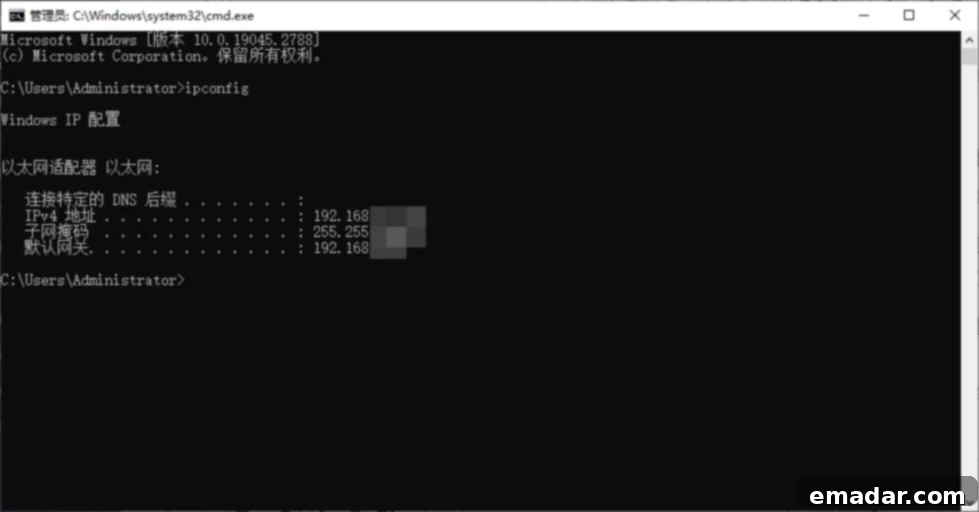
For Mac/Linux Systems:
On a Mac, press Command + Space to open Spotlight Search, then type Terminal and press Enter. On Linux, open your preferred terminal application. Once the terminal is open, type ifconfig (or sometimes ip a on newer Linux distributions) and press Enter. Similar to Windows, this command will display your private IP address within your local network.
Important Distinction: Please be aware that the commands above reveal your *local* or *private* IP address (e.g., one starting with 192.168.). This is the address your device uses to communicate within your home or office network. It is distinct from your *public* IP address, which is the single address assigned by your ISP to your router and is visible to the entire internet. Network Address Translation (NAT) allows multiple devices on a private network to share a single public IP address when accessing the internet. To find your public IP, you must use Method One.
IPv4 vs. IPv6: Unpacking the Differences
The internet relies on two primary formats for IP addresses: IPv4 and IPv6. While both serve the fundamental purpose of identifying devices and routing data, they differ significantly in their structure, capacity, and capabilities. Understanding these differences is crucial as the internet continues to evolve.
| Aspect | IPv4 | IPv6 |
| Format Example | 192.168.0.1 (Dotted-decimal notation) | 2001:0db8:85a3:0000:0000:8a2e:0370:7334 (Hexadecimal notation) |
| Address Size | 32-bit addresses, approximately 4.3 billion unique addresses | 128-bit addresses, yielding an almost infinite number of unique addresses (340 undecillion) |
| Address Sufficiency | Nearing exhaustion, often requires Network Address Translation (NAT) | Vastly abundant, capable of supporting trillions of devices, eliminating the need for NAT |
| Current Popularity | Still widely used, strong compatibility with legacy systems and devices | Increasingly adopted, especially in new network deployments, but some services and older hardware may not yet fully support it |
| Security Features | IPsec is optional and often added as an extra layer | IPsec (IP Security) is built-in and mandatory, offering enhanced end-to-end security |
| Configuration | Manual or DHCP (Dynamic Host Configuration Protocol) | Stateless Address Autoconfiguration (SLAAC) and DHCPv6 for easier network setup |
Illustrative Examples to Clarify the Distinction:
- Browsing YouTube: When you open your browser and navigate to YouTube, your device initiates a request to YouTube’s servers. If you are connected to an IPv4 network (which is still most common globally), your outgoing communication will carry your IPv4 address as the source. YouTube’s servers will respond to this IPv4 address. If you were on an IPv6 network, the communication would use your IPv6 address. This seamless process highlights how IP versions dictate the underlying communication protocol.
- Proxy IP Usage: In scenarios involving domestic or cross-border proxy IP usage, many service providers explicitly state that they only support IPv4. This is primarily because IPv6’s widespread compatibility is still a work in progress, and many legacy systems or niche applications have not yet fully transitioned or integrated IPv6 support. This often necessitates the use of IPv4 proxies for guaranteed functionality and broader reach in certain operational contexts.
- Future of IoT: The sheer abundance of IPv6 addresses is critical for the Internet of Things (IoT). With billions of devices—from smart home appliances to industrial sensors—requiring unique identifiers, IPv4’s limited address space simply wouldn’t suffice. IPv6 is designed to accommodate this massive expansion, allowing every single smart device to have its own unique, globally routable IP address.
The Profound Impact of IP Addresses on Your Business Operations
This section is perhaps the most critical for professionals: your IP address isn’t just a technical detail; it’s a vital component that profoundly affects not only your internet speed but also, crucially, the very security and longevity of your online accounts and business ventures. The quality and type of IP address you use can dictate success or failure in various digital landscapes.
Scenario 1: Frequent IP Switching in TikTok Operations Leading to Account Suspension
TikTok, like many other social media platforms, employs sophisticated anti-fraud and risk control systems. These systems are highly sensitive to sudden and frequent changes in IP addresses, especially if these IPs are associated with shared networks or datacenter proxies. If your account repeatedly logs in from different, seemingly unrelated IP locations in a short period, or if it uses IPs with a poor reputation (e.g., previously flagged for spam or malicious activity), TikTok’s algorithms may flag it as suspicious bot activity or an attempt to bypass geo-restrictions. This often triggers severe consequences, ranging from shadowbanning and content suppression to outright account suspension or permanent bans. Maintaining a consistent, high-quality IP address for each TikTok account is paramount for sustainable operation.
Scenario 2: IP Blockage During WhatsApp or Facebook Registration, Preventing Verification Codes
When attempting to register new accounts on platforms like WhatsApp or Facebook, encountering issues like not receiving verification codes or instant account flagging is a common problem. This often stems from using IP addresses that have been previously identified by these platforms as originating from “malicious network environments.” These could be datacenter IPs, VPN IPs, or shared proxies that have been abused by other users for spamming, botting, or fraudulent registrations. Platforms maintain blacklists of such IP ranges to prevent abuse. If your IP falls into one of these blacklisted segments, your registration attempts will be automatically blocked, or the platform will refuse to send verification codes, effectively preventing you from creating or accessing your accounts. A clean, reputable IP address is essential for successful account registration and verification.
Scenario 3: Slow YouTube Video Loading and Inability to Access Content
Experiencing persistent buffering, low-resolution playback, or complete failure to load videos on platforms like YouTube can often be attributed to issues with your local network environment or geographic location. This can include high latency due to long physical distances to content servers, network congestion, or even geo-restrictions that limit access to certain content based on your IP’s location. By utilizing a high-quality proxy IP with a server located closer to the content delivery network (CDN) or in a region where the content is unrestricted, you can significantly bypass these issues. A proxy can optimize your routing, reduce latency, and enable access to geo-restricted content, thereby dramatically improving streaming speed and overall user experience.
Additional Business Scenarios Where IP Quality is Critical:
- E-commerce and Market Research: For businesses conducting competitor analysis, monitoring geo-targeted pricing, or verifying ad placements, the IP address determines the localized view of the internet they receive. Using local proxies allows businesses to see exactly what customers in specific regions see, providing accurate market intelligence.
- Data Scraping and Web Crawling: Collecting large volumes of data from websites often leads to IP bans or rate limiting. High-quality, rotating proxy IPs are indispensable for data scraping operations, allowing continuous data extraction by distributing requests across numerous IPs, making it appear as if many different users are accessing the site.
- Social Media Management (Multi-Account): For agencies or individuals managing multiple social media accounts (e.g., Instagram, Twitter, LinkedIn), each account requires a distinct and consistent IP profile to avoid being linked together by platform algorithms. Using separate, dedicated proxy IPs for each account prevents cross-account flagging and maintains account integrity.
- Ad Verification and Fraud Prevention: In the advertising technology (AdTech) sector, IP addresses are used to verify ad placements, detect click fraud, and ensure ads are displayed to the correct target audience in the right geographical locations. Reliable IP data is crucial for maintaining the integrity of ad campaigns.
In essence, for any business operating in the digital realm, especially those involved in cross-border activities, data analysis, or multi-account management, strategic IP management is not an option but a necessity. The right IP strategy can be the difference between robust, scalable operations and constant setbacks.
Meeting IP Management and Network Isolation Needs Effectively
For individuals and businesses engaged in cross-border e-commerce, international social media marketing, data aggregation, or any operation requiring distinct online identities, robust IP management and network isolation are not merely beneficial—they are absolutely essential. The key lies in utilizing stable, secure, and clean proxy IP resources that can simulate genuine user behavior and provide a dedicated, isolated online environment for each account or task.
This is where the choice of proxy type becomes critical. While datacenter proxies offer speed and cost-effectiveness, their identifiable nature often leads to detection and blocking by sophisticated platforms. Residential proxies, on the other hand, are IP addresses provided by Internet Service Providers (ISPs) to real homeowners, making them appear as legitimate users. Static residential proxies combine this authenticity with the stability of a fixed IP address, which is crucial for maintaining consistent online identities.
The solution to these intricate needs is to leverage a high-quality proxy service that offers dedicated IP resources. This ensures that each of your online profiles operates within its own “independent environment” with a “fixed IP” that originates from a “real network” location. This setup is paramount for evading sophisticated anti-bot and risk control mechanisms employed by major online platforms.
Proposed Solution: IPFLY’s Static Residential Proxies. IPFLY provides a comprehensive, one-stop solution tailored to various operational requirements. Whether your priority is environmental isolation for distinct account management, flexible IP switching for diverse tasks, robust account separation to prevent linking, precise regional proxy targeting, or ensuring long-term stability for continuous operations, IPFLY’s static residential proxies are engineered to deliver reliable performance and mitigate operational risks effectively.
By investing in premium proxy solutions, you empower your business to navigate the complexities of the internet with confidence, ensuring uninterrupted access, enhanced security, and sustained operational efficiency across all your global digital endeavors.
Comprehensive Summary
- IP Address Fundamentals: An IP address functions as your unique digital “house number” on the internet, crucial for identifying devices and routing data. It can be easily queried through various online tools and command-line interfaces. Understanding both your local (private) and public IP is important for effective network management and online operations.
- IPv4 vs. IPv6 Distinction: The core difference between IPv4 and IPv6 lies in their address length, format, and the sheer number of addresses they can support. While IPv4 is a 32-bit system facing exhaustion, IPv6 is a 128-bit system offering an almost limitless supply, designed for the future of the internet. Currently, IPv4 remains the predominant standard, and many platforms and legacy systems continue to primarily support it, making its continued relevance undeniable for many business applications.
- The Criticality of IP Quality for Business: For businesses engaged in cross-border e-commerce, social media marketing, data scraping, or any form of multi-account management, the quality and type of IP address used directly dictate account security, content loading efficiency, and the overall stability of operations. Poor quality or frequently changing IPs can lead to account bans, geo-restrictions, and significant operational setbacks.
- Strategic IP Management with Professional Services: To effectively mitigate online risks, bypass geo-restrictions, and enhance operational efficiency, it is highly recommended to partner with a professional and compliant proxy IP service provider like IPFLY. Such providers offer access to clean, stable, and dedicated IPv4 (and increasingly IPv6) resources, such as residential or static residential proxies. These superior IP types are instrumental in maintaining authentic online footprints, preventing platform detection, and ensuring seamless, uninterrupted digital activities for your business.
📌 An Important Reminder: If you are managing multiple social media accounts, planning extensive WhatsApp campaigns, or engaging in any activity requiring distinct online identities, it is prudent to first assess your current IP type. Is it dynamic or static? Is it a shared IP or a dedicated one? Does it originate from a datacenter (IDC) or a genuine residential network? The right IP address is not merely a tool; it is a fundamental safeguard for every cross-border professional, ensuring the security and success of their digital ventures.
Elevate Your Operations with IPFLY Residential Proxies
IPFLY, leveraging its proprietary server infrastructure and advanced big data filtering system, is committed to providing only premium IP resources that ensure maximum reliability and performance:
- Authentic ISP-Assigned Residential IPs: We provide real IP addresses issued directly by Internet Service Providers to residential users, making them virtually indistinguishable from regular internet traffic. This authenticity is key to bypassing sophisticated detection systems.
- Pristine, Unpolluted IP Segments: Our IPs are carefully curated to be non-shared and boast no history of abuse, spamming, or blacklisting. This guarantees a clean online reputation for your operations, significantly reducing the risk of flags or bans.
- Comprehensive Control Features: IPFLY proxies support robust IP detection, precise geographical location filtering, and seamless multi-country switching capabilities. These features empower users to tailor their IP strategy to specific project needs, ensuring targeted and efficient operations across global markets.
To effectively manage risk, prevent account flagging, and ensure seamless online operations, utilize IPFLY for unparalleled IP isolation and control!