

In the dynamic and often challenging world of cross-border e-commerce and extensive overseas social media matrix management, one of the most persistent and daunting challenges faced by countless professionals is the dreaded “IP association leading to account bans.” This issue can bring operations to a grinding halt, causing significant financial losses and reputational damage. However, this critical pain point can be effectively resolved when the pristine, high-purity IPs offered by IPFLY Global Proxy are seamlessly integrated with the advanced environment isolation technology of the ClonBrowser Fingerprint Browser. This comprehensive guide will walk you through the in-depth configuration of these two powerful tools, enabling you to establish an entirely “independent identity” for each operational environment and meticulously circumvent any association risks.
Understanding the Imperative: Why Independent Digital Identities Matter
The digital landscape is increasingly scrutinized by major platforms, which employ sophisticated algorithms to detect unusual activity or linked accounts. Operating multiple online stores, managing numerous social media profiles for marketing, or engaging in Web3 activities from a single IP address or with identical browser fingerprints is a sure-fire way to trigger these detection systems. Such actions often lead to swift account suspensions, loss of hard-earned digital assets, and severe operational disruptions. Establishing truly independent digital identities is not just a best practice; it is a fundamental requirement for sustainable and scalable online operations. By ensuring that each account operates within its own distinct digital environment, you mitigate the risk of platform detection and maintain the integrity of your entire online ecosystem.
Discovering IPFLY: Your Gateway to Pure Global Proxies
IPFLY stands out as a premier provider of high-quality global proxy IP services, specifically designed to meet the rigorous demands of professional online operations. What sets IPFLY apart is its reliance on an exclusive IP control mechanism coupled with a fully self-built server infrastructure. This proprietary approach ensures unparalleled reliability, speed, and, most importantly, the exceptionally high purity of its IP resources. With a vast network spanning over 190 countries and regions worldwide, IPFLY boasts an impressive pool of more than 90 million premium IP resources. These resources include highly sought-after locations in popular markets such as the United States, the United Kingdom, Japan, and many more, offering unparalleled flexibility and reach for global users. The commitment to a self-managed infrastructure translates into superior performance, enhanced security, and a consistent level of service that is critical for mission-critical online tasks.
IPFLY’s Diverse Proxy Solutions and Unbeatable Value
IPFLY offers a range of proxy solutions tailored to different operational needs, all designed with purity and performance in mind:
1. Static Residential Proxies – Charged Per IP
- Unlock incredible savings with discounts of up to 80% off! (Don’t forget to use discount code 【IP6688】 at checkout to avail this exclusive offer).
- Experience ultra-high purity native IPs, which are meticulously sourced to mimic real user connections. This makes them perfectly suited for sensitive social media operations, particularly on platforms like TikTok, Facebook, and Instagram, where IP detection is common. Native IPs are often less prone to detection because they originate from legitimate internet service providers, giving the impression of a genuine user.
- Enjoy access to these premium static residential IPs for as low as $1.92 per IP, offering exceptional value for long-term, stable identity management. Static residential IPs provide a consistent and dedicated IP address, ideal for maintaining a stable digital presence for specific accounts or tasks over extended periods. This stability is crucial for operations that require a constant geographical presence.
2. Dynamic Residential Unlimited Traffic Plan – Charged Per GB
- Benefit from an additional 20% discount on dynamic residential proxy traffic when you apply the discount code 【IP6688】.
- For high-volume data needs, the 900GB package is available at a competitive price of $1.03 per GB. This plan is perfect for tasks requiring frequent IP rotation and large data transfers, such as extensive web scraping, comprehensive market research, and large-scale ad verification, where continuously changing IPs enhance anonymity and prevent blocking.
- For the most demanding users, a limited-time special offer presents the 5000GB package at an unbeatable rate of just $0.67 per GB. This is an unparalleled opportunity to secure high-quality dynamic residential traffic at the industry’s most competitive price. Dynamic residential IPs offer high anonymity by frequently rotating through a vast pool of residential IPs, making it extremely difficult for websites to track user activity across sessions. This flexibility is invaluable for operations that benefit from a fresh digital footprint with each connection.
These pricing structures, combined with the high quality and expansive reach of IPFLY’s network, make it an indispensable tool for anyone serious about professional-grade online operations that require robust, reliable, and undetectable proxy solutions.
Introducing ClonBrowser: The Powerhouse of Fingerprint Isolation
ClonBrowser is a cutting-edge multi-account management fingerprint browser that has garnered the trust of over 100,000 users globally over its impressive 7-year history. This platform is engineered to provide a secure and isolated browsing environment for managing a vast array of online accounts across various platforms. Its core strength lies in its ability to create unique browser fingerprints for each profile, effectively mimicking individual physical devices. This includes spoofing critical browser parameters such as user-agent strings, canvas fingerprints, WebGL rendering details, timezone settings, language preferences, installed fonts, and more. By altering these identifiable attributes, ClonBrowser ensures that each account appears as a distinct and independent user to websites and online services, making it virtually impossible for platforms to link them.
ClonBrowser is the go-to solution for securely managing accounts on popular platforms such as Facebook, TikTok, Amazon, and Web3 applications, in addition to supporting more than 1000 other online services. This robust isolation prevents cross-account detection and safeguards your valuable digital assets. Whether you’re an e-commerce seller managing multiple storefronts, a digital marketer handling numerous social media profiles, an affiliate marketer requiring diverse accounts, or a blockchain enthusiast participating in various Web3 projects, ClonBrowser provides the essential layer of security and anonymity required for seamless, undetected operation. Its intuitive interface and powerful features make complex multi-account management accessible and secure for professionals at all levels.
The Unbeatable Synergy: IPFLY and ClonBrowser for Ultimate Anonymity
The true power emerges when IPFLY’s high-purity, geographically diverse proxy IPs are combined with ClonBrowser’s sophisticated browser fingerprinting and environment isolation capabilities. This powerful synergy creates an unparalleled defense against platform detection mechanisms. IPFLY provides the “where” – a unique, untainted IP address that dictates your virtual location and identity on the network layer, making it seem as though you are browsing from a distinct geographical spot. ClonBrowser provides the “who” – a unique, spoofed browser fingerprint that makes your digital device appear distinct on the application layer, ensuring that your browser’s unique characteristics (like fonts, screen resolution, and operating system) are randomized and unique for each profile. Together, they form a complete, impenetrable digital identity, making each of your online accounts appear as if it belongs to a different, legitimate user operating from a unique physical device and location. This combination is the ultimate strategy for preventing association risks, scaling operations securely, and ensuring the long-term viability and success of your online ventures without fear of detection or bans.
Step-by-Step Configuration Guide: Integrating IPFLY Static Native IP with ClonBrowser
To fully leverage the combined power of IPFLY and ClonBrowser, follow these detailed steps to configure your IPFLY static native IP within ClonBrowser, creating a robust and isolated browsing environment for each of your online profiles:
Step 1: Acquire Your IPFLY Static Native IP
Your journey begins with securing a high-quality static native IP from IPFLY. Navigate to the official IPFLY website. If you haven’t already, register for a new account using a valid email address and then log in to your user dashboard. This secure portal will serve as your command center for purchasing, managing, and retrieving all your purchased IPs. Ensure you use a strong password and keep your login credentials secure.
Step 2: Select and Purchase Your Desired IP Package
Once logged into the IPFLY dashboard, locate and click on the “Residential Static IP” section, typically found in the main navigation or sidebar. From there, proceed to “Package Purchase” and then specifically select “Static Native IP.” You will be presented with various country options. Carefully choose the country that best aligns with your operational needs (e.g., if you’re targeting the US market or need an IP for a US-based platform, select a US IP). Proceed with the purchase. Remember, as a special benefit for ClonBrowser users, you can enjoy an exclusive 20% discount on your IPFLY package by simply using the discount code 【IP6688】 at checkout. This ensures you get premium IPs at an even better value.
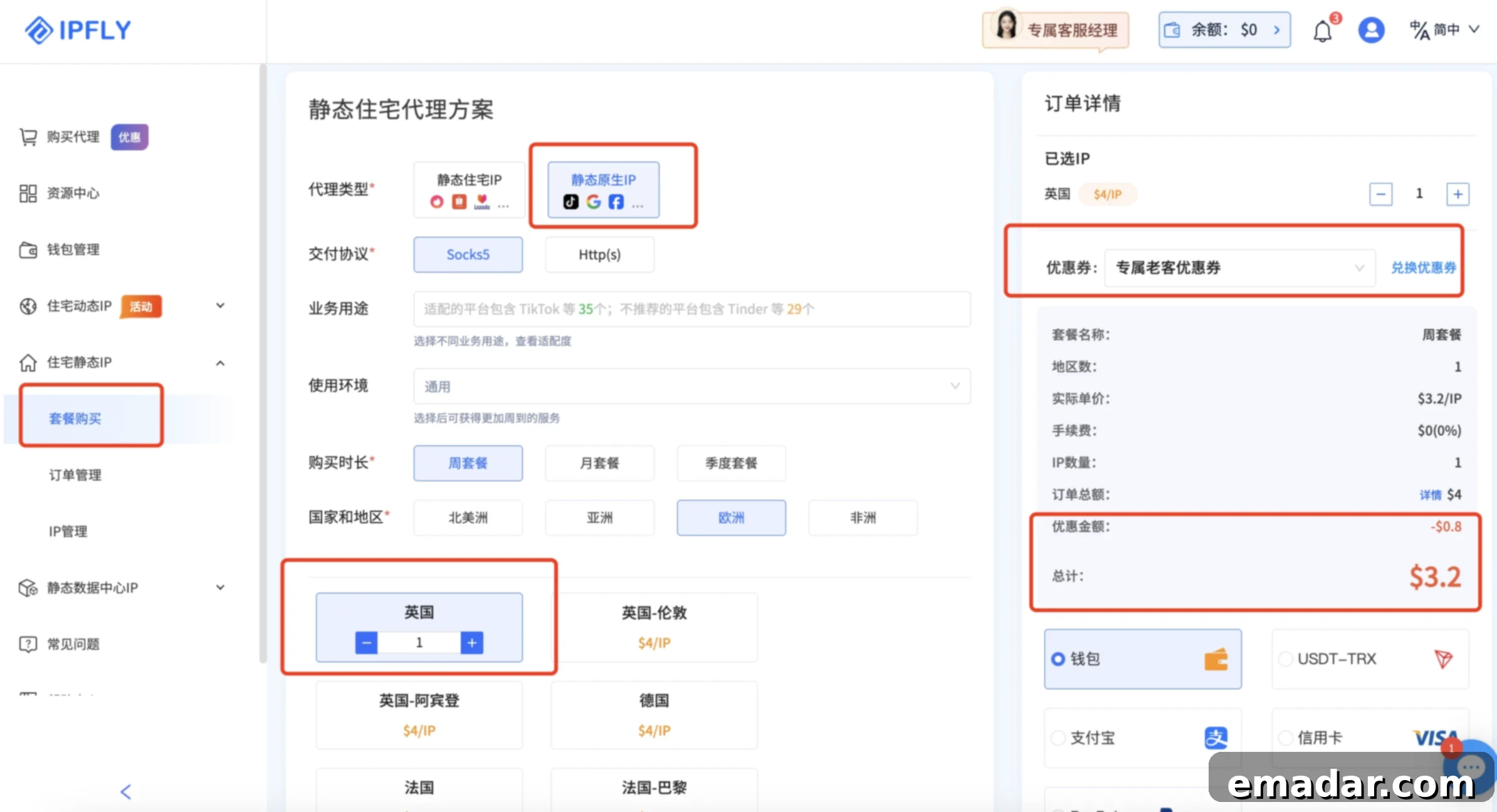
Step 3: Retrieve Your Purchased IP Details
Upon successful payment and package activation, your newly acquired static IP details will be immediately accessible. Return to the “Residential Static IP” section within your IPFLY dashboard and click on “IP Management.” Here, you will find a comprehensive list of all your purchased IPs, along with crucial connection information. This typically includes the specific IP address, the designated port number, a unique username, and a password required for authentication. Keep this information readily available as you will need to accurately input it into ClonBrowser in a subsequent step. It’s recommended to copy these details to a secure temporary location.
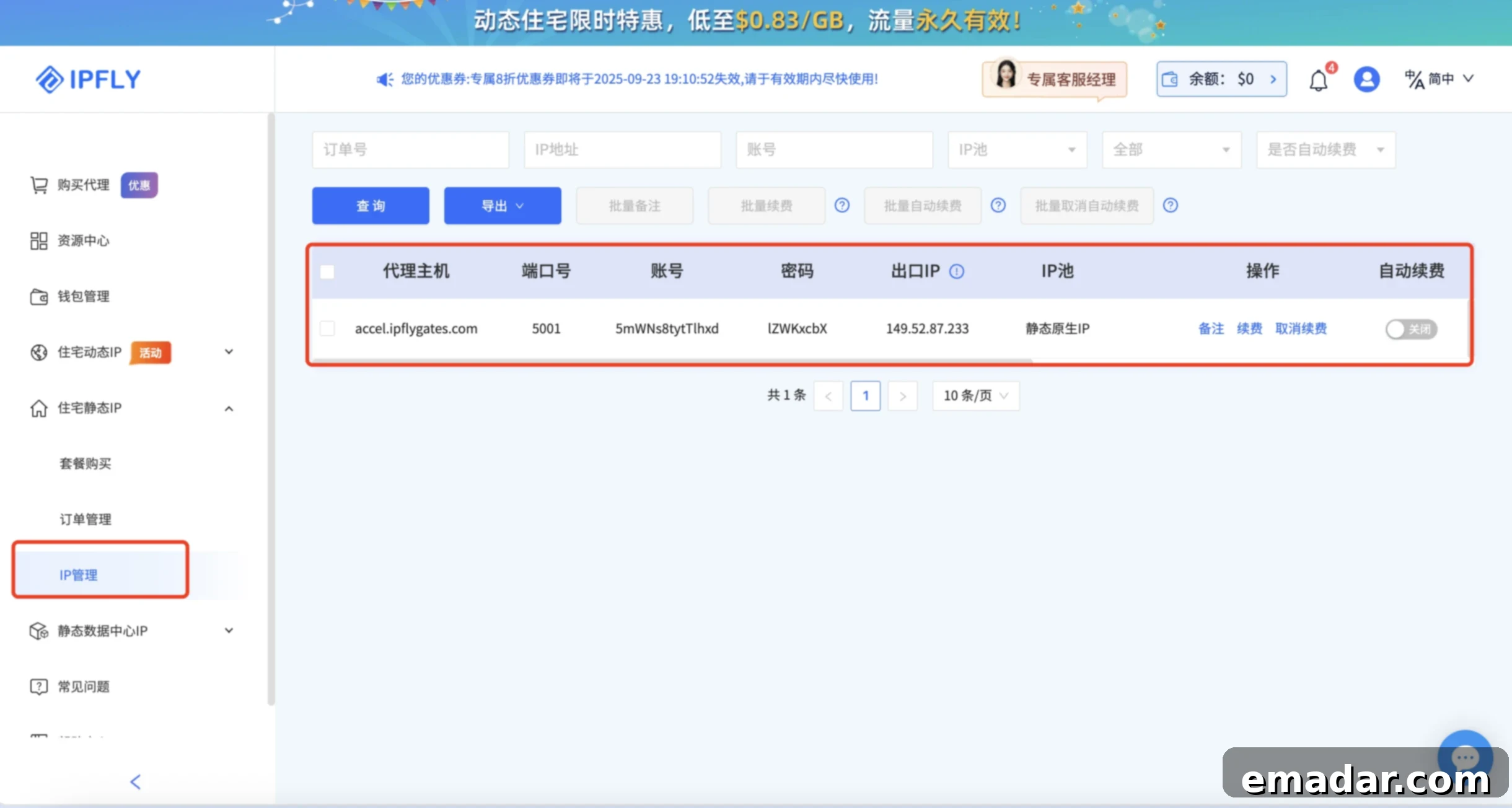
Step 4: Download and Log In to ClonBrowser
Now, it’s time to set up your isolation environment. Download and install the ClonBrowser fingerprint browser application on your computer. Ensure you download it from the official website to avoid any security risks. After installation, register for a new account if you haven’t already, and then log in to its intuitive dashboard. ClonBrowser’s interface is designed for ease of use, making multi-account management straightforward and efficient. Familiarize yourself with the main layout, which typically displays your created browser profiles.
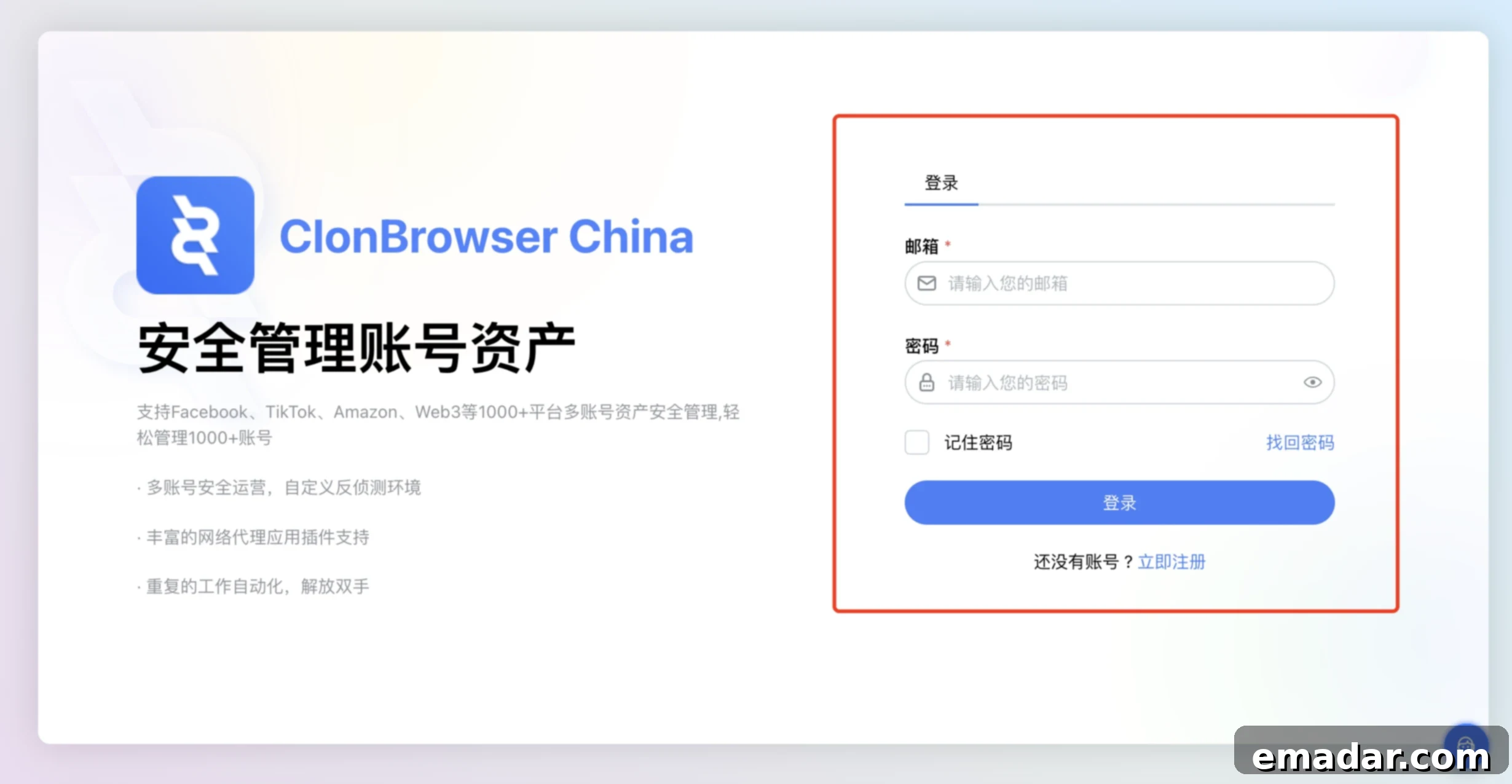
Step 5: Initiate a New Browser Profile Configuration
Within the ClonBrowser dashboard, locate and click the “Create Browser” button (or a similar prompt like “New Profile”). This action will open a configuration window, where you will define the parameters of your new isolated browsing environment. Begin by filling out the “Basic Settings” section. This typically involves giving your new browser profile a unique and descriptive name (e.g., “TikTok US Account 1,” “Amazon Seller Germany,” “Facebook Ad Account”). You can also add optional notes for better organization and assign it to a specific group if you manage many profiles. A well-organized profile name will help you quickly identify the purpose and associated accounts of each isolated environment.
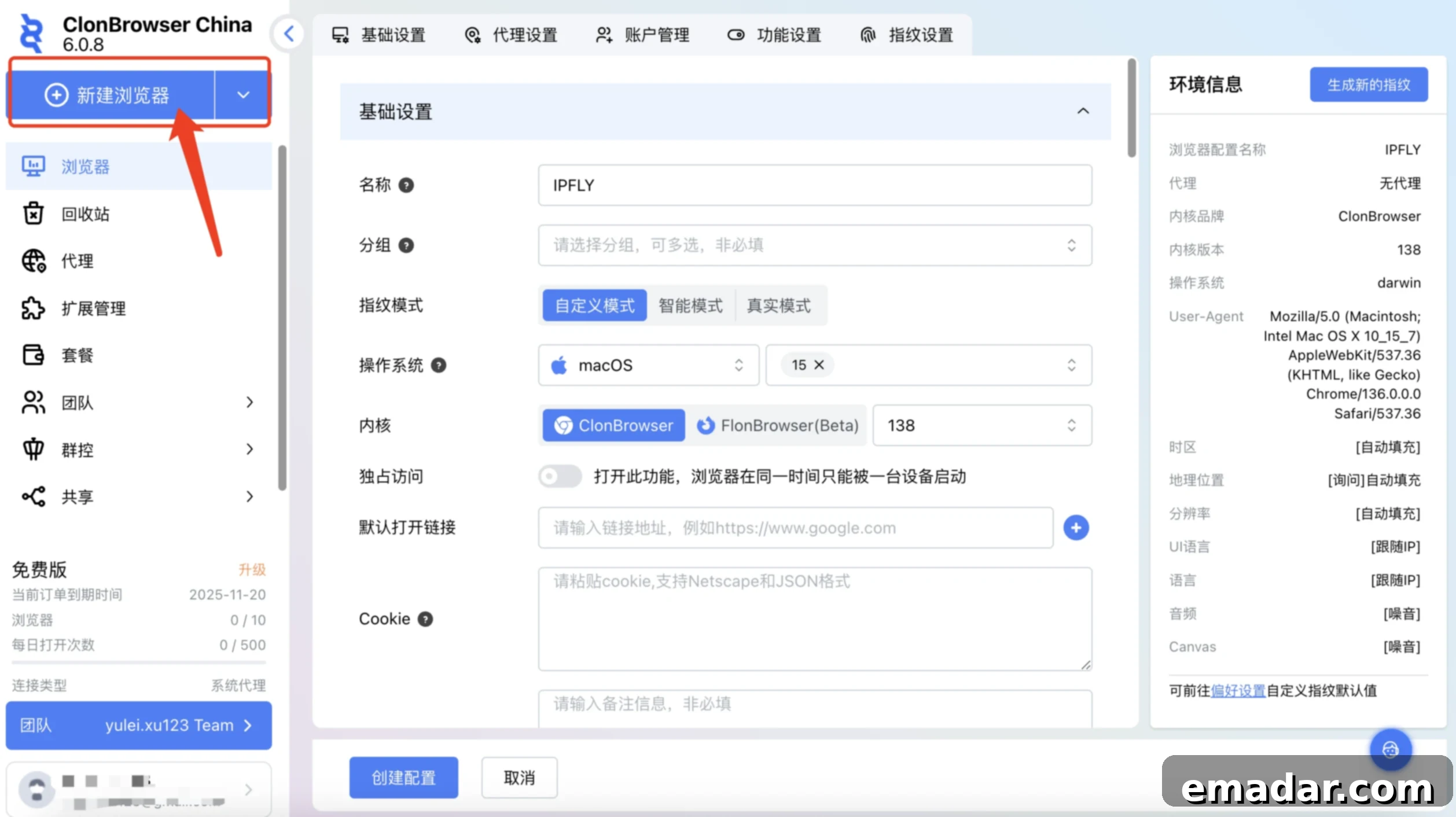
Step 6: Configure Proxy Settings with IPFLY Details
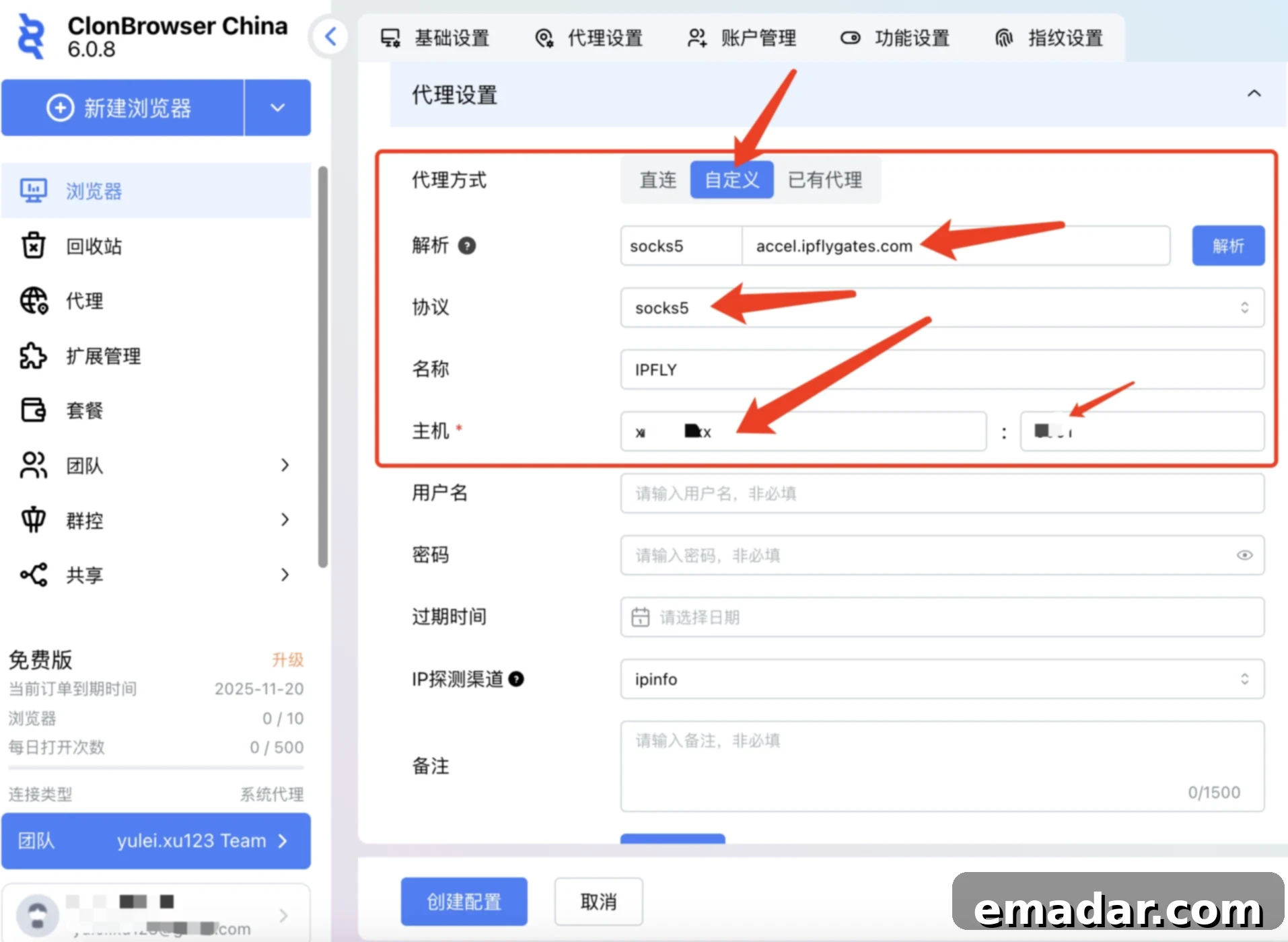
This is a crucial step for integrating your IPFLY proxy, forming the network layer of your independent digital identity. In the configuration window, navigate to the “Proxy Settings” tab. Select “Custom” as your proxy type, which allows for manual input of proxy details. Now, carefully copy the IP address, port, username, and password that you retrieved from the IPFLY “IP Management” section in Step 3. Paste these details precisely into the corresponding fields in ClonBrowser. For the protocol, select the option that matches your IPFLY proxy (e.g., SOCKS5 or HTTP(S)). Most IPFLY static residential proxies use SOCKS5 for enhanced security and performance. Double-check all entered information to ensure absolute accuracy, as even a minor typo will prevent the proxy from connecting correctly.
Step 7: Finalize Other Settings and Create Profile
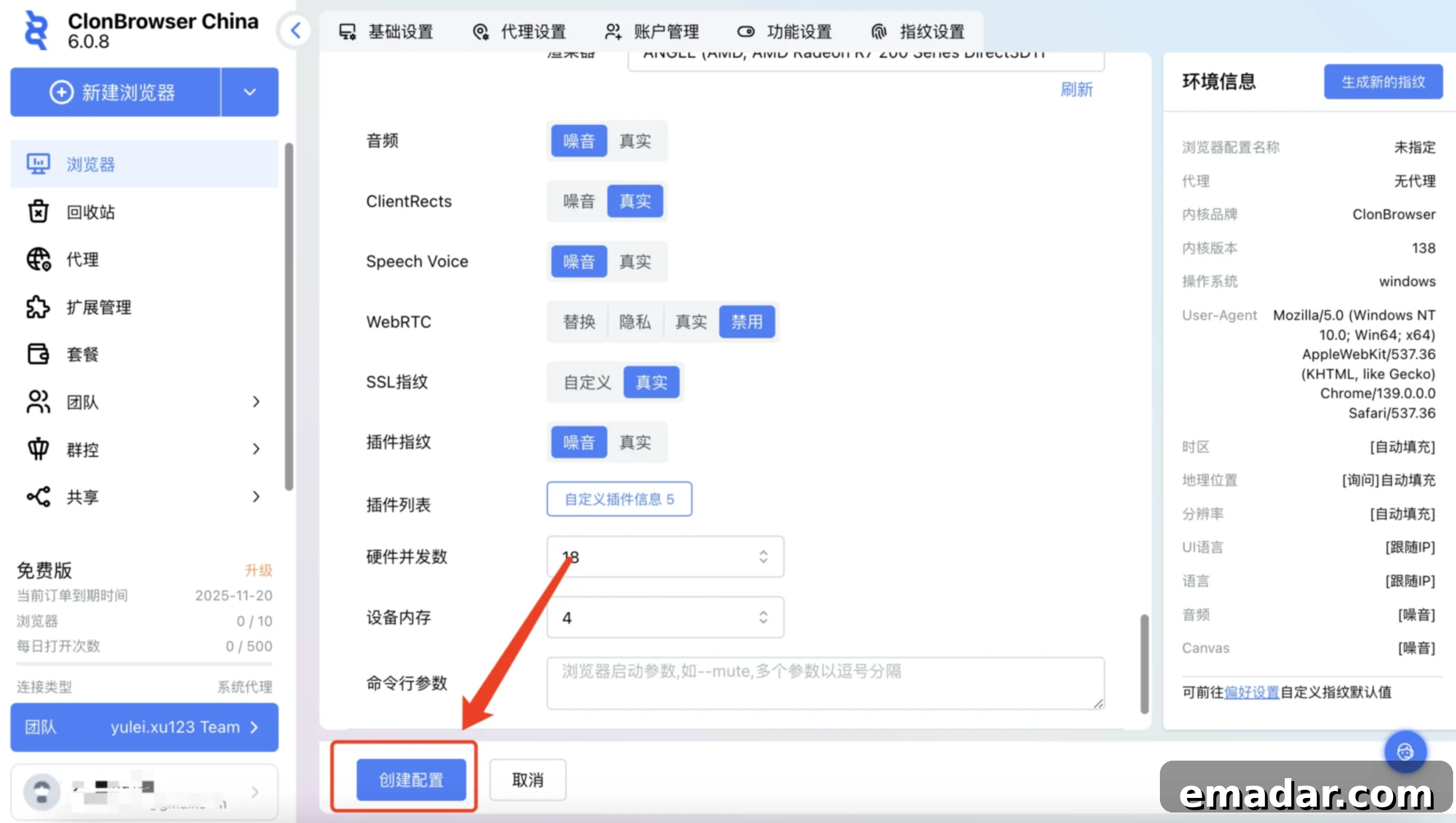
Before creating your profile, take a moment to review and customize the remaining settings to further enhance the uniqueness of your digital identity. This includes “Account Management” where you can import cookies from existing accounts (crucial for maintaining login sessions), or set up specific user agents to mimic different browsers or operating systems. Explore “Function Settings” which might involve configuring automated tasks, specific browser extensions for that profile, or custom start pages. Critically, delve into the “Fingerprint Settings.” ClonBrowser will automatically generate a unique browser fingerprint by default, but you can often customize parameters like screen resolution, operating system, hardware details, and even WebRTC settings to further enhance uniqueness and mimic a genuinely distinct device. Once you are satisfied with all configurations, click “Create Configuration” to save your new, robustly isolated browser profile.
Step 8: Launch Your Secure and Independent Environment
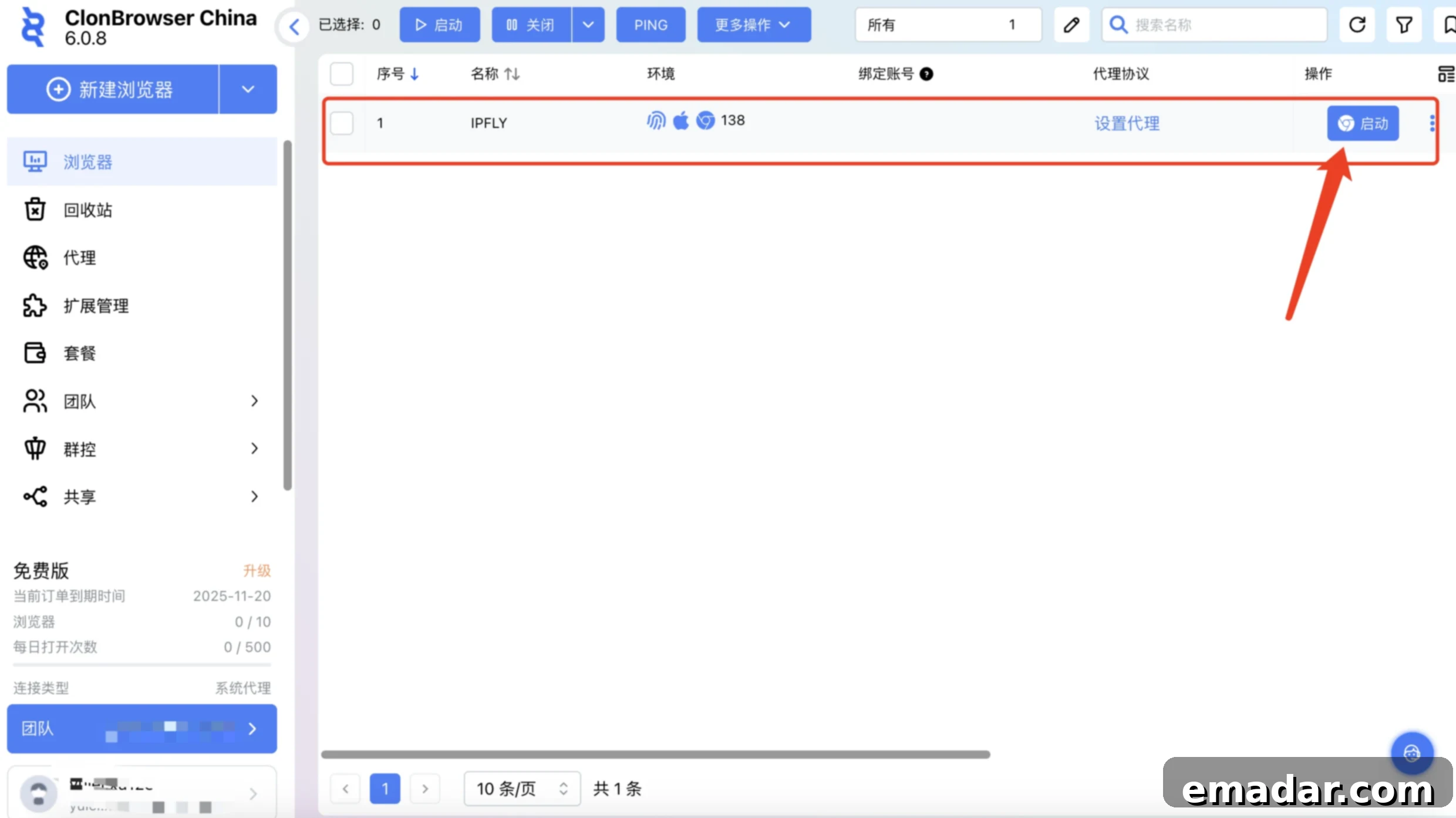
Congratulations! You have successfully created a browser profile that boasts both an independent IP address from IPFLY and a uniquely spoofed browser fingerprint from ClonBrowser. Back on the ClonBrowser main dashboard, you will now see your newly created profile listed among your other browser environments. To begin browsing within this secure and isolated environment, simply click the “Launch” button next to your profile. Each time you launch this specific profile, you will be operating under its designated unique IP and custom fingerprint, effectively isolating it from all other profiles. This significantly reduces the risk of account association and bans, allowing you to operate multiple accounts with peace of mind and unparalleled security.
Important Note: For optimal performance and to ensure seamless access to global services, it is recommended that these operations, particularly the initial setup and testing of the proxy connection, are performed within a reliable overseas network environment if possible. This can help prevent potential connectivity issues or latency that may arise from local network restrictions or geographical distance when accessing international proxy services. If you encounter issues, ensure your local network is not blocking proxy connections.
With these steps meticulously followed, the integration of IPFLY global proxy with ClonBrowser fingerprint browser is now complete. You are now equipped with a powerful toolset to manage your multi-account operations with unprecedented security and anonymity, setting the foundation for scalable and undetectable online activities.
Broadening Your Horizon: Benefits and Use Cases
Beyond simply preventing account bans, the combined solution of IPFLY and ClonBrowser opens up a plethora of opportunities for various online endeavors, offering a competitive edge in today’s digital economy:
- Scalable E-commerce Operations: Easily manage numerous online stores on platforms like Amazon, eBay, Shopify, and Etsy without risking cross-account detection. Expand your market reach by operating from different virtual locations, catering to diverse customer bases and avoiding geo-restrictions.
- Advanced Social Media Marketing: Develop and manage extensive social media matrices on platforms like TikTok, Facebook, Instagram, Twitter, and LinkedIn for targeted marketing campaigns, content distribution, and audience engagement, all while maintaining account integrity and avoiding platform suspicion.
- Comprehensive Market Research: Conduct competitor analysis, monitor pricing strategies, and gather crucial market intelligence from various geographical locations without leaving a digital footprint. Access geo-restricted content, analyze regional trends, and understand local market dynamics more accurately.
- Secure Web3 and Blockchain Activities: Engage in decentralized finance (DeFi), NFT trading, and other blockchain-related activities with enhanced anonymity and security, protecting your digital assets and privacy from surveillance and potential breaches.
- Ad Verification and Brand Protection: Verify ad placements and monitor brand mentions across different regions to ensure compliance with advertising standards and detect fraudulent activities, ensuring your advertising budget is spent effectively and your brand reputation is safeguarded.
- SEO Monitoring and Local Search Optimization: Monitor search engine rankings from different cities and countries to optimize local SEO strategies, understand regional search result variations, and gain an advantage in specific geographic markets.
This sophisticated combination provides a robust framework for professionals seeking to expand their digital footprint securely and efficiently, transforming potential roadblocks into unprecedented opportunities for growth and innovation across the global online landscape.
Ready to Elevate Your Online Operations?
Don’t let IP association and account bans hinder your progress in the competitive digital world. Embrace the future of secure, scalable online management with the powerful combination of IPFLY Global Proxy and ClonBrowser Fingerprint Browser. Take the decisive step towards safeguarding your digital identities, protecting your valuable accounts, and expanding your global reach today. Start leveraging the power of truly independent browsing environments and unlock new potentials for your business.
One-Click Registration/Download Channels
IPFLY: https://console.ipfly.net/register
ClonBrowser: https://www.clonbrowser.net/