
Have you ever experienced these frustrating scenarios?
- Opening YouTube, only for a video to take more than ten seconds to load and start playing?
- Watching your video quality inexplicably drop to a pixelated 360p in the middle of a captivating scene?
- Getting stuck with comments that load halfway, or suffering from unbearable lag during a live stream, making interaction impossible?
Before you rush to blame your computer or Wi-Fi connection, consider this: it’s highly probable that your internet connection is being “throttled,” either by your Internet Service Provider (ISP) or by the platform itself. In such cases, a reliable proxy IP can act as your personal “acceleration lane,” significantly improving your online video experience.
This comprehensive article will guide you through understanding the nuances of slow YouTube loading and how to effectively overcome these hurdles. We’ll delve into:
- ✅ The core reasons why YouTube videos might be loading slowly or buffering constantly.
- ✅ How proxy IPs can effectively accelerate your YouTube experience, and which specific types offer the best performance.
- ✅ A step-by-step guide on how to correctly configure a proxy IP to ensure smooth, high-definition YouTube streaming every time.
❓Why Does YouTube Load So Slowly for Many Users? Unmasking the Causes
The frustration of a lagging YouTube video is universally understood. While the causes can be multifaceted, several common culprits frequently contribute to a subpar streaming experience. Understanding these issues is the first step towards finding an effective solution.
1. Internet Service Provider (ISP) Throttling or Network Congestion
One of the most prevalent reasons for slow YouTube loading is ISP throttling. ISPs sometimes deliberately slow down specific types of internet traffic, including streaming video, especially during peak usage hours or if you exceed certain data caps. This practice, often justified by “network management,” can severely impact your streaming quality. Furthermore, general network congestion, particularly on international routes or during high-demand periods, can create bottlenecks, leading to significant delays and buffering. Your data packets might be taking a long, circuitous route, impacting the overall speed and responsiveness of your connection to YouTube’s servers.
2. Assignment to a “Shared IP” or “Inferior IP Segment”
Many users are assigned shared IP addresses by their ISPs. If other users on the same shared IP engage in activities that YouTube deems suspicious (e.g., bot activity, excessive scraping), that entire IP segment can be flagged or experience reduced priority by YouTube’s algorithms. This can lead to what feels like deliberate slowdowns or lower quality streams, as the platform attempts to manage potential abuse. An “inferior IP segment” might also imply an IP range that has a history of being associated with spam or malicious activity, further reducing its trustworthiness in the eyes of major streaming platforms.
3. ISP Bandwidth Allocation Strategies and Slower International Links
ISPs often have different bandwidth allocation policies, particularly concerning international traffic. Connecting to YouTube’s servers, which are distributed globally, often requires traversing international links. If your ISP prioritizes local traffic or has limited capacity on international routes, your connection to YouTube, especially if its nearest server is overseas, will inevitably be slower. This can be a significant factor for users located far from major internet exchange points or in regions with less developed internet infrastructure for international connectivity.
4. Geographical Restrictions, Censorship, or Regional Interference
In certain regions, access to YouTube may be restricted or interfered with due to government censorship, licensing agreements, or other regional policies. Even if access isn’t completely blocked, these restrictions can introduce delays, packet loss, or intentional slowdowns as network filters and firewalls process your connection. Furthermore, YouTube itself implements geo-restrictions for specific content, meaning videos might not be available or stream optimally in certain countries due to content licensing agreements, further contributing to a fragmented and inconsistent user experience.

Can a Proxy IP Really Accelerate Your YouTube Streaming? The Definitive Answer
Absolutely! The answer is a resounding yes: by selecting the correct type of proxy, you can significantly boost your YouTube loading speed, improve video quality, and enhance overall streaming stability. A proxy acts as an intermediary, rerouting your internet traffic through a different server, which can effectively bypass many of the common issues detailed above.
The effectiveness lies in several critical aspects:
✅ Bypassing ISP Throttling & Selecting Optimal Network Exit Nodes
One of the primary benefits of using a proxy IP is its ability to circumvent ISP throttling. When your traffic is routed through a proxy server, your ISP sees encrypted data traveling to the proxy, not directly to YouTube. This makes it difficult for them to identify and throttle your streaming activity. Moreover, a high-quality proxy service allows you to choose from a vast network of servers located in different geographical regions. By selecting an IP from a data center or residential network in a region with excellent connectivity to YouTube’s servers (such as the USA, Hong Kong, or Singapore), you can effectively bypass congested local network bottlenecks. These superior proxy servers are engineered to handle high volumes of encrypted traffic with minimal latency, ensuring a smoother and faster connection to YouTube.
- Leverage robust overseas proxy IPs from reputable providers (e.g., in the USA, Hong Kong, or Singapore). These strategically located servers can bypass local network bottlenecks and significantly improve data transfer rates.
- High-performance proxy servers are optimized to handle encrypted traffic efficiently, ensuring that your data reaches YouTube’s servers rapidly without unnecessary delays.
- Crucially, avoid “shared bandwidth” solutions or “polluted IP segments” that are prone to blacklisting or throttling by platforms like YouTube. Opting for clean, dedicated, or premium residential IPs will drastically improve your access quality and streaming experience.
✅ Choosing Native Residential IPs for Unmatched Authenticity and Trust
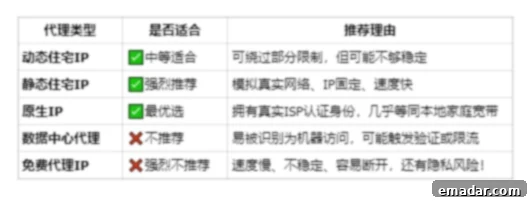
For the most reliable and undetectable YouTube acceleration, native residential IPs are unparalleled. These IPs are genuinely assigned to real internet users by their ISPs, making them indistinguishable from regular home internet connections. When you stream YouTube through a residential IP, you essentially appear as an ordinary household user located in the proxy’s geographical region. This authenticity is crucial because YouTube’s sophisticated algorithms are less likely to flag or “deliberately slow down” traffic originating from a residential IP, ensuring a seamless and high-quality viewing experience without interruptions caused by suspicious IP detection.
- A native residential IP originates from a real user’s network, mimicking the digital footprint of a typical home internet user.
- This authenticity builds greater trust with streaming platforms like YouTube, significantly reducing the likelihood of your connection being throttled or flagged for suspicious activity.
✅ Utilizing Static Dedicated IPs for Superior Stability and Consistency
While residential IPs offer authenticity, combining this with a static dedicated IP provides the ultimate stability. A static dedicated IP means that your assigned IP address remains constant and doesn’t change frequently. This consistency is highly beneficial for YouTube streaming, as it allows the platform to recognize your connection as stable and reliable over time. For instance, your viewing history, login sessions, and personalized recommendations will remain consistent, leading to a much smoother and more personalized user experience. Frequent IP changes, often associated with rotating proxies or inferior services, can sometimes trigger security checks or temporary slowdowns from streaming services, which a static dedicated IP helps avoid.
- A static dedicated IP ensures that your online identity remains consistent, preventing frequent IP changes that can disrupt your streaming sessions.
- This consistency allows YouTube’s systems to recognize and trust your connection more readily, leading to smoother playback, stable account logins, and an uninterrupted viewing experience.
Selecting the Right Proxy Type for Optimal YouTube Performance
Choosing the appropriate proxy type is paramount to achieving the best possible YouTube streaming experience. While various proxies exist, not all are equally effective. Here’s a breakdown of the most suitable types:
1. Residential Proxies: The Gold Standard for YouTube
As mentioned, residential proxies are highly recommended because they come from real home IP addresses provided by ISPs. They make your internet traffic appear as if it’s originating from a genuine residential user, making them extremely difficult for YouTube to detect and block. This results in the highest trust level, allowing for uninterrupted streaming, access to geo-restricted content, and full HD quality without buffering. They are ideal for consistent, long-term streaming and maintaining account integrity.
2. Static Residential Proxies: Stability Meets Authenticity
A specific type of residential proxy, static residential proxies, offer a fixed IP address that doesn’t change with every request or after a certain period. This combines the authenticity of a residential IP with the stability of a dedicated IP. For YouTube, this means your streaming sessions are less likely to be interrupted, your login status remains consistent, and you can enjoy prolonged, high-quality video playback without sudden drops in performance. They are perfect for dedicated streaming setups or if you manage multiple YouTube accounts that require stable IP addresses.
3. Dedicated Datacenter Proxies (with caveats)
While generally less preferred than residential IPs for YouTube due to their higher detectability, dedicated datacenter proxies can still offer fast speeds if sourced from a reputable provider with clean IP ranges. They are hosted in data centers and offer excellent bandwidth. However, YouTube and other streaming services are often adept at identifying and flagging datacenter IP ranges, potentially leading to CAPTCHAs, content restrictions, or even temporary bans if misused. If you opt for a datacenter proxy, ensure it’s dedicated and from a provider known for maintaining clean IP pools, though residential remains the safer and more reliable choice for streaming.
Why Avoid Free or Shared Proxies?
It’s crucial to steer clear of free or openly shared proxies. These are almost always overloaded, slow, and highly prone to being blacklisted by YouTube. They offer no security, often inject ads, and can even compromise your data. For a smooth, secure, and reliable YouTube experience, investing in a quality paid proxy service is essential.
🔧 How to Properly Configure a Proxy IP for Seamless YouTube Access
Configuring a proxy IP for YouTube doesn’t have to be complicated. With a reliable proxy service, the process is straightforward, allowing you to enjoy accelerated streaming in no time. Let’s walk through the general steps, using a hypothetical service like IPFLY as an example.
Step-by-Step Configuration Guide:
- Register and Select Your Desired Country Node: Begin by registering for an account with a premium proxy provider. Once registered, you’ll typically gain access to a user dashboard where you can choose a specific country node. For YouTube, consider locations known for excellent internet infrastructure and proximity to YouTube’s content delivery networks (CDNs), such as the United States, Hong Kong, Japan, Singapore, or European countries. Your choice often depends on the content you wish to access or the server closest to your physical location for optimal latency.
- Obtain Your Proxy Configuration Details: After selecting your node and proxy type (e.g., static residential IP), the provider will furnish you with the necessary connection credentials. These typically include the proxy’s IP address, the port number, a unique username, and a password. It’s crucial to keep these details secure, as they are essential for authenticating your connection to the proxy server.
- Configure Your Device or Browser Using Proxy Tools: With your proxy details in hand, you’ll need to input them into a proxy client or directly into your device’s network settings.
- System-Wide Proxy Settings: For a comprehensive solution, you can configure the proxy directly in your operating system’s network settings (e.g., Windows “Proxy settings,” macOS “Network Preferences”). This will route all internet traffic from your device through the proxy.
- Browser Extensions: Many browsers offer dedicated proxy extensions (e.g., FoxyProxy for Chrome/Firefox) that allow you to easily switch between different proxy configurations without altering system settings. This is ideal if you only want to proxy specific browser traffic.
- Dedicated Proxy Software/Clients: Some premium proxy providers offer their own desktop applications that simplify the connection process, often including advanced features like IP rotation management and connection monitoring.
- Fingerprint Browsers: For advanced users or specific use cases requiring a highly consistent and unique digital footprint (e.g., managing multiple YouTube channels), fingerprint browsers (e.g., Multilogin, GoLogin) are excellent. They not only route traffic through a proxy but also manage browser fingerprints (user-agent, canvas, WebRTC, etc.) to further enhance anonymity and prevent detection.
- Launch YouTube and Experience the Difference: Once configured, simply open your web browser or YouTube app. Your internet traffic to YouTube will now automatically be routed through the selected proxy server. You should immediately notice a significant improvement in loading times, video quality, and overall streaming fluidity. Gone are the days of endless buffering and pixelated screens!
Compatible Devices and Environments:
The flexibility of proxy IPs extends to a wide array of devices, ensuring you can enjoy accelerated YouTube streaming wherever you are:
- ✔ Windows/macOS Computers: Easily configurable via system network settings or browser extensions.
- ✔ Android/iOS Mobile Phones: Proxy settings can be found in the Wi-Fi network details for system-wide application, or specific apps might support in-app proxy configurations.
- ✔ Emulator Environments: Essential for users running multiple instances or virtual environments for specific tasks, ensuring each emulated device has a unique, clean IP.
- ✔ Smart TVs (via Router Configuration): For an immersive big-screen experience, you can configure the proxy directly on your home router. This makes all devices connected to that router (including Smart TVs, gaming consoles, and media streamers) automatically use the proxy, bypassing individual device configuration.
Beyond Speed: The Comprehensive Benefits of Proxies for YouTube
While speed and stability are key advantages, using a quality proxy IP for YouTube offers several other significant benefits that enhance your overall online experience.
1. Accessing Geo-Restricted Content
One of the most compelling reasons to use a proxy is to bypass geographical restrictions. Many YouTube videos, especially movies, TV shows, and live sports events, are restricted to specific regions due to licensing agreements. By connecting through a proxy server located in the desired country, you can virtually change your location and access content that would otherwise be unavailable in your region, unlocking a world of entertainment.
2. Enhanced Privacy and Security
A proxy server acts as a shield between your device and the internet. When you connect through a proxy, your real IP address is masked, and websites, including YouTube, only see the proxy’s IP. This significantly enhances your online privacy by making it harder for third parties, advertisers, and even your ISP to track your viewing habits and online activities. Furthermore, premium proxies often offer encrypted connections, adding an extra layer of security to your data.
3. Bypassing Network Restrictions (School/Work)
Many educational institutions and workplaces implement network restrictions or firewalls that block access to streaming platforms like YouTube. A proxy IP can often circumvent these local network blocks by routing your traffic through an external server, allowing you to access YouTube and other websites that might otherwise be inaccessible. This can be particularly useful for educational research or breaks.
Troubleshooting Common Proxy Issues for YouTube
While proxies are generally reliable, occasional issues can arise. Here are quick tips for troubleshooting:
- Check Credentials: Double-verify that the proxy IP, port, username, and password are correct. A single typo can prevent connection.
- Try Another IP: If your current proxy IP isn’t working or is slow, try switching to a different IP from your provider’s pool, or select a different country node.
- Verify Proxy Server Status: Ensure the proxy server itself is online and operational. Your provider’s dashboard or support page usually offers status updates.
- Clear Browser Cache: Sometimes old cached data can interfere. Clear your browser’s cache and cookies after configuring a new proxy.
- Firewall/Antivirus: Temporarily disable your local firewall or antivirus to see if it’s blocking the proxy connection. If it helps, adjust its settings to allow the proxy.
Ultimately, a slow YouTube experience isn’t necessarily a problem with your internet speed itself, but very often, it’s because your “network identity” isn’t trusted or is being deliberately constrained.
By leveraging a clean, high-speed, and authentic proxy IP, you’re not just changing your IP address; you’re essentially acquiring an exclusive high-speed lane directly to YouTube’s content servers. This transforms your streaming experience from frustrating waits to instant, crystal-clear playback.
Don’t let a “dirty IP” lead to account issues or poor performance! Take action now to revitalize your YouTube experience. 👉 Claim your discount and get access to premium IPs today. With a vast pool of over 90 million real residential IPs, you can enjoy ultra-smooth, low-latency streaming. Trusted by cross-border professionals, it’s your ultimate “anti-blocking artifact” for an unrestricted online world!