
Have you ever encountered these frustrating situations?
- Searching for “TikTok web version” only to find the page inaccessible?
- Clicking on the official website and seeing a message like “TikTok is not available in your region”?
- You’ve registered an account, but somehow you just can’t log in or use the web version?
Don’t worry! This comprehensive guide will walk you through everything you need to know: how to access the TikTok web version, register and log in to your account, and effectively overcome region restrictions.

Accessing TikTok Web: Your Gateway to a Bigger Screen Experience
The TikTok web version offers a powerful and convenient way to engage with the platform beyond your mobile device. You can easily find it by navigating to the official TikTok website, which is simply tiktok.com. This online portal opens up a world of possibilities, allowing you to browse video content, discover new creators, manage your account, upload videos, and even check your direct messages, all from the comfort of your desktop or laptop.
The primary advantages of using the TikTok web version are significant, especially for content creators, marketers, and businesses. Firstly, it provides a superior big-screen viewing experience, making it easier to appreciate the visual details of videos and offering a more immersive experience than a small phone screen. Secondly, it drastically improves efficiency for content creation and management. With a keyboard and mouse, tasks like writing captions, managing hashtags, editing profiles, and navigating through analytics become much faster and more precise. This desktop environment is ideal for professional workflows, allowing for better integration with other production tools and a more comfortable working setup for extended periods.
Troubleshooting Common Issues: Why Can’t I Access TikTok Web?
While the TikTok web version is incredibly useful, many users encounter difficulties accessing it. Understanding the common reasons behind these issues is the first step toward finding a solution:
- Geo-Restrictions and Regional Blocks: TikTok, like many global platforms, implements geo-blocking. This means that access to its services, including the web version, can be restricted in certain countries or regions due to local government regulations, data privacy laws, or other operational considerations. Prominent examples include mainland China, India, and some parts of the Middle East. If you’re in one of these areas, you’ll likely see a message indicating that the service is unavailable in your region.
- IP Address Recognition Errors: Your IP address is your digital fingerprint online. TikTok’s systems are designed to detect unusual or suspicious activity based on IP addresses.
- Shared VPNs: Many free or low-quality VPNs use a limited pool of shared IP addresses. If many users are accessing TikTok through the same IP, or if that IP has been previously associated with spamming, bot activity, or policy violations, TikTok might flag it as “polluted” or “abnormal,” leading to access denial.
- Frequent IP Changes: Rapidly switching IP addresses across different geographical locations can also raise red flags, making TikTok’s algorithms suspect automated behavior rather than genuine user activity.
- “Polluted” IPs: Some IP addresses are simply blacklisted by platforms like TikTok because of a history of misuse. Using such an IP, even unintentionally, will likely result in a block.
- Browser Compatibility and Technical Glitches: Sometimes, the issue isn’t with your location or IP, but with your browser or internet setup.
- Outdated Browsers: Always ensure you’re using a modern, updated web browser such as Google Chrome, Microsoft Edge, or Mozilla Firefox. Older browsers might not fully support TikTok’s web functionalities.
- Browser Extensions: Certain browser extensions, particularly ad blockers, privacy tools, or VPN browser plugins, can interfere with how TikTok loads its content. Try disabling them temporarily.
- Cache and Cookies: Corrupted browser cache or cookies can sometimes prevent websites from loading correctly. Clearing them can resolve unexpected issues.
- Internet Connection: A slow or unstable internet connection can also lead to incomplete page loads or timeouts.
The Ultimate Solution: Bypassing Restrictions with Quality Proxies
To effectively resolve the common access issues, especially geo-restrictions and IP-related blocks, a reliable proxy service is often the most robust solution. High-quality proxy providers like IPFLY offer dedicated overseas proxy IP services that can simulate a genuine, local network environment in your desired region. When you use such a service, TikTok’s systems will perceive your connection as originating from within a supported country, thus allowing seamless access without triggering any abnormal activity flags.
Unlike free VPNs, which often provide unreliable connections, slow speeds, and easily detectable IPs, a premium proxy service offers several advantages:
- Authenticity: Residential proxies, for instance, use real IP addresses assigned by Internet Service Providers (ISPs) to homeowners, making them virtually indistinguishable from regular users.
- Stability and Speed: Reputable providers ensure stable connections and high speeds, crucial for streaming videos and uploading content without interruptions.
- Dedicated/Clean IPs: Many services offer dedicated or highly pure IP addresses that haven’t been previously flagged, significantly reducing the risk of detection and blocking.
- Security: Encrypted connections protect your online activity and data.
Recommended Configuration for Proxy Use:
While the exact configuration will depend on your chosen proxy provider and setup (e.g., browser extension, system-wide proxy settings, or dedicated proxy software), the general principle involves directing your internet traffic through the proxy server. This typically includes:

- Purchasing proxy access from a reputable provider like IPFLY.
- Obtaining the proxy server’s IP address and port number.
- Configuring your browser’s proxy settings (e.g., in Chrome, navigate to Settings > System > Open your computer’s proxy settings) or using a browser extension designed for proxy management.
- Selecting an IP from a country where TikTok is fully accessible.
- Verifying the connection before attempting to access TikTok.
This setup effectively masks your true location and provides you with the necessary access to the TikTok web platform.
Seamless Registration: Creating Your TikTok Web Account
Once you’ve ensured stable access to the TikTok website, registering an account is straightforward:
- Visit the Official TikTok Website: Make sure you are on tiktok.com. You’ll usually find a “Sign Up” or “Log In” button in the top right corner.
- Choose Your Registration Method: TikTok offers several convenient options:
- Email Address: This is a widely used and reliable method. Ensure you use an active email account as you will likely need to verify it.
- Phone Number: You can register using a mobile phone number. However, it’s crucial to note that this must be a number from a country where TikTok is fully supported. If you’re using a proxy, ensure your phone number matches the region of your proxy IP, or choose another registration method.
- Third-Party Accounts: For ease of access, TikTok allows you to register and sign in using existing accounts from platforms like Google, Facebook, Twitter, Apple, and sometimes others depending on your region. This can be a quick way to get started.
- Complete the Registration Details:
- Enter Your Birthday: TikTok strictly enforces an age restriction, requiring users to be at least 13 years old. Provide accurate information to avoid account issues.
- Set Up Username and Password: Choose a unique username that represents you or your brand. Create a strong, complex password using a combination of letters, numbers, and symbols to protect your account.
- Verification: Depending on your chosen method, you might need to verify your account through a link sent to your email or a code sent to your phone number. Follow the on-screen prompts to complete this step.
Pro Tip for Account Health: It is highly recommended to use a clean and high-quality IP environment, such as those provided by IPFLY, when registering your account. TikTok’s sophisticated algorithms analyze IP addresses during registration to detect potential “marketing accounts” or “abnormal users” that might be associated with spam or bot activities. Starting with a reputable IP significantly reduces the risk of your new account being flagged or restricted from the outset, ensuring a smooth and legitimate user experience.
Mastering Login: Accessing Your TikTok Web Profile
Once your account is registered, logging into the TikTok web version is a seamless process, allowing you immediate access to your profile and all its functionalities:
- Click the “Log In” Button: On the TikTok homepage (tiktok.com), locate and click the “Log In” button, typically found in the top-right corner.
- Select Your Registered Method: A pop-up window or a new page will appear, prompting you to choose your login method. Select the same method you used for registration: either your phone number, email address, or one of the third-party accounts (Google, Facebook, etc.).
- Enter Credentials and Log In: Input your registered phone number/email and password, or authorize access through your chosen third-party account.
- Upon Successful Login, You Can:
- Upload Videos: Easily upload pre-edited video content from your computer. The web version often provides more precise control over video trimming, adding descriptions, hashtags, and selecting cover images. This is particularly beneficial for creators who edit their content using professional desktop software.
- View and Manage Direct Messages (DMs): Keep track of your conversations, respond to followers, collaborate with other creators, or manage customer inquiries directly from your desktop. The larger screen makes managing multiple chats much more convenient.
- Access Data Analytics and Statistics: For creators and businesses, the web version offers robust analytics tools. You can delve into detailed audience insights, track video performance (views, likes, shares, comments), monitor follower growth, and understand engagement trends. This data is invaluable for refining your content strategy.
- Comment and Interact with Content: Engage with the TikTok community by leaving comments, replying to others, and liking videos, all with the ease of a full keyboard.
The web version truly empowers users with a comprehensive suite of tools for managing their TikTok presence efficiently and effectively.
Web Version vs. Mobile App: A Detailed Comparison
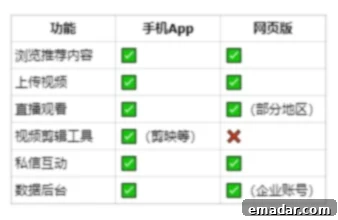
While both the TikTok web version and the mobile app serve the same core purpose – connecting you to the world of short-form video – they offer distinct experiences tailored to different user needs. Understanding these differences can help you maximize your TikTok usage:
- Screen Size and Viewing Experience:
- Web Version: Offers a larger, more immersive viewing experience, ideal for detailed content consumption, especially when showcasing high-quality visuals. It reduces eye strain during extended browsing.
- Mobile App: Designed for on-the-go consumption, optimized for portrait mode, and provides an intimate, full-screen mobile experience.
- Content Creation and Editing:
- Web Version: Primarily focuses on uploading pre-produced content. It excels for creators who use professional desktop editing software (e.g., Adobe Premiere, DaVinci Resolve) and then upload the final video. Captioning, hashtagging, and scheduling can be done more efficiently with a keyboard.
- Mobile App: Offers native in-app camera, real-time filters, AR effects, sound library access, and quick editing tools specifically designed for mobile capture and immediate sharing. It’s perfect for spontaneous creation and leveraging TikTok’s unique mobile-first features.
- Navigation and User Interface:
- Web Version: Utilizes a desktop-friendly layout with clear navigation menus, allowing for easier multi-tab browsing and quick switching between tasks (e.g., checking analytics while composing a post).
- Mobile App: Features a streamlined, intuitive touch-based interface, optimized for vertical scrolling and quick interactions.
- Features and Functionality:
- Web Version: Provides robust account management, detailed analytics dashboards (crucial for business and creators), direct messaging, video uploads, and general browsing. It’s often the preferred tool for strategic content planning and performance tracking.
- Mobile App: Often receives new features first, includes location-based services, unique AR lenses, and specific mobile-only challenges or trends. Features like Live streaming are more deeply integrated and easier to initiate on the app.
- Efficiency for Workflows:
- Web Version: Highly efficient for bulk uploads, managing multiple accounts (when using appropriate proxy solutions), in-depth data analysis, and integrating with external business tools. It’s a productivity hub for serious TikTok users.
- Mobile App: Best for quick content capture, immediate engagement, and casual browsing.
In essence: The web version is incredibly comprehensive and has evolved to be a powerful tool, especially for content creators, brands, and businesses managing their operations on a computer. While the mobile app provides the quintessential TikTok experience for casual users and spontaneous creation, the web version is indispensable for those who treat TikTok as a serious platform for marketing, community building, and strategic content distribution.
The Foundation of TikTok Success: A Secure and Stable Network
Whether you’re just starting your TikTok journey, expanding your e-commerce business, or managing multiple accounts across different regions, one fundamental principle remains paramount: **a clean, secure, and stable network environment (specifically, your IP address) is the absolute prerequisite for successful TikTok operations.**
This holds true for various user profiles:
- New TikTok Users: If you’re a beginner simply looking to register and explore the platform, starting with a clean IP ensures your account isn’t immediately flagged as suspicious, paving the way for organic growth.
- Cross-Border Sellers and E-commerce Brands: For those who rely on the web version to upload product videos, manage campaigns, target specific geographical markets, or handle customer service efficiently, a stable IP is vital for maintaining account integrity and avoiding geo-restrictions that could hinder your business.
- Content Creators and Influencers: If you aim to switch countries to target diverse audiences, test content strategies in different regions, or bypass content limitations, a reliable and anonymous IP is essential to appear as a local user in your chosen market.
The integrity of your IP address directly impacts how TikTok perceives your account. Using shared, “polluted,” or frequently changing IPs can lead to shadow bans, account restrictions, or even permanent bans, effectively derailing your efforts. Therefore, investing in a high-purity IP service is not merely a convenience; it’s a strategic necessity to establish a strong, trustworthy foundation for your TikTok presence.
👉 Choosing a **high-purity IP service provider** like IPFLY’s Static Residential Proxies ensures your account is well-established from the very beginning, setting you up for sustained success!
IPFLY Proxy Advantages:
- Global Coverage Across 190+ Countries: Access a vast network of static and dynamic residential IPs, giving you unparalleled flexibility to target specific geographical markets and bypass regional restrictions effectively.
- High Purity and Anonymity: Our IPs are meticulously maintained to ensure they are clean and untainted, providing high anonymity that makes your online activity indistinguishable from a regular user, crucial for long-term account farming and management.
- Seconds-Level Connection and Unwavering Stability: Experience lightning-fast connection speeds and reliable, uninterrupted service, essential for smooth video uploads, live streaming, and seamless platform interaction without frustrating disconnections.
- Full Protocol Support (HTTP/HTTPS/SOCKS5): Compatibility with all major protocols ensures that our proxies work flawlessly across various applications and tools, offering maximum versatility for your operational needs.
- Comprehensive Platform Compatibility: Our proxies are designed to be compatible with all major platforms and tools, including fingerprint browsers (for managing multiple accounts), system-wide proxy settings, and automation tools, enabling advanced and efficient TikTok management strategies.
👉 Claim your discount and get access to premium IPs today!