
Unlocking Global Communication: A Comprehensive Guide to Setting Up Your Gmail Account
In today’s interconnected world, a reliable and secure email service is not just a convenience—it’s a necessity. For individuals, businesses, and particularly those engaged in international trade, cross-border e-commerce, or global brand building, Google’s Gmail stands out as the undisputed leader. Renowned for its unparalleled stability, generous storage capacity, and robust security features, Gmail has become the default choice for millions. Whether you’re communicating with international clients, managing overseas operations, or expanding your brand’s reach into new markets, especially in regions like the US, a Gmail account offers the infrastructure and reliability you need to succeed. This comprehensive guide will walk you through every step of creating a Gmail account, from initial preparations to advanced security settings, ensuring a smooth and secure setup process.
Beyond its core functionalities, Gmail integrates seamlessly with Google’s extensive ecosystem, providing access to powerful tools like Google Drive, Google Calendar, and Google Meet, all under one unified account. This integration is invaluable for teams collaborating across different time zones and for businesses striving for efficiency and cohesion in their digital operations. Its intelligent spam filters, intuitive interface, and powerful search capabilities further enhance productivity, making email management a breeze. With Gmail, you’re not just getting an email address; you’re gaining a gateway to a suite of tools designed to streamline your personal and professional life.
Essential Preparations Before You Begin Your Gmail Registration
Before diving into the registration process, a few key preparations can save you time and prevent potential roadblocks, especially if you’re located in regions with restricted access to Google services. Laying the groundwork properly ensures a smooth and hassle-free experience.
- Prepare a Valid Phone Number: A working mobile phone number capable of receiving SMS messages is crucial for verification purposes. Google uses phone numbers to confirm your identity and protect your account from unauthorized access. For international users or those operating across borders, it’s advisable to use a number that supports international SMS, or a local number if you’re registering for a specific regional presence. This step is a cornerstone of Gmail’s security protocols, helping to prevent bot registrations and ensure real users are creating accounts. Make sure your phone has good reception or is connected to a stable network to receive the verification code promptly.
- Set Up a Backup Email Address: While not always mandatory during initial registration, setting up a recovery email address is highly recommended for future account security and access. In scenarios where you forget your password, your account gets locked due to suspicious activity, or you need to recover access, a backup email provides a vital lifeline. This alternative contact method significantly speeds up the account recovery process and adds an extra layer of security, making it harder for unauthorized individuals to gain control of your account.
- Ensure a Stable Network Environment: This is perhaps the most critical preparation, particularly for users in certain geographical locations. Google services, including Gmail, can be restricted or heavily monitored in countries like mainland China. To ensure uninterrupted access and prevent frequent verification prompts or even account suspension, a stable and appropriate network environment is essential.
- For users in regions where Google services are often inaccessible, simply relying on a standard VPN might not be enough. Google’s advanced detection systems can often identify and flag VPN traffic, leading to repeated verifications or temporary blocks.
- To mitigate these issues and simulate a genuine user environment, we highly recommend utilizing a high-quality proxy service. Providers like IPFLY offer specialized solutions such as US static residential proxies or Socks5 proxy IPs. These types of proxies provide a clean, dedicated IP address that mimics a real home internet connection in the United States, significantly reducing the chances of Google flagging your activity as suspicious. This stability is paramount for a successful registration and long-term, uninterrupted use of your Gmail account, especially for critical business operations.
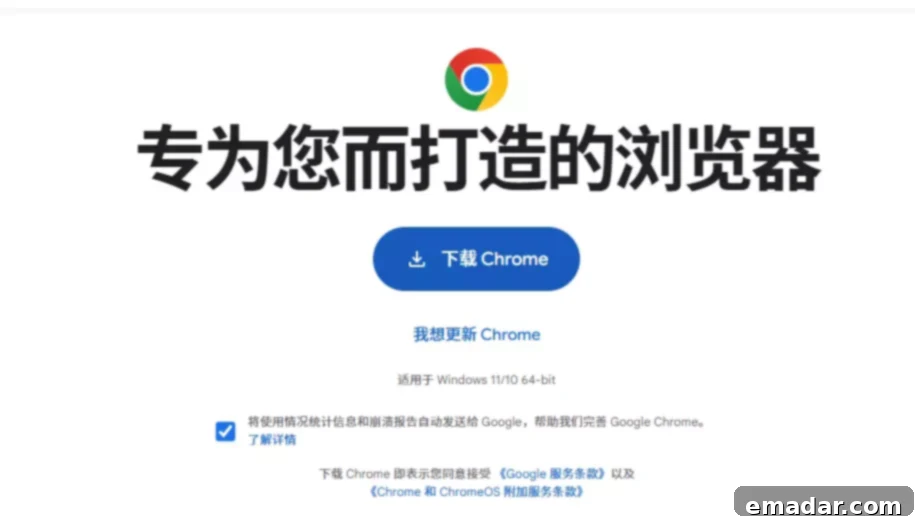
- Browser Preparation: For the best and most secure registration experience, always use the latest version of a reputable web browser, such as Google Chrome. Before starting the process, it’s advisable to open your browser in “Incognito Mode” (also known as private browsing). This mode prevents browser extensions, cookies, and cached data from interfering with the registration process, ensuring a clean slate. Cached data from previous browsing sessions or conflicting extensions can sometimes cause unexpected errors or redirection issues during sensitive account creation steps.
Detailed Steps for Registering Your New Gmail Account
Once your preparations are complete, you’re ready to embark on the straightforward process of creating your Gmail account. Follow these steps carefully to ensure a successful registration.
1. Access the Gmail Registration Page
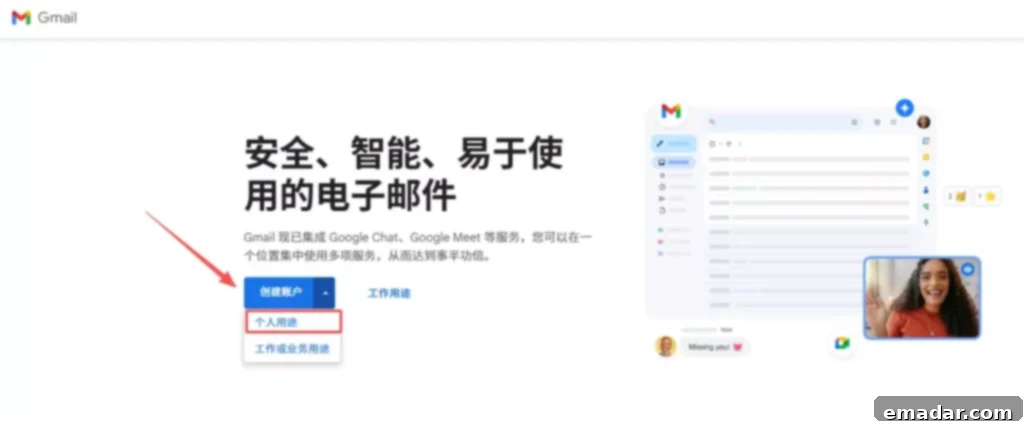
- Open your chosen browser (preferably Chrome in Incognito Mode) and type “Gmail” or “Google Mail” into the search bar. Look for the official Google link that directs you to the Gmail sign-up page. Alternatively, you can directly navigate to accounts.google.com/signup.
- Important Note: If the page fails to load, displays an error message, or redirects unexpectedly, this is a strong indicator of network restrictions. In such cases, immediately switch to your pre-arranged stable network environment, such as a US residential IP provided by a service like IPFLY, and try accessing the page again. This often resolves access issues instantly.
2. Fill in Your Personal Information
The registration form will prompt you for basic personal details. Accuracy here is important, especially for professional use.
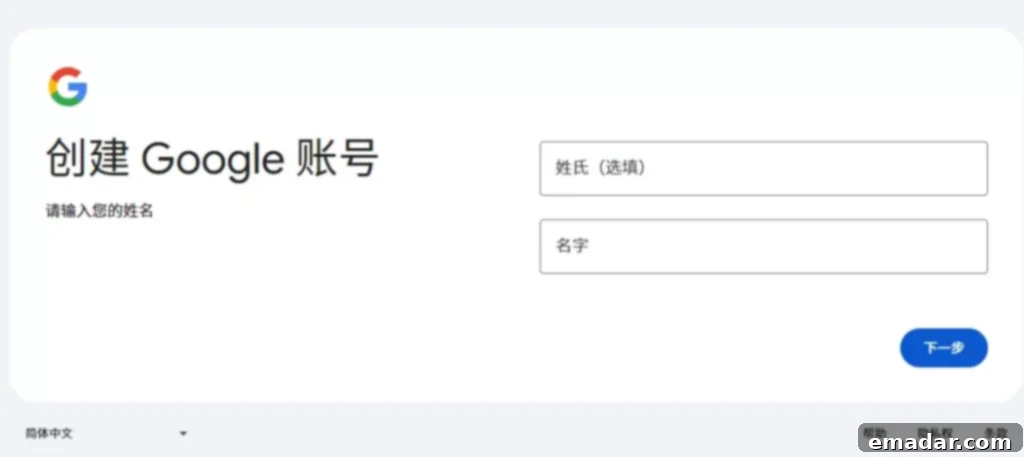
- First Name and Last Name: Enter your legal first and last names. For business communications, using your real name fosters trust and professionalism. Google also uses this information for identity verification and account recovery processes, so it’s best to be consistent.
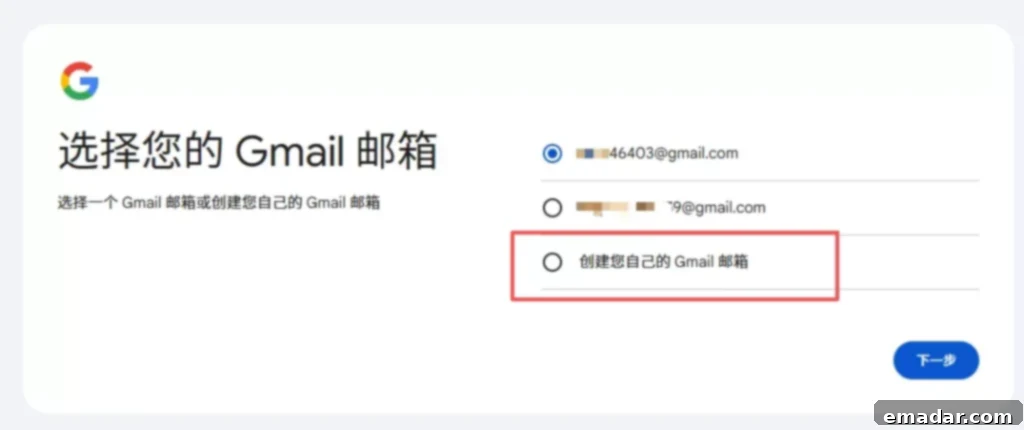
Username: This will be your unique Gmail address (e.g., [email protected]). Google may suggest available usernames based on your name, but you’ll also have the option to create your own. When selecting a username, aim for something professional, memorable, and easy to type. If your preferred username is already taken, try adding numbers, an initial, or a relevant keyword related to your business or purpose. For example, if “johnsmith” is unavailable, “johnsmith123” or “jsmithbiz” might work. This username is permanent, so choose wisely as it will represent your online identity.
- Password Setting: Your password is your primary line of defense. Create a strong, unique password that you haven’t used for any other account.
- It should be at least 8 characters long and ideally a mix of uppercase and lowercase letters, numbers, and symbols (e.g., !, @, #, $, %).
- Avoid easily guessable information such as birthdays, common phrases, or simple number sequences (e.g., “12345678”).
- Consider using a password manager to generate and store complex passwords securely.
3. Verify Your Phone Number
This is a critical security step that helps Google confirm you’re a real person and not an automated bot.
- Enter the phone number you prepared earlier into the designated field. Ensure the country code is correct. Then, click “Next.”
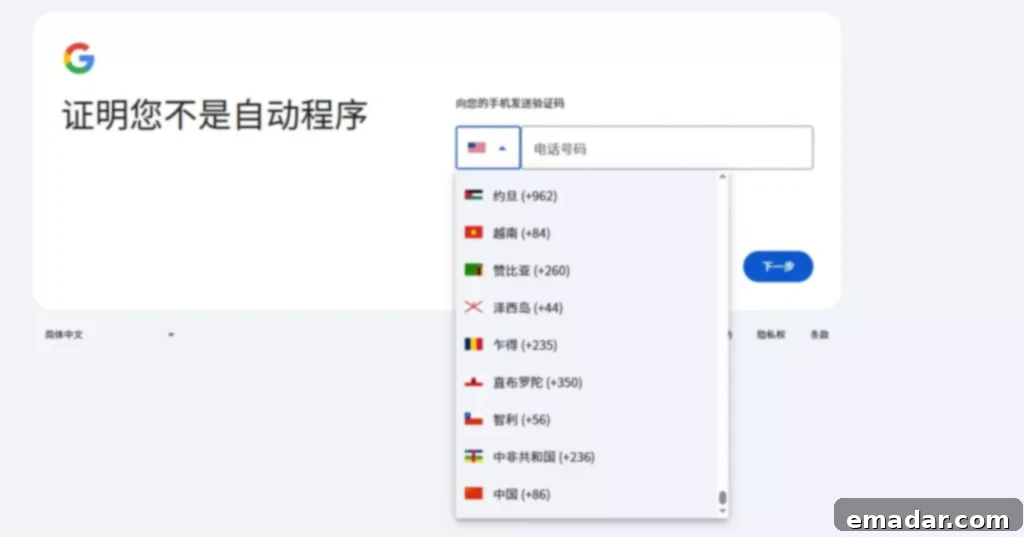
- Google will send a verification code via SMS to your phone. Retrieve this code and enter it into the prompt on your screen.
- Troubleshooting Tip: If you don’t receive the verification code within a few minutes, check your phone’s signal, ensure you’ve entered the correct number, and verify that your number supports international SMS if applicable. Sometimes, network congestion or temporary service issues can cause delays. If repeated attempts fail, it might indicate that Google’s systems have flagged your current network environment as suspicious, especially if you’re in a restricted region. In such cases, switching to a dedicated US residential proxy or a different, stable network environment (like those provided by IPFLY) and retrying the verification process can often resolve the issue.
4. Set Recovery Email and Birthday Information
These details are important for account recovery and personalization.
- Recovery Email: Provide a secondary email address that you can access. This is an essential step for account security, allowing you to regain access if you ever forget your password or if your primary Gmail account is compromised. Google will use this email to send recovery links or codes.
- Birthday and Gender: Enter your date of birth and select your gender. This information helps Google personalize services and ensure age-appropriate content. It also plays a role in verifying your identity if you ever need to recover your account, so accuracy is important.
5. Read and Agree to Google’s Service Terms and Privacy Policy
Before finalizing your account creation, Google requires you to review and agree to its terms of service and privacy policy.
- Carefully read through these documents to understand how Google collects, uses, and protects your data. Once you’re comfortable, check the box indicating your agreement and click “Create Account.”
- Important Note: Occasionally, Google’s automated systems might detect what it perceives as “unusual traffic” or request further identity verification even after successful phone verification. This often happens if your IP address is shared, inconsistent, or linked to known suspicious activity. To circumvent these issues, try changing your device (e.g., from desktop to mobile), clearing browser cookies, or most effectively, using a clean, dedicated residential proxy IP from a trusted provider like IPFLY. A stable residential IP significantly enhances the perception of legitimate user activity, helping you bypass these additional security hurdles.
Post-Registration: Essential Security Settings for Your New Gmail Account
Your Gmail account is a central hub for your online activities. Protecting it is paramount. After successful registration, take these crucial steps to bolster your account’s security.
- Enable Two-Step Verification (2SV): This is arguably the most critical security measure you can implement. Two-step verification adds an extra layer of security by requiring a second form of verification (like a code sent to your phone or generated by an authenticator app) in addition to your password when you sign in. To enable it, navigate to “Google Account > Security” and follow the prompts. Binding your mobile phone or a dedicated authenticator app (like Google Authenticator) ensures that even if someone steals your password, they cannot access your account without physical access to your second verification method. This feature dramatically reduces the risk of unauthorized access and should be activated immediately after registration.
- Add and Review Recovery Options: Ensure your recovery phone number and recovery email address are up-to-date and accessible. These options are vital for regaining access to your account if you forget your password or if your account is ever compromised. Periodically review these settings in your Google Account security section to ensure they are still accurate and that you have access to them. Consider adding multiple recovery options for maximum security.
- Regularly Check Your Logged-In Devices: Google allows you to see all devices currently logged into your account and their last activity. Regularly review this list in your Google Account security settings (“Your devices” section). If you spot an unfamiliar device or a login from an unexpected location, you can immediately remove its access and change your password. This proactive monitoring helps prevent account hijacking and keeps you informed of your account’s activity.
Common Gmail Registration Issues and Effective Solutions
While the Gmail registration process is generally smooth, users, particularly those operating under specific network conditions, might encounter a few common hurdles. Knowing how to address them quickly can save significant frustration.
- Issue 1: Gmail Registration Page Fails to Open or Displays an Error
- Solution: This issue is almost always related to network restrictions or unreliable internet connectivity. For users in regions where Google services are blocked or heavily filtered, a standard internet connection simply won’t suffice. The most effective solution is to use a highly stable and geographically appropriate proxy. Services like IPFLY offer dedicated US residential proxies, which simulate a real internet connection from within the United States. This bypasses local restrictions and presents your connection to Google as originating from an unblocked region, allowing the page to load correctly and preventing further security checks.
- Issue 2: Frequent Demands for Identity Verification or “Unusual Traffic” Alerts
- Solution: Google’s security algorithms are sophisticated. If you’re frequently prompted for identity verification (e.g., captchas, phone calls, or emails) or receive warnings about “unusual traffic,” it often means Google detects inconsistencies or suspicious patterns in your activity. This can happen with shared VPN IPs, frequently changing IP addresses, or IPs associated with many account creations.
To resolve this, first, clear your browser’s cache and cookies. Then, switch to a long-term, stable Socks5 proxy IP, ideally a residential one, which provides a dedicated and consistent IP address. This helps in maintaining a consistent digital footprint, making your activity appear more legitimate to Google’s systems and reducing the likelihood of being flagged for suspicious behavior. IPFLY’s exclusive and clean IPs are particularly effective in this scenario.
- Solution: Google’s security algorithms are sophisticated. If you’re frequently prompted for identity verification (e.g., captchas, phone calls, or emails) or receive warnings about “unusual traffic,” it often means Google detects inconsistencies or suspicious patterns in your activity. This can happen with shared VPN IPs, frequently changing IP addresses, or IPs associated with many account creations.
- Issue 3: Verification Code Not Received via SMS
- Solution: If the SMS verification code isn’t arriving, several factors could be at play. First, double-check that you’ve entered your phone number correctly, including the country code. Ensure your mobile phone has a strong signal and that your service provider supports international SMS if you’re using a number from a different country than your physical location. Sometimes, delays are due to network congestion, so waiting a few minutes and retrying the “Resend code” option can help. If the problem persists, consider using a different mobile number that is known to reliably receive international SMS, or as a last resort, explore Google’s alternative verification methods if available in your region, such as voice call verification.
Practical Tips and Advanced Strategies for Gmail Registration and Management
Beyond the basic steps, there are several practical tips and advanced strategies that can enhance your Gmail experience, especially for power users and businesses.
- Batch Account Creation for Teams: For cross-border e-commerce teams, marketing agencies, or businesses that require multiple Gmail accounts (e.g., for different brands, departments, or marketing campaigns), attempting to create many accounts from a single IP address will almost certainly trigger Google’s security flags, leading to immediate suspensions. The intelligent solution is to utilize different residential proxy IPs for each account creation. By routing each new account registration through a unique, geographically distinct residential proxy, teams can mimic multiple individual users, significantly reducing the risk of mass account suspensions due to perceived suspicious activity from a single IP address. This strategy is vital for maintaining a large portfolio of active and trusted Gmail accounts.
- Leverage Email Labels and Filters for Enhanced Productivity: Once your Gmail account is set up, dive into its powerful organizational features. In “Settings,” you can create custom labels (e.g., “Client A,” “Marketing,” “Urgent”) to categorize your emails. Even more impactful are filters, which allow you to automatically sort incoming mail based on sender, subject, keywords, or other criteria. For example, you can set up a filter to automatically apply a specific label to all emails from a particular client, archive promotional emails, or mark important messages as starred. This dramatically improves inbox management, ensures critical communications are always visible, and boosts overall email efficiency.
- Seamless Integration with Google Ecosystem: A single Gmail account is your key to unlocking Google’s entire suite of productivity and collaboration tools. This includes Google Drive for cloud storage and file sharing, Google Docs, Sheets, and Slides for online document creation and real-time collaboration, Google Calendar for scheduling and event management, and Google Meet for video conferencing. For teams engaged in international business, this ecosystem provides an invaluable toolkit for seamless collaboration, data management, and communication across different locations and time zones, solidifying Gmail as more than just an email service but a comprehensive digital workspace.
Conclusion: Your Gateway to Global Digital Engagement with Gmail
Registering for a Google Gmail account is a fundamental step for anyone looking to engage effectively in the global digital landscape. While the process itself is designed to be user-friendly, specific regional network environments and Google’s stringent security protocols can sometimes present challenges. By following this detailed guide, conducting the necessary preparations, and understanding how to navigate common issues, you can ensure a smooth and successful registration.
The key to consistent and reliable Gmail access, especially for users in restricted regions or those managing multiple accounts, lies in utilizing a secure and stable network environment. Leveraging specialized services like IPFLY’s American residential or Socks5 proxy IPs provides the authenticity and consistency needed to avoid frequent verifications and potential account suspensions. Gmail is more than just a communication tool; it’s an indispensable asset for cross-border communication, a cornerstone for international business operations, and a vital entry point into the vast and powerful Google ecosystem.
IPFLY stands as a premier provider of professional proxy services, specifically tailored to meet the demands of cross-border industries and digital commerce:
- ✔ Our extensive network offers global coverage across more than 190 countries, ensuring you can connect from virtually anywhere to anywhere.
- ✔ We provide a diverse range of proxy types, including static and dynamic residential proxies, genuine native IPs, and robust data center proxies, all designed for superior performance.
- ✔ Users benefit from our exclusive, pure IPs, ensuring dedicated usage and unmatched anonymity for sensitive operations.
- ✔ We prioritize your privacy with a strict no-logs policy and offer high anonymity features, seamlessly integrating with fingerprint browsers for enhanced security.
- ✔ Our platform supports API integration, simplifying bulk configurations and enabling efficient management for large-scale operations.
👉 Claim your exclusive discount now and access premium IP solutions with IPFLY!